



Instant planning poker, right in your Slack channel
Start an estimation session on any task or Jira issue without leaving Slack. Your team votes, Troopr posts the aggregate, and you push the agreed estimate straight to the Jira issue. No new app to open, no meeting to schedule.
Free for 10 users. No credit card required. Runs in Slack & Microsoft Teams.
Trusted by 600+ engineering teams worldwide
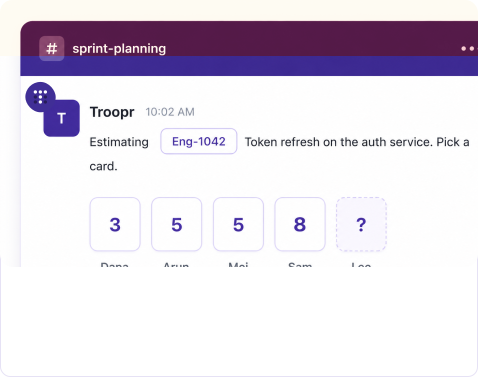
Everyone votes in the channel.
Cards stay hidden until the round closes, so the first estimate does not anchor the rest of the team.
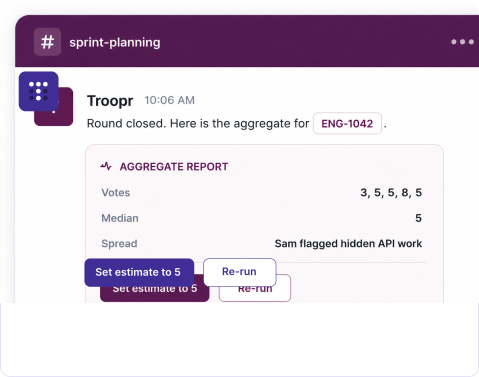
The estimate lands on the Jira issue.
Troopr posts votes, comments, and the median, then writes the agreed number to the issue when you confirm.
Estimate a task in the time it takes to type a Slack command
Instant planning poker is built for the estimate you need right now, on one task, without pulling the team into a separate tool or a scheduled ceremony.
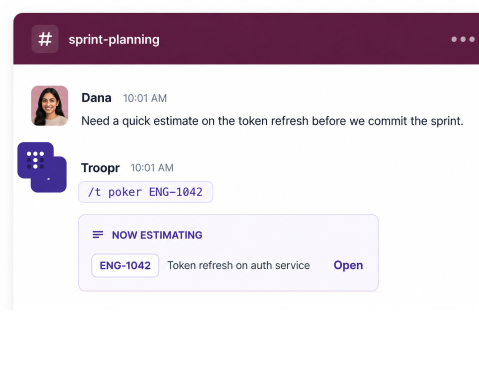
One command starts the session
The friction in estimation is getting everyone into the same place at the same time. Troopr removes it. Type the command in any Slack channel with a Jira issue key or a plain task summary, and the session is live where the team already is.
- Estimate a Jira issue or an ad-hoc task- Pass a Jira issue key to pull in the issue, or just a summary for work that is not ticketed yet.
- No scheduling, no separate room- The session opens in the channel on demand. Nobody installs anything or follows a link to vote.
- Issue context comes along- When you estimate a Jira issue, its summary and details show up in the session so people vote on the same thing.
Vote the way your team already estimates
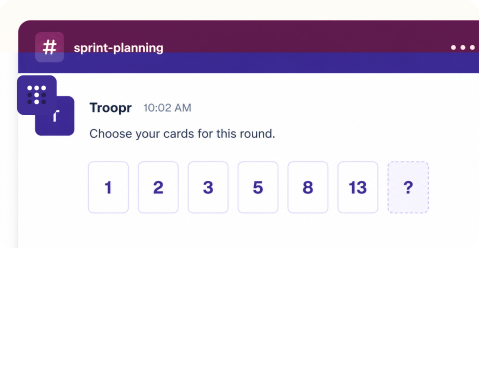
Teams do not agree on a single scale, and they should not have to switch tools to use the one they like. Pick a built-in deck or define your own set of cards for the session.
Fibonacci
Modified Fibonacci
T-shirt sizes
Sequential
Your own custom deck
- Comments alongside votes- People can add a note with their card, so an outlier estimate carries its reasoning into the report.
The result is summarized in the same channel
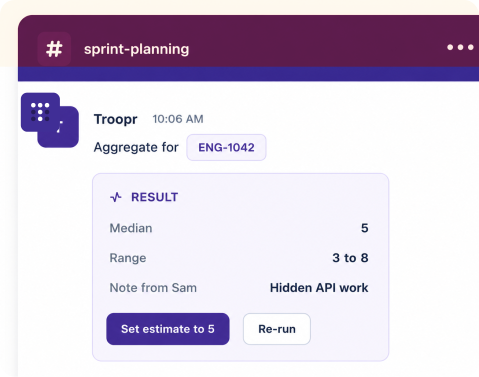
When the round closes, Troopr compiles every vote and comment into one report posted right where the team voted. No copying numbers into a spreadsheet, no separate dashboard to open to see how the team landed.
- Votes, comments, and the spread in one place- See where the team agreed and where it split, with the reasoning attached.
- Push the estimate to the Jira issue- Set the agreed number on the issue from Slack, so the estimate lives on the ticket and not in a thread.
- Kept in history for later- The report stays available, so the team can revisit how a task was sized when the work is done.
Re-run until the team actually agrees
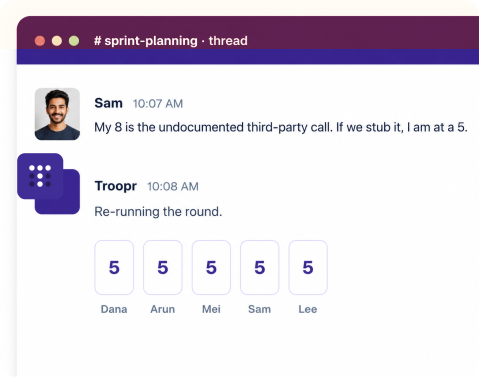
A wide spread is the point of the exercise, not a failure. When votes split, the discussion happens in the thread, then you re-run the same round in one click and watch the estimates converge.
- Unlimited rounds on the same task - Re-run as many times as it takes; each round produces its own aggregate.
- Discussion stays attached - The conversation that moved the estimate sits in the same thread as the votes.
Run it live when the team is together, async when it is not
An instant session works in real time when everyone is online. For distributed teams, the same poker also runs as a scheduled async check-in, so people vote when they get a moment.
Time-zone friendly
Async voting lets a distributed team estimate without finding one slot that works for every region.
Fewer interruptions
People vote when they reach a stopping point instead of breaking focus for a meeting.
Report kept on record
Troopr posts the aggregate to the channel and keeps it in history, so there is nothing to write up by hand.
Vote from anywhere
Everything happens in Slack, so people estimate from wherever they are working.
Everything else in the poker session
The details that make estimation honest and easy to keep running.
Hidden votes
Cards stay concealed until the round closes, so nobody anchors to the first number played.
Anonymous participation
Planning poker supports anonymous voting, so estimates are honest and not swayed by who voted what.
Custom decks
Use a built-in scale or define your own list of cards for the session.
Vote on a Jira key or a task
Estimate an existing Jira issue by key, or a plain summary for work that is not ticketed yet.
Comments with votes
Add a note to a card so the reasoning behind an estimate is in the report.
Write the estimate to Jira
Set the agreed story points or estimate on the issue from Slack once the team lands.
Aggregate in-channel
Votes, comments, median, and range compiled into one report where the team voted.
Re-run rounds
Run the round again any number of times until the team reaches an estimate.
Scheduled async poker
The same poker runs as a recurring check-in for teams that estimate the backlog on a cadence.
History and dashboards
Sessions roll into the Check-ins dashboards you can browse, filter, and export to PDF.
Slack Grid support
Works across a Slack Grid, with profiles shared across the grid.
All three modules included
Poker is part of Troopr Check-ins; Projects and Routines are on every plan, including Free.
Estimation that meets your security and scale requirements
Troopr runs planning poker for engineering orgs that need enterprise controls and reliability, on infrastructure built for scale.
SOC 2 Type II & ISO 27001
Both maintained through annual third-party audits, alongside GDPR compliance.
Slack Grid support
Installed across all workspaces in a Slack Grid, with shared-channel support.
SSO & RBAC
Single sign-on and role-based access control, with OAuth that respects Jira permissions.
Built to handle scale
Hosted on AWS with EC2 Auto Scaling to hold performance as usage grows.
Bot white-labeling
Rename the Troopr Assistant to match your team or company brand.
24x7 premium support
A dedicated Slack channel for priority support, plus a dedicated success manager.
Teams that run their ceremonies in Slack & MS Teams
Netflix
82%
Reduction in time spent in status-update meetings; ~67% less time finding and updating Jira.
Snowflake
86%
Time saved in weekly status update meetings with async check-ins.
Roku
45%
Reduction in Slack ↔ Jira context-switching overhead. Viral org-wide adoption.
Yahoo!
3.8 hrs
Saved per week for managers on meeting logistics. ~28 minutes a day saved per employee.
"We picked Troopr because it was cleared by our internal security team and the Jira integration just worked. Troopr boasts stable development and a responsive support team."
Engineering, Netflix · async standups via Check-ins
Do more than planning poker
Instant planning poker is one of six built-in check-in templates. Run the rest of your ceremonies the same way, in Slack.
Daily standup
FlagshipThe standup that writes itself. Troopr drafts each person's update from their real Jira, GitHub, and Slack activity and posts the team report.
Planning poker
Run recurring planning poker on a schedule to size the backlog collaboratively, then update the issues in Slack.
Retrospective
Periodic retros with a question template; collect replies and track action items for continuous improvement.
Team mood
Check how the team is feeling, spot trends over time, and act before morale becomes a problem.
Jira Issues Check-in
Prompt the team with a list of their Jira issues and action buttons; people update those issues from Slack. Also how teams run backlog refinement.
Standup bot for Slack
Async daily standups across time zones, with replies and Jira context rolled into one report.
Built to clear your security review
The privacy posture is a precondition of the product, not a later add-on. It's what makes an AI-native model safe to put in front of your team and your auditors.



- No training on customer data. Your work never trains a model.
- No storage of raw messages. Troopr derives and persists a structured set of facts about how your team works, not the raw firehose.
- Clear scope. Team channels, connected work tools, and a person's own shared activity. Troopr does not read other people's private DMs.
- OAuth and Jira permissions. Troopr authenticates via OAuth and never bypasses your Jira project, issue, or field permissions.
Questions engineering teams ask

Type the Troopr poker command in any Slack channel with a Jira issue key or a short task summary. The session opens right there, the team votes, and Troopr posts the aggregate in the same channel. Nobody has to install anything or open a separate tool to take part.
Choose from built-in decks like Fibonacci, modified Fibonacci, and T-shirt sizes, or define your own list of cards for the session. People can add a comment with their vote, so the reasoning behind an outlier estimate carries into the report.
Yes. When you estimate a Jira issue, you can set the agreed estimate on that issue from Slack once the round closes, so the number lives on the ticket and not buried in a thread.
An instant session runs in real time when the team is online together. For distributed teams, the same planning poker also runs as a scheduled async check-in, so people vote when they get a moment and Troopr compiles the report when the window closes.
A spread is useful information. The discussion happens in the thread next to the votes, then you re-run the same round in one click. You can re-run as many times as it takes for the team to converge, and each round produces its own aggregate.
Free for 10 users, no credit card. Paid plans start at $6/seat/mo, and all three modules, Check-ins, Projects, and Routines, are on every plan.
Estimate your next task in Slack
Join Netflix, Snowflake, Roku & 600+ engineering teams. Free for 10 users, no credit card required.

The AI project manager for engineering teams. Forms its own view of the work and does the coordination, right where your team already works.
2035 Sunset Lake Road, Suite B-2, Newark, DE 19702, United States.