



Say it once.
Troopr runs it every day.
A routine is a standing instruction, written as a sentence. Troopr checks what your team is actually doing on your cadence, then reports what it found, asks the one person who knows, or proposes the change for the owner to confirm.
Runs in Slack and Microsoft Teams. Nothing is written until someone confirms.
Free for 10 users . No credit card required
Trusted by 600+ engineering teams worldwide
Coordination is not one job.
It is a hundred small checks, and you run them.
Stop chasing status
The read on the day arrives before you would have asked, written from what actually moved.
Stop being the reconciliation layer
When the code shipped and the ticket still says in progress, Troopr takes it to the owner, not to you.
Stop watching for rot
Stale tickets, missing estimates, unassigned work, overdue items: checked on a cadence, raised only when there is something to raise.
Stop building the same query twice
You write a sentence. No chart picker, no query editor.

Same sentence.
You choose how far it goes.
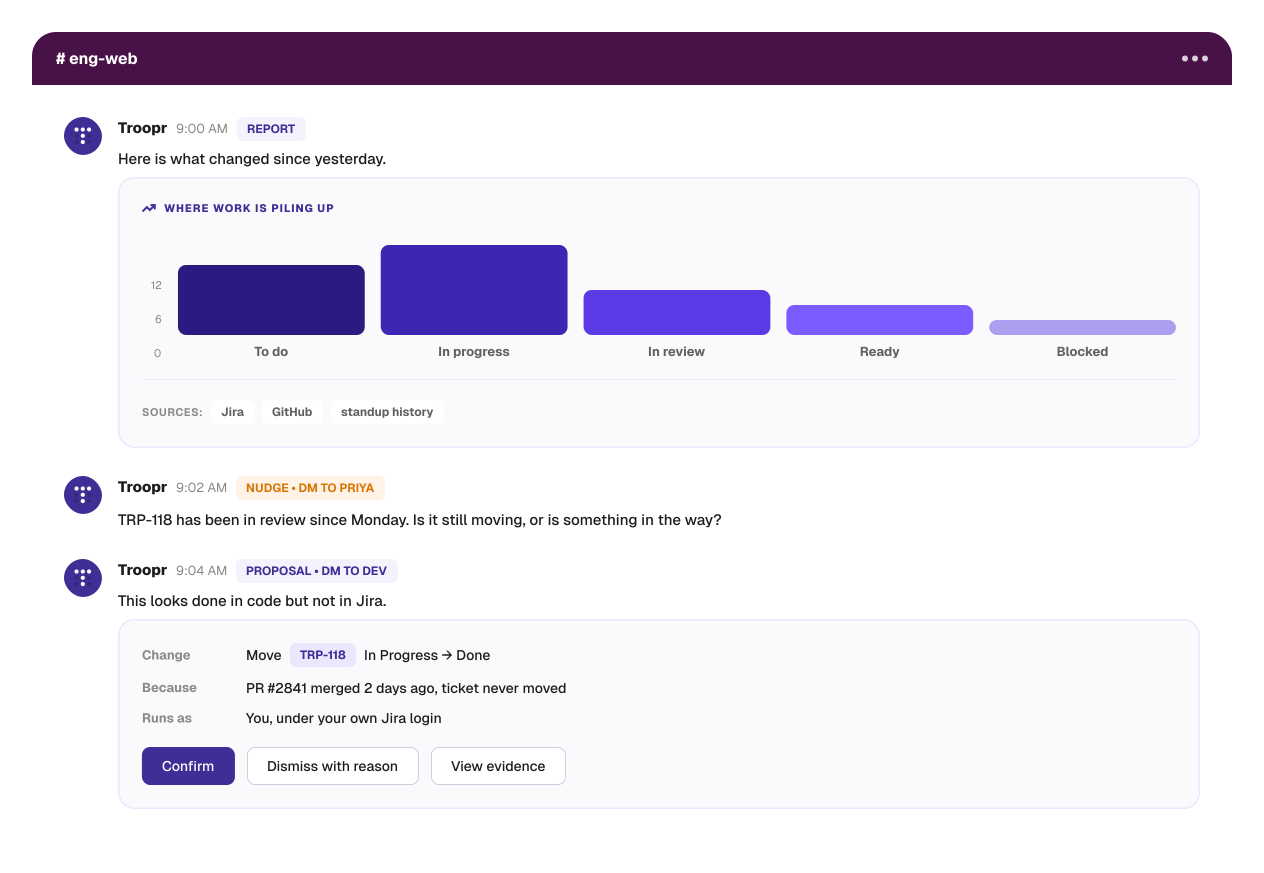
Every routine has the same shape: a sentence, a trigger, a preview, a run history. What changes is what it does to the work.
Report · it reads, and tells you
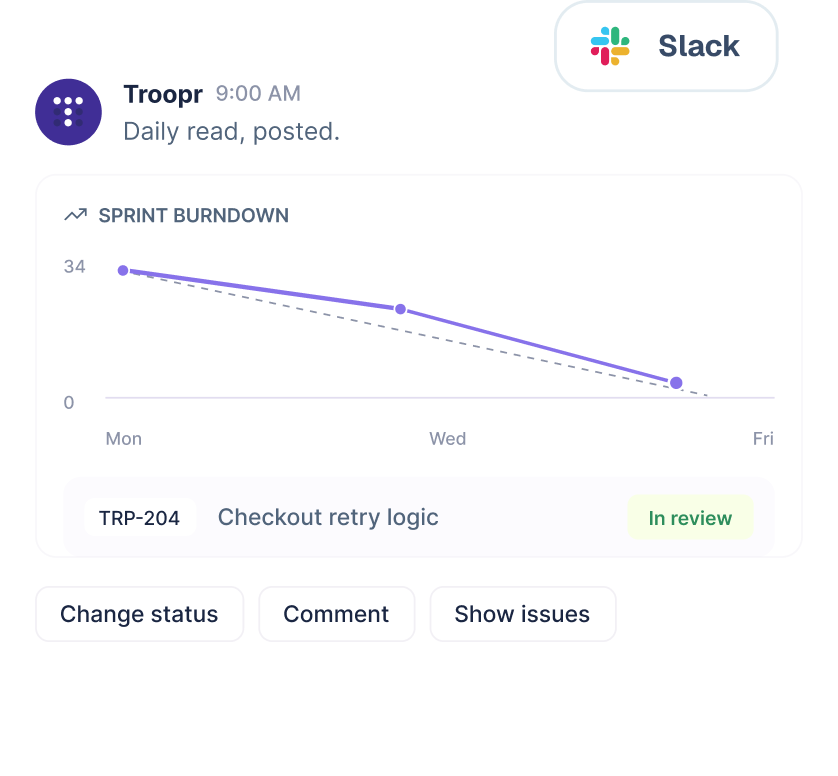
Reads your team’s work and changes nothing in it. Lands in the channel on schedule, as a chart where the answer has a shape. Every issue carries triage buttons, so whoever spots the problem fixes it without opening Jira.

Nudge · it asks the one who knows
A DM to one person about their own work. Nothing changes in Jira, and the answer comes back to you rather than to the channel. It is the follow-up you would have sent, minus having to notice first.

Proposal · the owner confirms
Offers a specific change to a specific ticket, routed to whoever owns the work. They tap Confirm and the write runs in Jira under their own login. Not before.
A team that starts with a Friday report starts acting on the work without learning a second product.
Silence is a signal
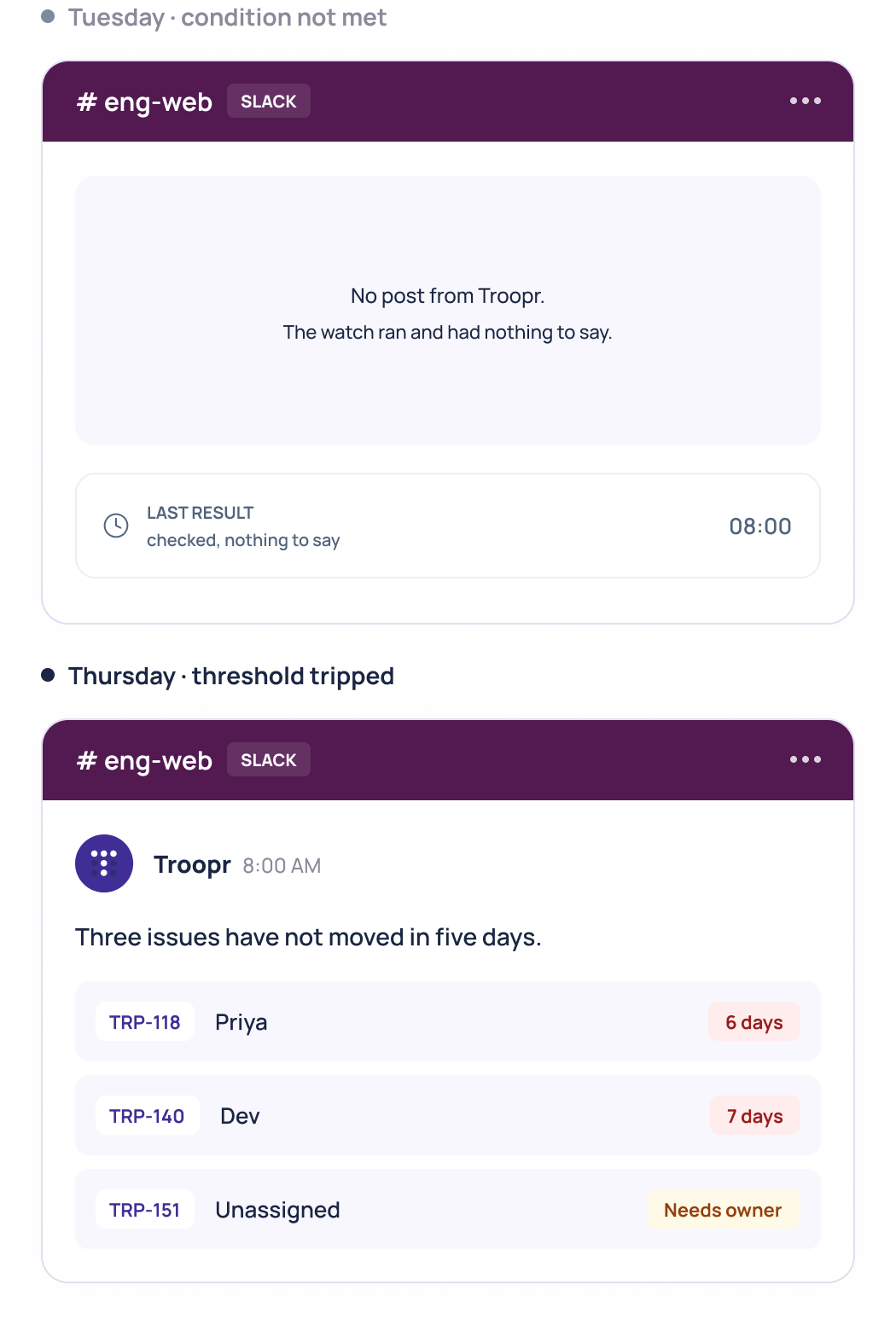
Any routine can run as a watch. It checks on its cadence and speaks only when its condition is true, so a quiet channel means nothing is wrong rather than nothing is running. In the product it reads “Silent unless something is wrong.”
Watch on an issue count crossing a threshold, the sum of a numeric field crossing one, issues untouched for N days, or anything you can express as a query. When a watch has nothing to say, its last result says exactly that.
“ Tell me if anything has not been touched in five days.
The read on the day, ending in decisions
The routine most teams turn on first. A narrative read rather than a wall of tickets, then the part managers actually open it for.

For anyone burned by an AI tool
writing something it should not have

The whole action vocabulary
Transition an issue, set assignee, set due date, create an issue, link a PR, ask a person, post to a channel, flag to a manager. That is all of it. GitHub stays read-only by design.
Self-clearing
One that stops being true, including because somebody did it by hand, clears itself with a reason. One that stays true shows when it was last checked.
Teachable
Dismiss with a reason and that reason becomes a working agreement later proposals respect. A routine dismissed repeatedly pauses itself and says so.
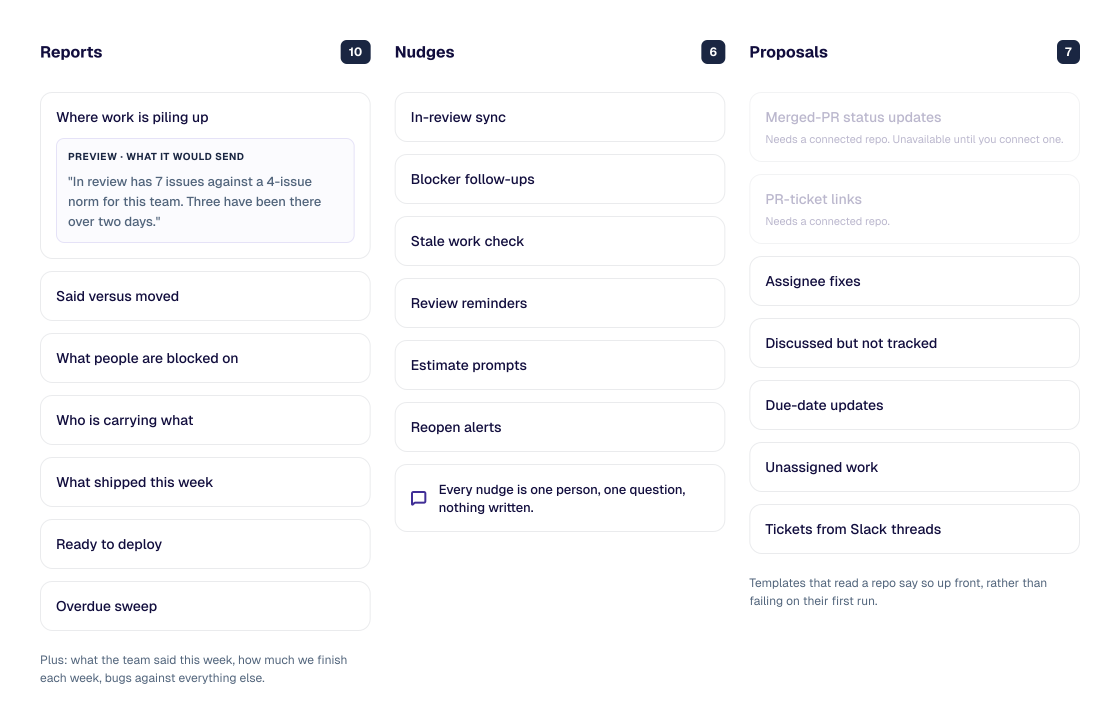
Twenty-three templates, previewed before they are on
Ten reports, six nudges, seven proposals. Nothing is on by default, and every template shows you exactly what it would send before you enable it.
Plain language is the default, not the ceiling
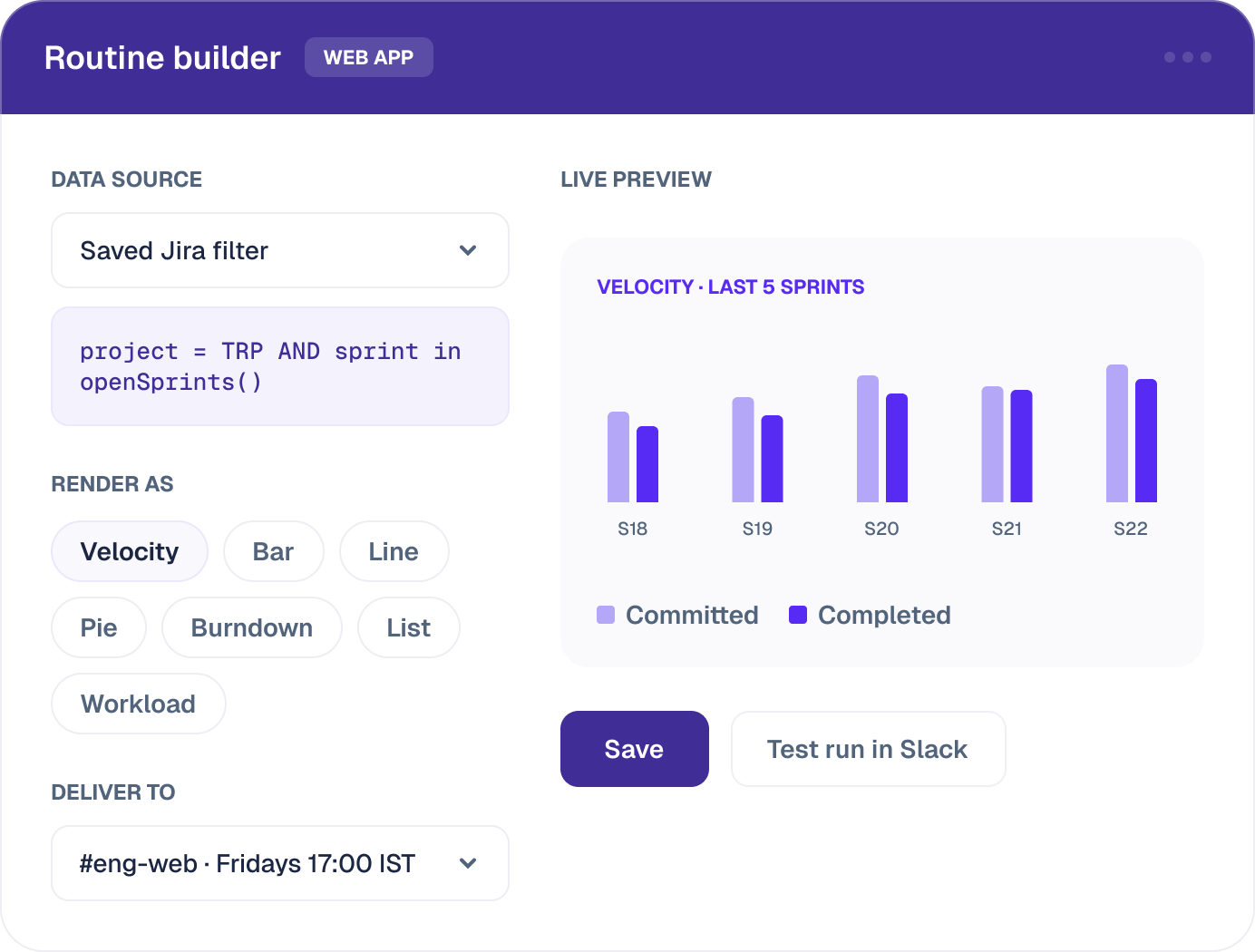
Point a routine at a project filter, custom JQL, or a saved Jira filter. Render it as a bar, line, or pie chart, a burndown or velocity chart by board, or as a list, summary, workload, or epic view.
- X axis on any field including sprint and labels, Y axis on issue count or the sum or average of any numeric field
- Condition-based lists, like every issue with a remaining estimate over your threshold
- A channel, a DM, the person it concerns, or the manager, on the days and time and timezone you pick
- Per-assignee DMs send each person only their own issues
The rest of it, without the tour
Running them
- Test run in chat
- Run now from the list
- Duplicate, enable, disable
- Trigger-phrase execution
- Full run history
Scoping them
- Personal and channel scope
- Routine admins
- Custom opening message, title, purpose
- Recent personal routines pinned in Slack App Home
Running them
- Light or dark chart theme
- Custom colors, field names, ordering
- Show issues, show JQL
- Full rendering in chat with drill-through
Keeping them honest
- Jira user fields resolved to real chat mentions
- Per-channel and workspace project restrictions
- OAuth that refuses what the person could not do in Jira
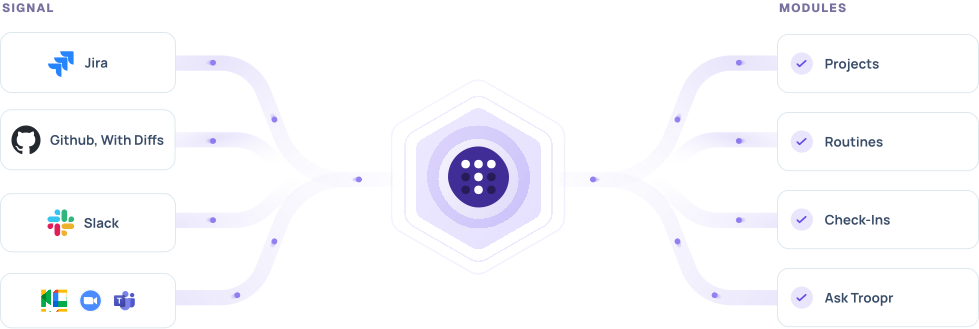
Routines run on the same view of your team that everything else runs on
Which is why a routine knows the difference between a ticket nobody touched and one somebody already handled by hand.
Projects
Keeps Jira and your channels in bidirectional sync, so the activity a routine reads is current and the change it proposes lands where the work lives.
Check-ins
Runs the standup that writes itself, plus retros, planning poker, and team mood. What people commit to there is what said versus moved checks against.
Ask Troopr
Answers questions about team state on demand. A routine is Ask Troopr on repeat, and a routine that proposes is Ask Troopr on repeat with hands.
Memory
Holds what Troopr has learned about how your team works, including the agreements you author and the reasons behind proposals you dismissed.
600+ engineering teams, on a 7-year track record
Netflix
~82%
Less time in status-update meetings across distributed engineering. Also ~67% less time finding and updating Jira issues.
Wayfair
~380k
Engineering hours a year reclaimed across teams using Troopr, on their own internal estimate.
Snowflake
~86%
Of weekly status-meeting time eliminated with async check-ins on Jira Cloud.
Roku
~45%
Less Slack-to-Jira context switching, about 1.8 focused hours per engineer per day.
"Teams finally realizing the value outside of our immediate org. The way it spreads is people in our channels see it and get jealous and ask how to set it up for themselves."
Engineering, Roku · Jira on-premise
$6 per seat/month. Everything included. Free for 10 seats.
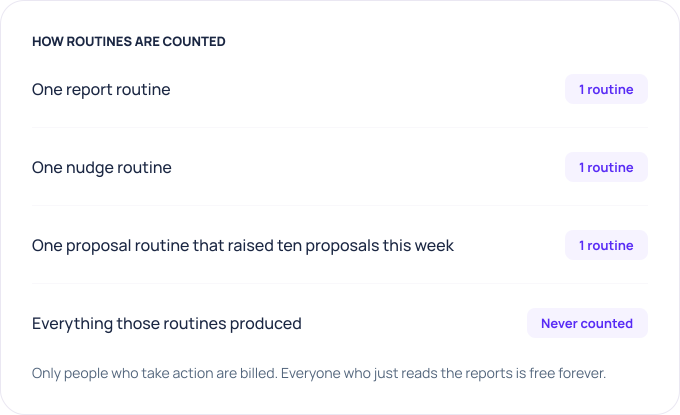
Free is real product, not a trial: 10 seats, 3 synced channels, 3 routines, unlimited teams and check-ins, every feature, no credit card. Standard is $6 billed annually, $8 monthly, with 2 routines per seat pooled across the workspace.
Built to clear your security review
The privacy posture is a precondition of the product, not a later add-on. It's what makes an AI-native model safe to put in front of your team and your auditors.



- No training on customer data. Your work never trains a model.
- No storage of raw messages. Troopr derives and persists a structured set of facts about how your team works, not the raw firehose.
- Clear scope. Team channels, connected work tools, and a person's own shared activity. Troopr does not read other people's private DMs.
- OAuth and Jira permissions. Troopr authenticates via OAuth and never bypasses your Jira project, issue, or field permissions.
Straight answers

No. Every proposal is a typed action from a closed list, routed to the owner, revalidated against live Jira when they confirm, and executed under their own login. Reports and nudges never write to Jira at all.
Yes. Troopr runs in Slack and Microsoft Teams, and delivers standups, reports, and proposals into team channels in both.
The routine itself, once, whatever its type. Its output is never counted or billed.
No. Routines are sentences, and 23 templates cover the common ones. The builder takes JQL and saved Jira filters if you want them.
No. Your tracker and your team’s channels are enough. Templates that read a repo say so and stay unavailable until you connect one.
Its last result reads “Checked, nothing to say,” with the time it ran. You can also run it on demand from the list.
Write the first one in a sentence
Turn on the daily read, add a watch for stale work, let a proposal routine keep Jira honest. Three routines are free forever, and you will know inside a week whether the team notices.

The AI project manager for engineering teams. Forms its own view of the work and does the coordination, right where your team already works.
2035 Sunset Lake Road, Suite B-2, Newark, DE 19702, United States.