

What Is Hybrid Work? Models, Benefits & Automation for 2026
What Is Hybrid Work?
Hybrid work is a flexible model where employees split their time between working remotely and in a physical office. Instead of defining work by location, hybrid work focuses on outcomes and collaboration, letting teams decide when in-person presence adds the most value.
In practice, hybrid work can take many forms: some teams choose fixed office days, others let employees decide freely, and many follow project-based rhythms. The unifying thread is flexibility, employees gain autonomy over where they work best, while organizations maintain the alignment and culture that come from shared in-person moments.
Since 2020, hybrid workplaced meaning has evolved from a pandemic workaround into a long-term operating model. By 2026, leading enterprises, especially in engineering, IT, and product organizations, are blending digital collaboration tools like Slack, Jira, and Confluence with automation to support distributed teams. The goal isn’t just to “balance” remote and office work, but to design systems that keep visibility, communication, and accountability seamless across both environments.
In short: Hybrid work is how modern teams combine flexibility with connectedness, supported by clear policies, async collaboration, and the right automation stack.
Why Hybrid Work Has Become the Global Standard
Hybrid work has moved from a temporary response to a permanent organizational strategy. What began as an emergency shift in 2020 has matured into the dominant model for high-performing companies worldwide. According to Microsoft’s Work Trend Index, over 70% of employees now expect flexible work options as standard, and 65% of organizations have restructured office policies to support hybrid models.
The reason is simple: the nature of work has changed faster than traditional structures can adapt. Cloud infrastructure, real-time collaboration tools, and AI-driven automation have made location less relevant to productivity. Teams can operate seamlessly across time zones, track progress through shared dashboards, and automate updates directly in platforms like Slack and Jira, removing the friction that once made remote coordination difficult.
Beyond convenience, hybrid work from home and in office has become a competitive differentiator. It attracts top talent, improves retention, and reduces costs associated with large office spaces. But its real advantage lies in agility, organizations can scale up or down quickly, optimize for employee well-being, and stay resilient against disruptions.

Hybrid work isn’t just a trend, it’s the operating system of modern enterprises, blending human flexibility with digital structure.
Benefits of Hybrid Work
Hybrid work benefits employees and organizations alike, but the real payoff comes when flexibility is balanced with structure. Below are the key advantages across different stakeholders.
1. For Employees: Flexibility and Focus
Hybrid work gives people control over how and where they perform best. Fewer commutes and quieter work environments improve focus, while in-office days preserve social connection. Studies from Novoresume and Microsoft show employees report greater job satisfaction and lower burnout when given choice over work location.
2. For Organizations: Productivity and Cost Efficiency
Enterprises adopting hybrid models report measurable gains in output per employee. With digital collaboration tools in place, teams can maintain real-time visibility, reduce meeting overhead, and optimize workspace use. A 2024 Owl Labs report found 56% of hybrid organizations reduced operating costs through smaller office footprints and smarter scheduling.
3. For IT and Operations Teams: Clarity and Automation
Hybrid models introduce complexity, multiple tools, time zones, and workflows. When managed manually, these can create silos and delays.
That’s where automation platforms like Troopr help. By connecting Slack, Jira, and Confluence, IT and engineering teams can automate updates, monitor SLAs, and track daily progress without switching contexts. This ensures hybrid work stays transparent and measurable, not chaotic.
4. For the Business: Talent and Resilience
Hybrid organizations can recruit globally, accessing specialized talent regardless of location. They also gain resilience, continuity of operations even during disruptions, whether logistical, economic, or environmental.
Hybrid work’s real benefit: it transforms flexibility from a perk into an operational advantage, when paired with the right processes and technology.

The 4 Common Hybrid Work Models
Hybrid work isn’t one-size-fits-all. Companies shape it based on culture, team structure, and operational priorities. Here are the four most common models used today.
1. Office-First Hybrid
In this model, the office remains the default workplace, but employees can work remotely on certain days or for specific tasks.
Best for: teams requiring high in-person collaboration, like product design, engineering, or leadership planning.
Challenge: without clear async communication protocols, remote days can feel disconnected.
2. Remote-First Hybrid
Here, remote work is the default, and office days are optional or event-driven (for key meetings, onboarding, or brainstorming).
Best for: distributed engineering or IT teams operating across time zones.
Tool requirement: strong automation and visibility across Slack, Jira, and other systems to prevent work fragmentation.
3. Flexible Hybrid (Employee Choice)
Employees decide where to work based on their schedule, preferences, or project demands.
Best for: organizations emphasizing trust, autonomy, and results over presence.
Key success factor: shared visibility into priorities and outcomes so flexibility doesn’t lead to ambiguity.
4. Split-Week or Role-Based Hybrid
Workdays are divided between home and office, or by role type (e.g., customer-facing vs. technical roles).
Best for: teams needing structured coordination but predictable patterns.
Consideration: requires planning for office utilization and coordination across mixed schedules.
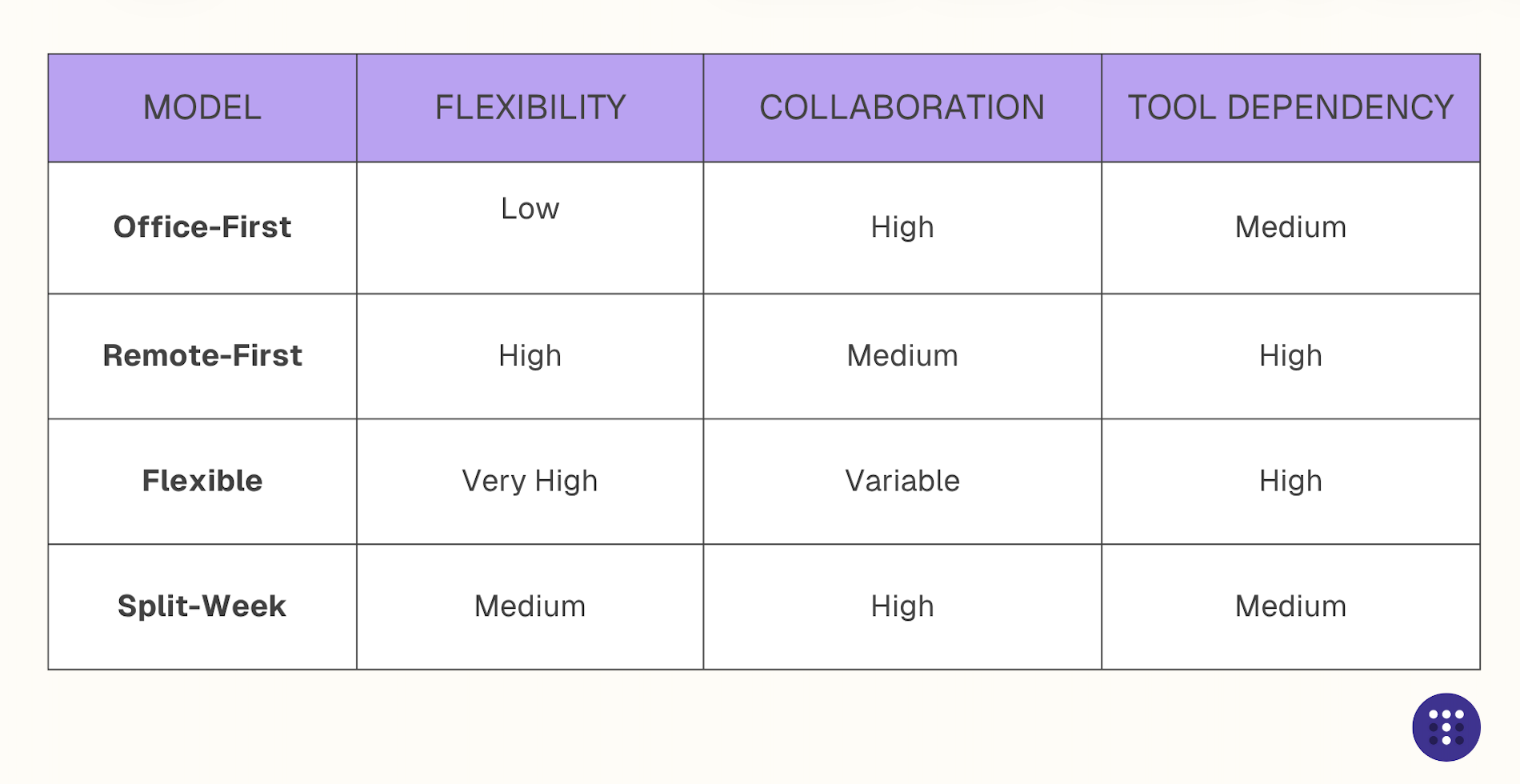
Tip: The best hybrid model isn’t the most flexible, it’s the one that aligns with your workflows, communication culture, and visibility tools.
Examples of Companies Succeeding with Hybrid Work
The most effective hybrid strategies come from organizations that treat flexibility as an operating system, not a perk. Industry leaders like Google, Microsoft, HubSpot, and Salesforce have each developed hybrid frameworks suited to their workforce and culture.
Google: The Structured Hybrid
Google’s “3–2 model” lets employees spend three days in the office and two days remote. This approach blends collaboration-heavy in-office sessions with focused solo workdays.
Structure matters. Clear expectations prevent imbalance between remote and on-site teams.
Microsoft: The Empowered Hybrid
Microsoft’s global hybrid model empowers employees to decide where they work most effectively while ensuring team alignment through shared objectives and digital tools like Teams and Viva.
Trust and data-driven visibility keep hybrid systems scalable.
HubSpot: The Flexible Hybrid
HubSpot allows employees to choose their mode of work, office, flex, or remote—on an annual basis. The company redesigned office spaces for connection, not attendance, showing how physical environments can evolve to serve hybrid collaboration.
Flexibility succeeds when reinforced by intentional culture design.
Salesforce: The “Success from Anywhere” Model
Salesforce gives teams the freedom to define their own hybrid schedules, backed by cloud-based automation and centralized communication.
Autonomy, when combined with connected systems, enables agility without losing accountability.
Across these examples, one principle stands out: hybrid work thrives when visibility, communication, and collaboration are automated, not manual.
That’s why more IT and engineering teams now rely on platforms like Troopr to sync project updates, service requests, and daily standups directly inside Slack and Jira, keeping distributed teams aligned wherever they are.
How to Make Hybrid Work Actually Work
Hybrid work succeeds when flexibility meets discipline. The companies that get it right don’t just allow hybrid, they design for it. Below is a simple framework you can adapt for your teams.
1. Define Clear Team Norms and Workflows
Hybrid work breaks without clarity. Define when to meet, what channels to use, and how decisions are documented.
Use tools like Slack for async updates and shared channels, and Confluence or Notion to capture context.
Ask: “Can every team member find what they need without a meeting?” If not, your system isn’t hybrid-ready.
2. Automate Visibility Across Teams
Manual updates and check-ins don’t scale across hybrid environments. Automate recurring standups, task progress, and ticket updates directly inside Slack or Teams.
Platforms like Troopr integrate with Jira to automatically summarize daily activities and surface blockers, so managers and contributors stay aligned without chasing status reports.
See how Troopr automates hybrid visibility across Slack and Jira → [Book a Demo]
3. Align Policies, Security, and Access
Hybrid teams need frictionless but secure access to data and tools. Standardize logins with SSO, define device policies, and adopt secure file-sharing protocols.
Consistency across remote and in-office environments prevents IT bottlenecks and compliance risks.
“Troopr supports enterprise-grade compliance, including SOC 2 Type II, SSO, and role-based permissions, helping IT teams enforce secure hybrid operations.”
4. Measure What Matters
The best hybrid systems are data-informed. Track metrics like:
- Meeting load vs. async communication ratio
- SLA completion and task velocity
- Employee satisfaction and retention
Combine these into visibility dashboards that reflect both operational and cultural health.
Mini Playbook: 4 Questions Before Finalizing Your Hybrid Setup
- Do teams know how to communicate async?
- Are updates automated and visible to everyone?
- Can leadership access hybrid KPIs easily?
- Are security and policies consistent across locations?
When these answers are “yes,” hybrid work starts working for you, not against you.
Common Challenges and How to Overcome Them
Even well-intentioned hybrid models fail when execution gaps appear. Here are the most common challenges and practical ways to solve them.
1. Communication Silos
The challenge: Teams drift into parallel conversations, remote employees miss context, while in-office teams default to hallway decisions.
The fix: Move discussions to shared digital channels. Tools like Slack and Microsoft Teams help unify communication, but success depends on norms, when to use threads, when to document, and how to escalate issues asynchronously.
Pro tip: Automate daily recaps and task updates through bots like Troopr, so everyone stays in sync without meetings.
2. Visibility Gaps
The challenge: Managers lose visibility into project progress, ticket status, or team workloads across time zones.
The fix: Integrate visibility dashboards that consolidate updates from Jira, Confluence, and Slack.
Automated summaries reduce dependence on status calls and give leaders real-time clarity.
3. Cultural Drift
The challenge: Hybrid setups can erode belonging, remote employees feel detached, and engagement declines.
The fix: Establish rituals that connect everyone, virtual town halls, weekly demos, or async wins shared in Slack. Recognition and transparency maintain cohesion even when teams are distributed.
4. Security and Governance Risks
The challenge: Distributed access to systems increases the surface area for breaches.
The fix: Standardize SSO, enforce MFA, and clearly define data-handling policies. IT and HR should align on governance so hybrid flexibility doesn’t compromise compliance.
In short: Hybrid work breaks when visibility, alignment, or security are left to chance. The fix isn’t more meetings, it’s smarter systems and consistent governance.
Hybrid work succeeds when it’s measurable. Explore how Troopr brings visibility and governance to your hybrid workflows → [Start Free]
FAQs
1. What is the difference between hybrid and remote work?
Remote work means employees operate entirely outside a physical office.
Hybrid work combines both, employees split time between remote and on-site work, giving them flexibility while maintaining in-person collaboration.
2. What are the main challenges of hybrid work?
The most common challenges include communication silos, lack of visibility, and inconsistent access to tools or data.
Organizations overcome these by defining async norms, automating status visibility, and enforcing unified security policies.
3. How can teams stay productive in a hybrid setup?
Hybrid productivity depends on structure. Teams use async updates, shared dashboards, and automation to minimize meetings.
Tools like Troopr help automate updates across Slack and Jira, so teams stay aligned without context-switching.
4. Which hybrid work tools helps with productivity?
Hybrid work relies on integrated communication, collaboration, and visibility tools.
Slack, Microsoft Teams, Jira, Confluence, and Troopr are commonly used together to manage workflows, track tasks, and share updates across distributed teams.
5. How do you measure hybrid work success?
Track both qualitative and quantitative metrics, employee satisfaction, meeting load, ticket resolution time, and task visibility.
When these are consistently tracked, hybrid models become scalable and transparent.


The AI project manager for engineering teams. Forms its own view of the work and does the coordination, right where your team already works.
101 Arctic Circle, Round Rock, Texas 78664, United States.