

Hybrid Work Schedule Templates & Rollout
TL;DR
- Hybrid work schedules balance flexibility and structure for distributed teams.
- Models vary, from employee-driven flexibility to manager-assigned office days.
- Templates differ for engineering, IT service, and cross-functional teams.
- Slack + Jira automation can streamline hybrid coordination and drop redundant meetings.
- A three-sprint rollout ensures smooth adoption, measurable impact, and cultural fit.
What You’ll Learn
- Core hybrid schedule models: flexible, fixed, office-first, remote-first.
- Proven templates for engineering squads, IT service teams, and cross-functional programs.
- How to configure Slack + Jira for hybrid visibility and async operations.
- A 3-sprint rollout plan with measurable milestones.
- Weekly metrics that matter (cycle time, latency, on-site ROI).
- Handling edge cases like physical access roles or incident spikes.
Introduction
Hybrid work schedules have evolved from pandemic stopgaps into intentional operating systems for modern teams. They define who works where and when, ensuring focus and collaboration coexist without chaos.
Yet, most organizations struggle to move beyond ad hoc arrangements. One team follows a “3–2 office cadence,” another opts for full flexibility, and IT keeps fixed shifts. The result? Visibility gaps, meeting fatigue, and inconsistent productivity.
A hybrid work schedule, done right, creates predictable collaboration windows without killing autonomy. It gives structure to distributed work, setting norms for presence, focus days, and response expectations.
Schedule Models at a Glance
Hybrid work isn’t a single template, it’s a spectrum of operating models balancing autonomy, predictability, and team alignment. Most organizations evolve toward one of four foundational models, with sub-variants depending on who controls scheduling and how coordination happens.
Flexible Hybrid
Employees choose where and when to work based on their tasks, projects, or personal constraints. Common in product and design teams, this model optimizes for autonomy and deep work.
Subtypes:
- At-Will: Employees decide daily where to work. Great for mature, trust-based cultures but hard to coordinate cross-team.
- Split-Week: Teams assign specific days (e.g., Mon–Tue remote, Wed–Thu office). Balances collaboration with quiet focus time.
Troopr Fit:
Flexible models need strong async visibility. Troopr Check-ins automate status updates in Slack so team leads can track progress without micromanaging attendance. Project Reports keep visibility metrics current inside channels, reducing “Where’s everyone?” friction.
Fixed Hybrid
A company-wide cadence defines which days are in-office — often a 3–2 or 2–3 pattern. Predictability is the key benefit, but it may reduce flexibility for global teams.
Subtypes:
- Manager-Scheduled: Leaders assign office days by role or sprint phase (e.g., planning in-office, build weeks remote).
- Mixed: Combines fixed office presence for key rituals (e.g., retros) with flexible remote options for other days.
Troopr Fit:
Fixed setups benefit from Jira-Slack automation that keeps project boards aligned to in-office collaboration cycles. Troopr can sync sprint goals, issue triage, and backlog refinements automatically, so meeting time is used for decisions, not updates.
Office-First Hybrid
In this setup, the office remains the default workspace, with remote work as an exception. Popular among legacy enterprises or roles requiring physical infrastructure (labs, hardware teams).
- Pros: Easier cultural cohesion, spontaneous collaboration.
- Cons: Less talent reach, potential bias toward in-office staff.
Troopr Fit:
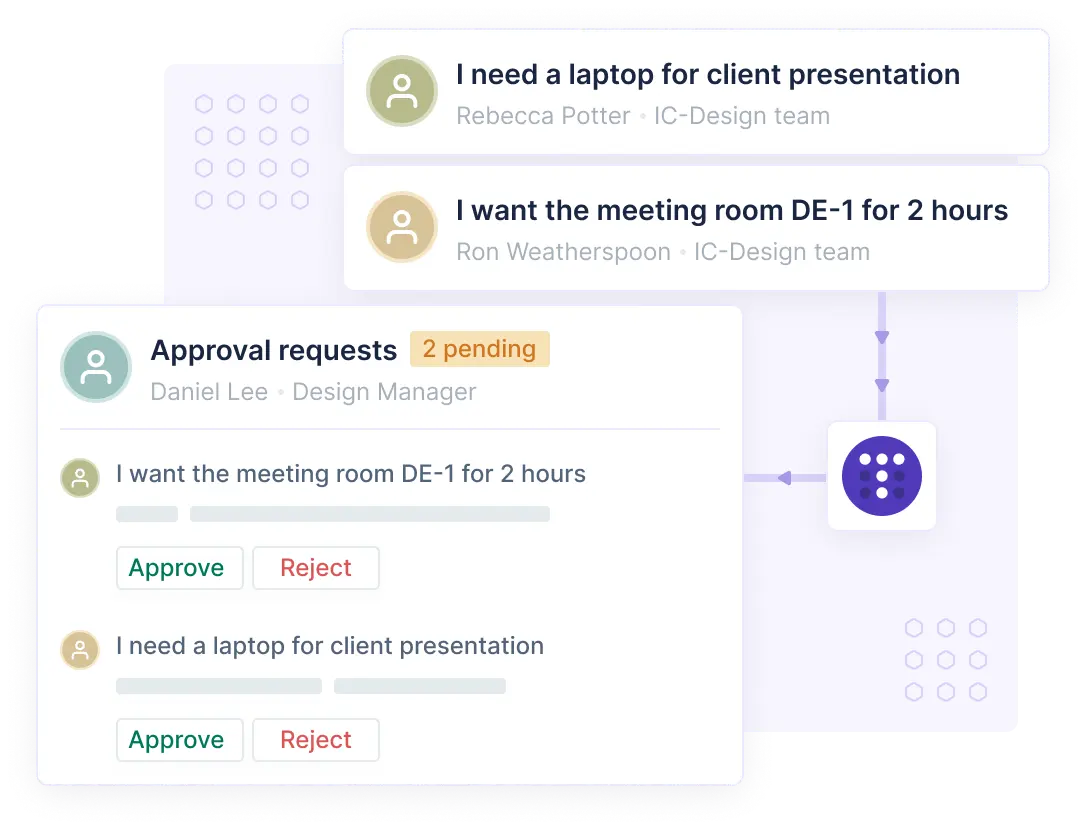
Troopr mitigates proximity bias by surfacing project progress and blockers equally from all contributors, in-office or remote. Automated reminders and reports make outcomes visible, not just presence.
Remote-First Hybrid
Remote is the default; the office is used for periodic syncs, innovation sprints, or onboarding. This model supports global talent and cost savings, but demands strong async tooling.
- Pros: Maximized flexibility, broader hiring pool.
- Cons: Requires deliberate effort to maintain team cohesion.
Troopr Fit:
Remote-first teams thrive on async standups and automated Jira workflows. Troopr Check-ins capture daily or weekly updates directly in Slack, while Charts and Reports replace dashboards, ensuring alignment across time zones.
Templates You Can Copy
Designing a hybrid work schedule starts with understanding your team’s rhythm, when collaboration drives value, and when focus delivers output. The best hybrid templates don’t just define where work happens; they define how it stays visible.
Engineering Squads
Goal: Deep focus on code, async progress visibility, shared collaboration days.
Best For: Product and development pods working in sprints.
Template:
- Mon–Tue: Remote focus (no meetings before 2 p.m.)
- Wed–Thu: In-office collaboration (code reviews, planning, whiteboard sessions)
- Fri: Optional remote; async demo prep and sprint summary.
Troopr Setup:
- Check-ins: Automate daily updates in Slack at 10 a.m.; collect blockers and PR mentions.
- Reports: Publish sprint burndown and velocity charts in the #squad channel every Thursday.
- Reminders: Auto-nudge unreviewed PRs or unresolved Jira issues.
IT Service Teams
Goal: Maintain SLA coverage while supporting hybrid flexibility.
Best For: Support, infrastructure, and on-call operations.
Template:
- Rotational hybrid: 3 days on-site (to access hardware/network), 2 remote.
- On-call windows: Distributed evenly across zones.
- Standups: Asynchronous every morning in Slack; escalation calls only for P1 incidents.
Troopr Setup:
- Jira Sync: Create/update tickets from Slack via Troopr bot.
- Reports: Automatic SLA breach alerts in #it-ops.
- Check-ins: Collect daily system health updates; archive to Jira for compliance.
Cross-Functional Programs
Goal: Align distributed departments on product launches or PI planning.
Best For: PMO, Marketing, and Engineering alignment projects.
Template:
- Week 1: On-site for quarterly planning.
- Weeks 2–11: Hybrid async execution with scheduled syncs biweekly.
- Week 12: Demo and review, in-office optional.
Troopr Setup:
- Channels: #pi-planning, #demo, #retro — connected to corresponding Jira Epics.
- Reports: Auto-share sprint and milestone progress mid-cycle.
- Check-ins: Biweekly retrospective prompts in Slack, feeding back into Jira.
Learn more about Troopr Check-ins for hybrid standups →
Slack + Jira Configuration for Each Template
Even the most elegant hybrid work schedule collapses without clear communication architecture. The key isn’t more tools, it’s the right connections between Slack and Jira, where hybrid teams already spend their time.
A well-configured setup replaces status meetings, supports async visibility, and ensures everyone sees the same work context, whether they’re remote or in-office.
Channel Taxonomy & Naming
Start by defining a channel taxonomy that mirrors your Jira hierarchy. Consistency in naming makes automation, reporting, and visibility predictable.
Recommended patterns:
- #proj-<projectname> → linked to Jira Project
- #squad-<teamname> → for daily check-ins and sprint reports
- #it-ops → for SLA and incident tracking
- #pi-<quarter> → for program increment or quarterly goals
[Figure: Diagram mapping Jira Projects → Slack Channels → Troopr automations]
Troopr Setup:
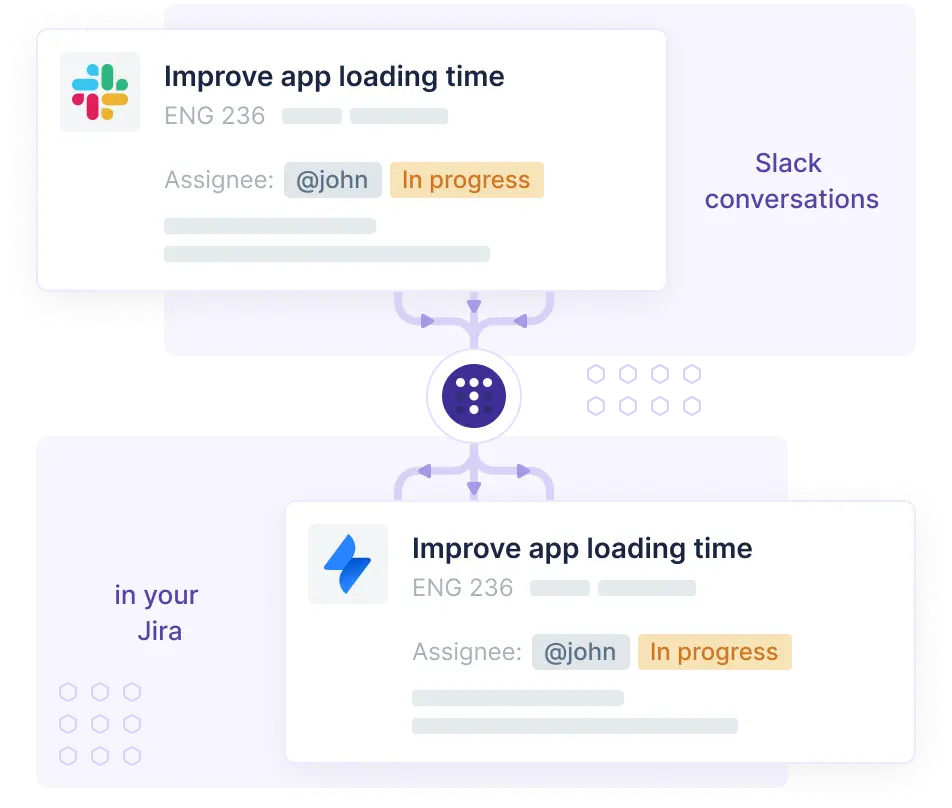
Connect each channel to its Jira counterpart with Troopr Projects integration. This enables:
- Creating or updating issues directly from Slack threads.
- Surfacing Jira comments or status changes in the linked channel.
- Maintaining bidirectional sync — ensuring remote updates are visible to in-office managers instantly.
Check out our --> Hybrid Work Playbook
Check-ins and Issue Triage Automations
For Engineering Squads:
Automate daily standups in Slack using Troopr Check-ins. Team members answer short prompts like:
- What did you complete yesterday?
- What’s next?
- Any blockers?
Responses totals into one report posted in the squad channel and archived in Jira for sprint retros.
For IT Teams:
Use Troopr Routines to send unresolved ticket summaries automatically. Add “Escalate to Jira” buttons in Slack threads so incidents convert into tracked issues seamlessly.
This setup reduces time spent in recurring sync meetings by 40–60% (based on Troopr customer data).
Rollout in 3 Sprints (How-To)
Rolling out a hybrid work schedule isn’t an HR policy change — it’s a workflow transformation. The most successful organizations phase adoption like an agile delivery project: test, scale, normalize.
Further Reading: Distributed Team Management Metrics: Slack + Jira Visibility Framework
Here’s how to execute it in three four-week sprints using Troopr for real-time visibility.
Sprint 1: Pilot One Squad, Baseline Metrics
Objective: Confirm workflow fit before scaling.
Actions:
- Select one engineering or IT squad as a pilot.
- Define their hybrid template (e.g., 3 office days, 2 remote).
- Set visibility expectations — async standups, Jira syncs, weekly metrics.
- Automate daily check-ins with Troopr Check-ins in Slack.
- Capture baseline data:
- Response latency
- PR cycle time
- Standup completion rate
Outcome: A lightweight proof of concept showing time saved and visibility improved.
Sprint 2: Expand, Retire Two Recurring Meetings
Objective: Scale successful behaviors across two more squads.
Actions:
- Extend Slack + Jira configuration to new teams.
- Replace redundant status meetings with async reports in Troopr.
- Introduce Troopr Routines for sprint progress.
- Begin tracking “decisions shipped vs meeting hours spent.”
Outcome: At least two hours/week reclaimed per team and improved update reliability.
Use Troopr Routines to visualize performance across squads inside Slack, no extra dashboards required.
Sprint 3: Document Norms; Automate Reports
Objective: Institutionalize hybrid operations.
Actions:
- Document hybrid norms in Confluence (“How we work hybrid”).
- Automate reports and blockers tracking via Troopr.
- Share adoption metrics: reduced meeting load, improved response rates.
- Create a manager training snippet on visibility and async expectations.
Outcome: Sustainable hybrid rhythm, predictable focus days, transparent progress, fewer syncs.
Start your hybrid rollout pilot with Troopr, see what’s included →
What to Measure Weekly
Hybrid schedules succeed only if teams can see, and improve , how work flows across locations. Visibility shouldn’t mean more dashboards; it should mean the right few metrics, delivered automatically inside the workspace where work happens.
Here are five weekly metrics that define a healthy hybrid rhythm, all trackable directly from Troopr Routines and Check-ins.
1. Response Latency
How long it takes for an issue comment, pull request, or message to get a reply.
- Why it matters: Measures async responsiveness and identifies bottlenecks.
- How to track: Troopr Routines can extract Jira activity timestamps to show average response time per team or channel.
2. Blocked Issues
The count (and duration) of issues tagged “Blocked” in Jira.
- Why it matters: Persistent blockers signal unclear ownership or misaligned hybrid handoffs.
- Troopr tie-in: Automated reminders surface blocked issues in Slack, ensuring no one gets stuck waiting across time zones.
3. PR Cycle Time
Average time between PR creation and merge.
- Why it matters: Reveals the real velocity impact of distributed work.
- Troopr tie-in: Troopr can post PR summaries in Slack daily, making progress visible without engineers opening Jira or Git dashboards.
4. Standup Completion Rate
Percentage of team members submitting async check-ins.
- Why it matters: Tracks engagement and accountability without enforcing sync meetings.
- Troopr tie-in: Check-in reports automatically log participation trends.
5. On-Site Day ROI
Ratio of decisions shipped vs time spent in office.
- Why it matters: Quantifies whether in-office time is delivering collaboration ROI.
- How to track: Compare Jira issue updates tagged “In-Office” with output metrics in Troopr Routines.
Automate weekly visibility reports in Slack — no dashboards needed →
Edge Cases & Exceptions
No hybrid schedule survives contact with real-world constraints unchanged. Some teams, especially those with physical access needs or volatile workloads, require flexibility layers that don’t undermine visibility or accountability.
Incident Spikes
Challenge: Unplanned workload surges during hybrid rotations (e.g., outages or major releases).
Solution:
- Trigger Troopr Alerts when SLA breaches occur.
- Use ad-hoc Check-ins tagged “Incident Response” to summarize resolution steps async.
- Schedule retrospective prompts once stability returns to capture lessons learned.
Schedule Overrides
Challenge: Temporary deviations (e.g., leadership offsites, company events).
Solution:
- Maintain an override log (Confluence or Notion) linked from Slack.
- Automate Troopr reminders to re-enable standard schedules post-event.
- Avoid manual communication silos by tagging overrides in Jira tasks for traceability.
If you are looking to decide on Hybrid vs remote, here's our guide.
Conclusion: Turning Schedules into Systems
Hybrid work isn’t about balancing office and remote, it’s about orchestrating visibility and rhythm.
A well-structured schedule backed by automation ensures deep work, predictable collaboration, and fair recognition—no matter where your people sit.
When you unify Slack + Jira through Troopr, hybrid work moves from ad hoc coordination to a measurable operating model:
- Async check-ins replace daily meetings.
- Automated reports replace status dashboards.
- Outcomes replace attendance as the measure of performance.
In short: Hybrid work schedules succeed when process, automation, and trust align.
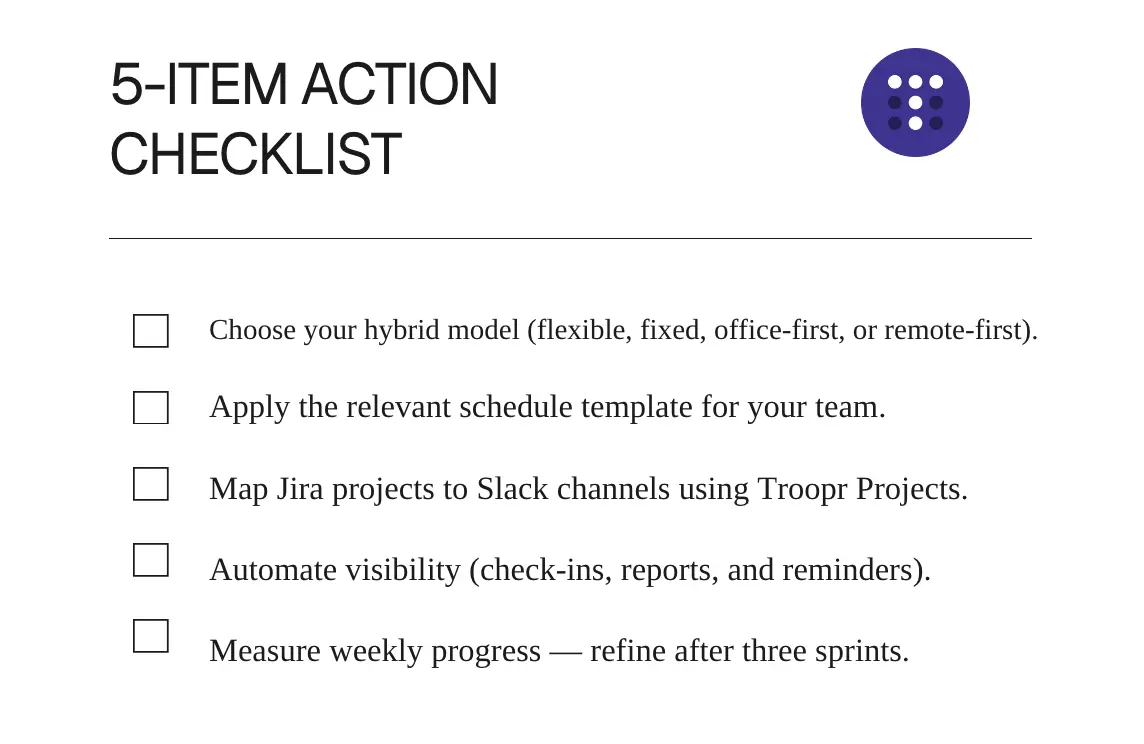
Start your pilot — automate hybrid standups and reports in Slack →
FAQ
Q1: What is a hybrid work schedule?
A hybrid schedule lets employees divide their week between remote and in-office work—balancing focus and collaboration.
Q2: How many days a week is a hybrid job?
Most organizations follow a 3:2 or 2:3 pattern, but models vary by team and project needs.
Q3: How do you manage hybrid schedules effectively?
Use Slack + Jira integrations to centralize communication, automate updates, and reduce meeting overhead.
Q4: How can Troopr help with hybrid visibility?
Troopr automates standups, reports, and Jira syncs inside Slack, making hybrid work measurable and async-first.
Q5: What’s the best hybrid model for engineering teams?
A split-week model (remote focus + in-office collaboration) supported by async updates delivers the best balance.


The AI project manager for engineering teams. Forms its own view of the work and does the coordination, right where your team already works.
101 Arctic Circle, Round Rock, Texas 78664, United States.