



Jira reports in slack
Jira reports in Slack:
sprint, burndown, velocity, any JQL
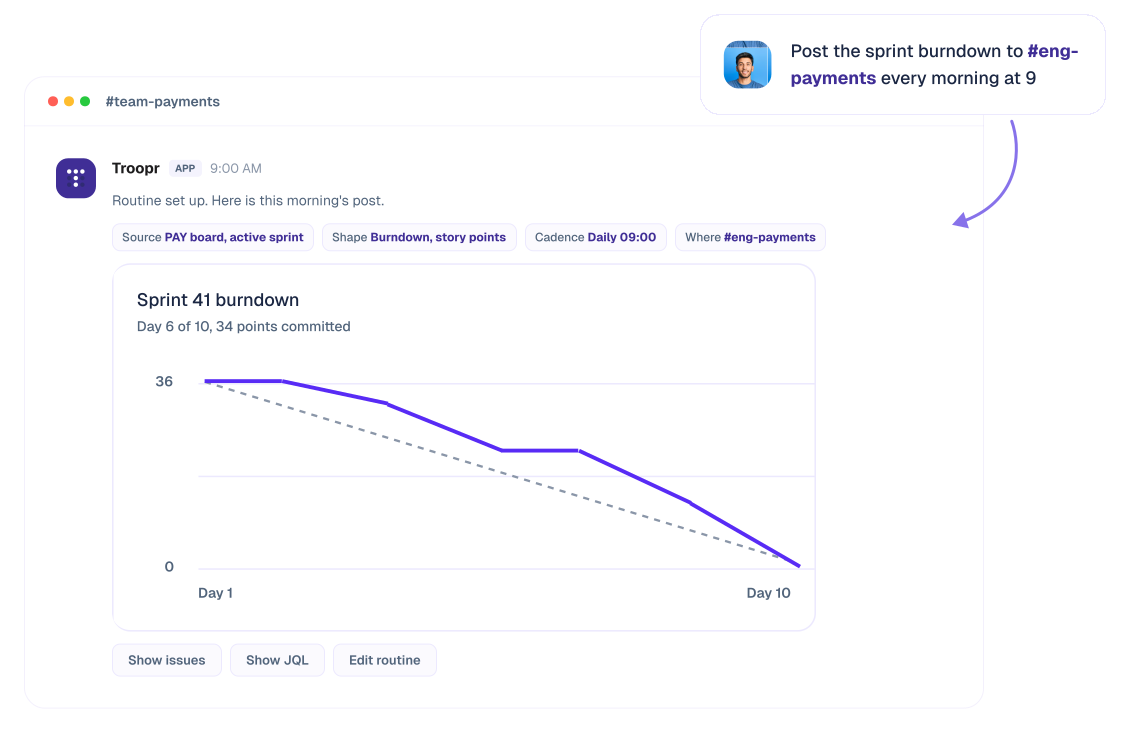
Describe the report you want. Troopr sets up the routine, renders the chart itself, and posts it to your channel on your cadence.
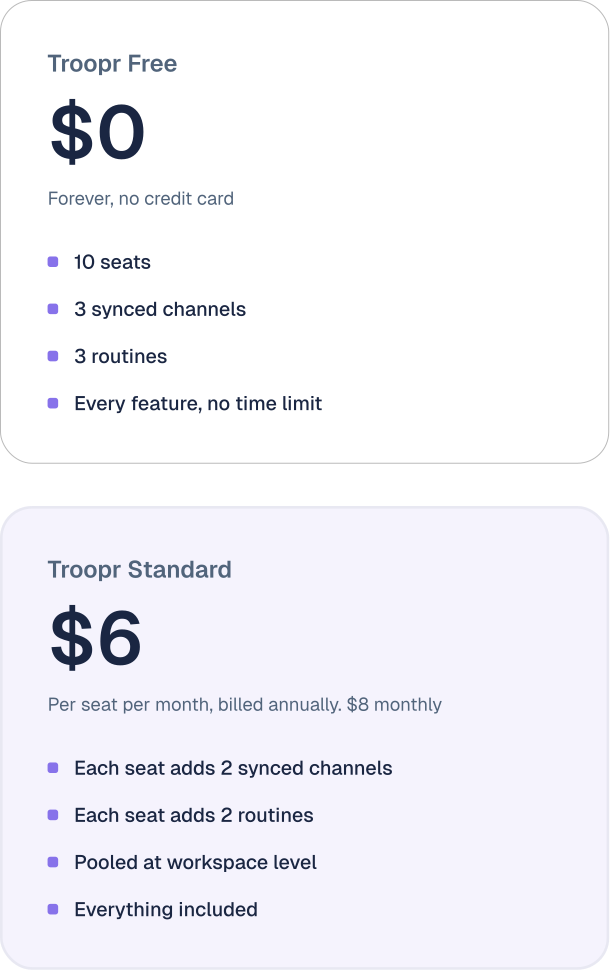
Free for 10 users . Then $6 per seat . No credit card . Not a trial.
Trusted by 600+ engineering teams worldwide
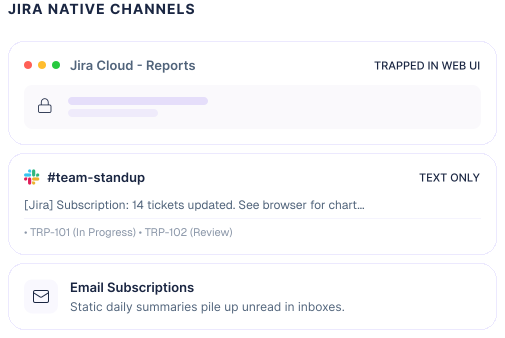
Jira has no native way to put a report into Slack.
An automation rule can post a text list of issues on a schedule, and a saved filter subscription sends email only. Charts are drawn in the browser, so nothing native can post one at all. Troopr renders the chart itself and delivers it into a channel on a cadence you describe in plain language, with action buttons on every issue.
Before you buy anything
What you can get into Slack for free, and where each route stops
Three real options, plus one workaround. All worth setting up. None will put a chart in a channel.
What lands in Slack
Cadence
Where it stops
Jira Cloud for Slack, the official app
Event notifications, issue previews, create and transition from a card
On the event
Event-driven, not cadence-driven. No scheduled digest, no chart. For a team that mainly wants to know when something changed it is genuinely enough, and it is already installed.
Jira Automation rule
A text list of issues built from smart values
Scheduled, to the minute
Text only, and it needs an admin plus smart-value syntax. It also draws on a monthly cap of successful rule runs, 100 on Jira Free, 1,700 on Jira Standard, 1,000 per paid user on Jira Premium, and every rule stops when a product hits it.
Saved filter subscription
Nothing. It sends email
Scheduled, cron
Atlassian's own answer is that a subscription cannot post to Slack. The workaround is a channel email address, which breaks under single sign-on.
Slackbot reminder plus a dashboard link
A message telling people to go look
Scheduled
The standing community answer for burndown. It works, and it turns the report into a click somebody has to take.
Automation limits from Atlassian's own documentation, September 2026.
The reason this is hard
Why the burndown chart will not paste itself into Slack
Jira draws the burndown in your browser. It is not served as an image, so there is no file for a bot to attach.
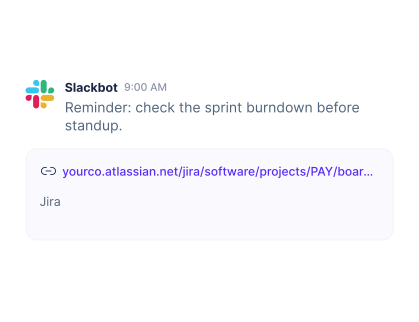
What a scheduled reminder can send
A link is not a report. It is a task you have assigned to your whole channel, and it is the difference between a stakeholder who knows the sprint is behind and one who finds out in the review.
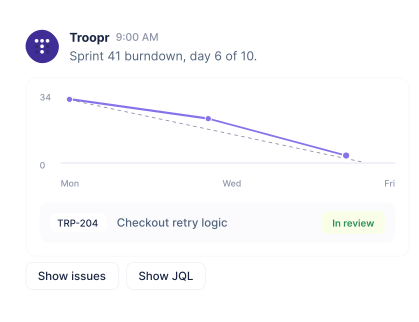
What a Troopr routine sends
Troopr does not screenshot Jira. It reads the board through the API and renders the chart itself, so the picture arrives in the channel with the issues attached.
Setup
How do you schedule a Jira report to a Slack channel?
You write a sentence. That is the whole setup.
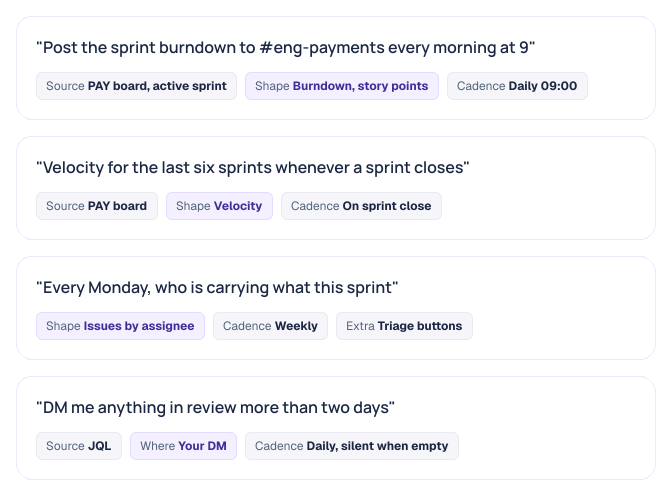
In Troopr the standing instruction is a routine, and a report is one of the three things a routine can be. Tell Troopr what you want in plain language and it works out which board to read, what shape the answer takes, how often, and where.You can do this in a DM, a channel, or the web app, and all of it stays editable. You edit the instruction, not a settings screen.
Or start from one
Do you have to describe it, or are there templates?
Both. Sixteen Jira report templates ship built in, from burndown to issues by custom JQL. Start from one when you know the shape you want, describe it when you do not. Either way you end up with a routine, and the wider library of nudges and proposals is on Troopr Routines.
Sprint and estimation
Burndown, velocity, estimates too high in a sprint, issues missing estimate.
Who has what
Issues by status, assignee, priority, reporter, and open issues by type.
Hygiene and flow
Issues missing updates, progressed recently, recently closed, due, ready for QA.
Anything else
A custom report as a line, bar or pie chart, and issues by custom JQL.
Sprint burndown
Sprint burndown in Slack
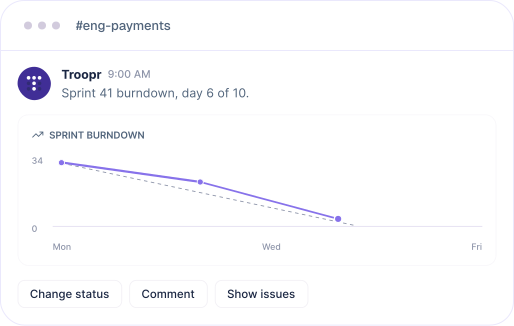
Point it at a scrum board and it reads the active sprint. What the daily version is good for is the shape, not the number.
- Pick the estimation statistic: Story points, original estimate, remaining estimate, or issue count. Get it wrong and the line is flat for reasons that have nothing to do with the team.
- Flat through the first half: Scope was committed but nothing was started.
- A cliff on the last day: A batch of tickets closed together, which is usually status catching up rather than work finishing.
Velocity
Velocity in Slack
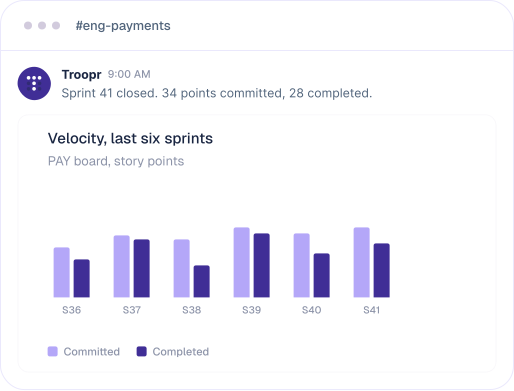
Committed against completed across recent sprints, by board, in whichever statistic the team estimates in. Weekly is usually noise. The version that earns its place posts on sprint close.
Sprint notifications carry the board, sprint, duration and committed points on start, then commitment against completed with the chart on close. The retro opens with the number already in the channel.
Custom reports
Any JQL you can write, and the ones worth writing
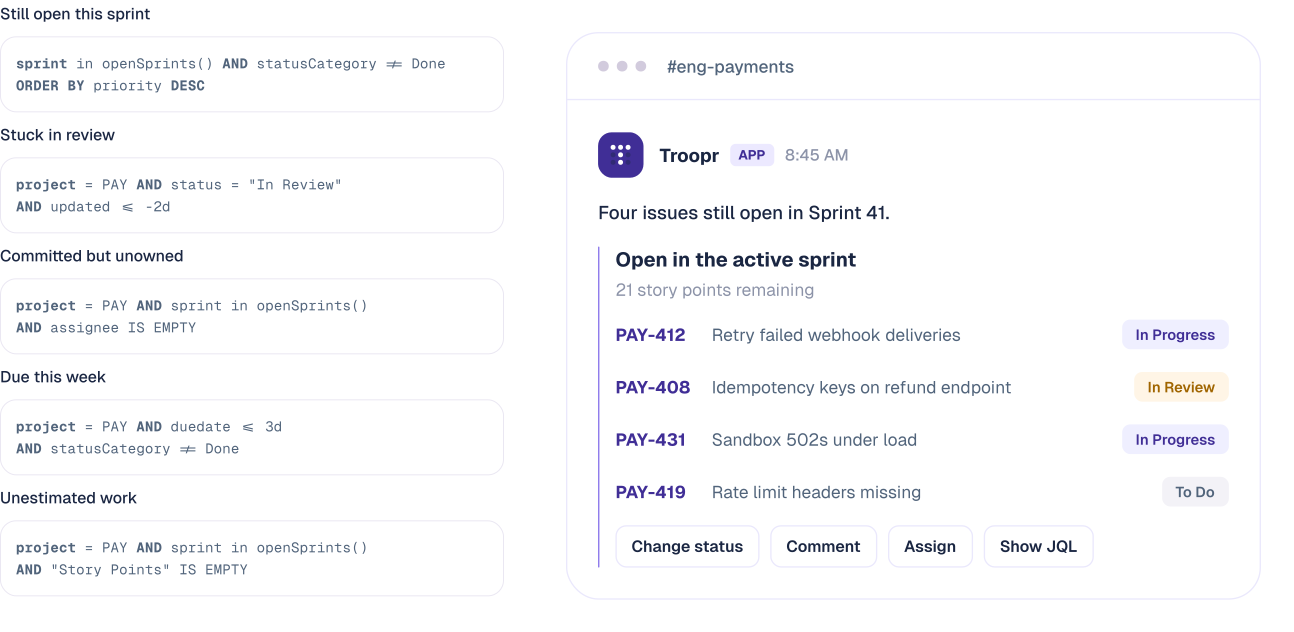
Paste a query, point at a saved Jira filter, or describe the condition and let Troopr write the JQL. It is validated against Jira before the routine saves, so a bad query fails at setup rather than at 9am on a Monday. These five change behaviour.
One instruction, three things it can do
A report tells you. A nudge asks. A proposal fixes it.
Every routine is the same sentence-shaped instruction, so a team that starts with a Friday report can move to acting on it without learning a second product.
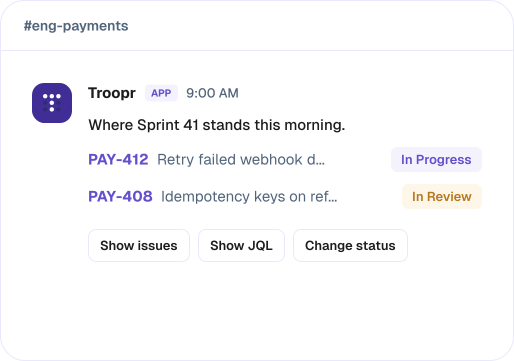
Report · reads, changes nothing
Post the sprint burndown to #eng-payments every morning at 9.
Reads the team's Jira and changes nothing in it. Delivered to a channel on a schedule, as a chart where the shape of the answer is a picture and a written summary where it is not.
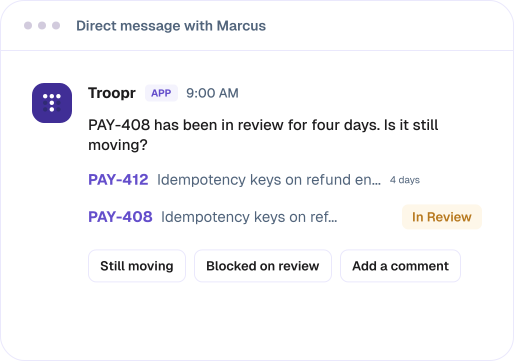
Nudge · asks one person
Ask whoever owns a ticket in review more than two days whether it is still moving.
DMs one person about their own work. Nothing changes in Jira, and the answer comes back to whoever set the routine instead of to the whole channel.
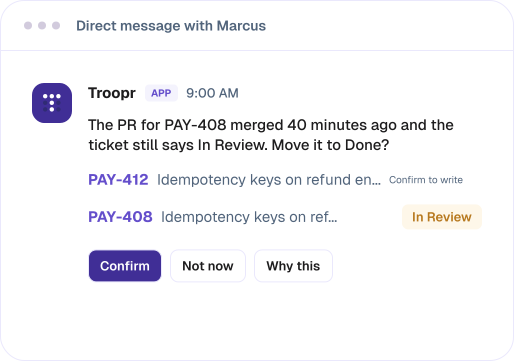
Proposal · writes when you confirm
When a PR merges and its ticket still says in progress, propose moving it.
Offers a change to a ticket. Nothing is written until somebody confirms, it is revalidated against live Jira at that moment, and the write runs under their own login.
A proposal that stops being true, including because someone did it by hand, clears itself and says why.
Watches
Silent unless something is wrong
A daily report that says everything is fine trains people to ignore it. Any routine can carry a watch instead: it checks on its cadence and posts only when its condition is true.
Four conditions: an issue count against a threshold, the sum of a numeric field against a threshold, issues not updated in a number of days, or issues matching a JQL query.
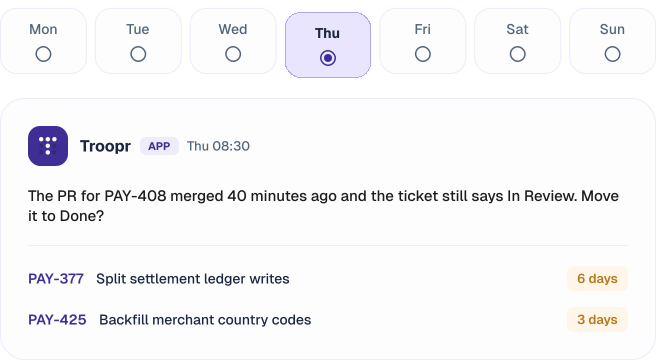
Six of these seven days posted nothing. On each of them the routine's last result reads "checked, nothing to say", so you can tell a silent watch from a broken one.
Actions
Acting on a report without opening Jira
Every issue carries buttons for status, comment and any field, plus show issues and show JQL. Every action executes as the person who clicks it, through their own Jira connection.
~3.8 hrs
Saved per week for managers on meeting logistics, after Yahoo's process-automation team stopped pinging people for status. Scheduled reports are the other half of that job: the status nobody has to assemble.
%201.svg)
Troopr pricing
What Troopr costs, and which Jira it runs on
Troopr meters two things, and reporting touches one: the routine, which counts as one unit whatever its type. What a routine produces is never counted, so a routine raising ten proposals in a week is still one unit.
A seat is a person who takes action. Readers are free, and the billable population dedupes across teams, so one person in five teams is one seat.
The official Jira Cloud for Slack app is Cloud only. Troopr runs on Jira Cloud and Jira Data Center on every plan, with OAuth 2.0 per user, and for instances behind a firewall, fixed IPs to allowlist plus a WebSocket agent mode. Enterprise can run a Docker image in its own network.
Security & privacy
Built to clear your security review
The privacy posture is a precondition of the product, not a later add-on. It's what makes an AI-native model safe to put in front of your team and your auditors.



- No training on customer data. Your work never trains a model.
- No storage of raw messages. Troopr derives and persists a structured set of facts about how your team works, not the raw firehose.
- Clear scope. Team channels, connected work tools, and a person's own shared activity. Troopr does not read other people's private DMs.
- OAuth and Jira permissions. Troopr authenticates via OAuth and never bypasses your Jira project, issue, or field permissions.
Looking for employee or customer support automation? That's a different job, and a different product.
Check enjo ↗Setup issues
When a report does not arrive
The routine ran but nothing posted

Cause. It is carrying a watch and the condition was false. Fix. The routine list shows its last result as "checked, nothing to say". Take the watch off if you want a post either way.
The burndown arrives empty or flat
Cause. No active sprint on the board, or the estimation statistic does not match how the team estimates, so every issue reads as zero. Fix. Set it to what the team actually uses.
A query that works in Jira is rejected
Cause. JQL validates as the connected account, and the query references a field or project that account cannot see. Fix. Run it in Jira as that account. If it fails there too, it is a permission, not the syntax.
Everything stopped at once
Cause. The workspace or personal Jira token expired. Fix. A health banner appears with one-click reconnect, which preserves existing webhooks, notification defaults and channel configuration.
Questions
Questions engineering teams ask
Can I get an actual Jira chart into a Slack channel, or only a link?
Nothing native can, because Jira renders the chart in the browser rather than serving it as an image. Troopr reads the board through the API and renders the chart itself.
Does the official Jira Cloud for Slack app do scheduled reports?
No. It does event notifications, issue previews, and creating and transitioning issues from Slack. It is event-driven rather than scheduled, and it has no charting.
Can a Jira filter subscription go to Slack instead of email?
Not directly. Subscriptions send email, and Atlassian's own answer is that there is no way to route one to Slack. The workaround is a channel email address, which fails under single sign-on.
Can I schedule a JQL query to a Slack channel without a Jira admin?
Yes. You connect your own Jira account and set the routine up yourself. Jira Automation is the free alternative, and it needs admin access plus a share of your monthly rule-run allowance.
Does everyone in the channel see the same issues?
Each person sees what their own Jira permissions allow. Actions run as whoever clicks, so nothing is possible in Slack that they could not do in Jira.
What happens on a day when there is nothing to report?
If the routine carries a watch it stays quiet, and its last result reads "checked, nothing to say" so you can tell silence from a failure. Without a watch it posts on its cadence either way.
Does this work with Jira Data Center?
Yes, on every plan including Free, with fixed IPs to allowlist and a WebSocket agent mode for instances that cannot be reached directly. The official Jira Cloud for Slack app is Cloud only.
Is it free?
Troopr Free covers 10 seats with 3 synced channels and 3 routines, every feature included and no time limit. It is not a trial. Troopr Standard is $6 per seat per month billed annually.
If somebody on your team screenshots a chart every morning, that is the job
Teams that only need to know when a ticket changes already have that, free, in the official app. The reason to add Troopr is the report that arrives on its own, as a chart, with the actions attached.

The AI project manager for engineering teams. Forms its own view of the work and does the coordination, right where your team already works.
2035 Sunset Lake Road, Suite B-2, Newark, DE 19702, United States.