

The 5 Best AI Project Management Tools in 2026
Every project management tool shipped AI in the last two years. Almost all of it does the same three things: summarise a thread, draft a task description, answer a question about a board someone else kept up to date.
That last part is the problem. The expensive work in project management was never writing the status update. It was knowing what actually happened, which means someone has to keep the tracker honest first. An AI that summarises a stale board produces a confident, well-written, stale summary.
So this comparison of AI project management tools is organised around one question: does the tool form its own picture of the work, or does it wait for humans to tell it? Every price and plan gate below was checked against the vendor's own pricing page.
What is an AI project management tool?
An AI project management tool uses a language model to take over work a project manager or engineering manager would otherwise do by hand. In practice that covers four jobs: producing status, planning and scheduling work, keeping records current, and answering questions about the state of a project.
The gap between vendors is not model quality. It is what the AI can see and what it is allowed to do. A tool that reads only the tickets in its own database knows only what people typed into it. A tool that reads the tracker, the code and the team's conversations can tell you that a pull request merged on Tuesday while the ticket still says in progress.
The second gap is authority. Some tools only tell you things. Some schedule work on your behalf. A few propose changes to the record and write them once a person confirms. That distinction matters more than any feature list, because it decides how much of the job actually leaves your plate.
The three kinds of AI project management software
Most comparison articles rank these together as though they compete. They mostly do not. Knowing which kind you are shopping for saves a wasted trial.
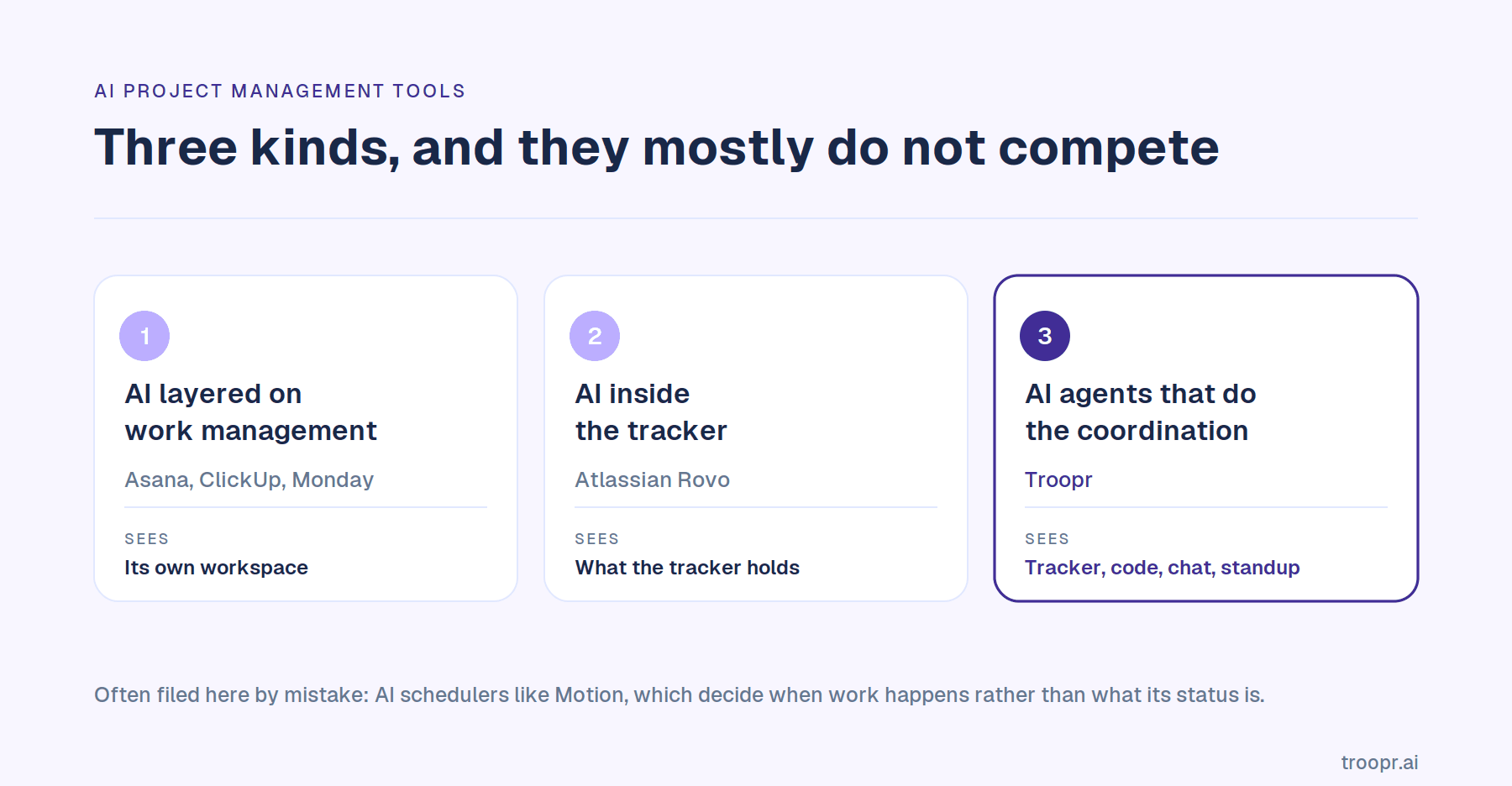
1. AI layered on general work management
Asana, ClickUp, Monday, Notion and the rest. A mature work-management platform with an AI layer added on top: summaries, drafting, natural-language automation, chat over your workspace. Broad, cross-functional, and priced per seat plus AI credits.
Strong when one platform serves marketing, ops, design and engineering together. Weaker for engineering specifically, because the AI can only reason over what the platform holds, and engineering work lives in a tracker, a code host and a chat tool that the platform usually is not.
2. AI inside the tracker
Atlassian Rovo is the example that matters, because most engineering teams are already on Jira. The AI lives where the work is tracked, so it has genuine context on the backlog, and there is nothing new to buy or install.
The limit is the same as the strength. It knows what Jira knows. If your team decides things in chat and ships in GitHub, the tracker's AI sees the consequences only once someone has entered them.
3. AI agents that do the coordination
The newest branch, and the only one aimed at the coordination work rather than the record-keeping. Instead of waiting to be asked, the agent reads across the tracker, the code host and chat, forms its own view of what the team is doing, produces the status itself, and proposes the changes that follow for a person to confirm.
Troopr is the engineering-team example. The distinction from the first two kinds is that nobody has to update anything first for the output to be right.
A fourth group is sometimes filed here and should not be: AI schedulers like Motion, which decide when work happens on your calendar. Useful, genuinely AI-first, and a different job from coordinating a team.
How to evaluate AI project management tools
Eight questions that separate tools which look identical on a feature grid.
- What can the AI actually see? Only its own database, or the tracker, the code host and the team's conversations. This single answer determines whether its output is grounded or a restatement of what somebody typed.
- Does it produce status, or summarise status someone else produced? Summarising is the easy half and the half that was never expensive.
- Can it act, and who confirms? Reporting changes nothing on its own. Ask whether it can transition an issue or set an assignee, and whether a human approves before anything is written.
- What does it remember? A tool with no model of who owns what and what done means on your team stays generic forever.
- How is the AI metered? Nearly every tool in this category now meters AI in credits on top of the seat price. Find the allowance, what each action costs, and what happens when it runs out.
- Is the AI in the free tier? Often it is not, which makes a free plan a demo rather than a trial of what you would actually buy.
- Does it fit the stack you have? Which Jira variants, which chat platform, whether it reads code activity. Tools that require you to move your tracker are not AI project management tools, they are migrations.
- Does it train on your data, and does it hold SOC 2 Type II and ISO 27001? At any size above one team this decides whether the purchase clears security review.
The 5 best AI project management tools
1. Troopr
Troopr is the AI project management agent for engineering teams. It is the only tool in this list that produces the team's status itself rather than formatting what people report.
It reads live Jira activity per person, GitHub pull requests and commits including the code diffs behind them, the team's Slack channels, and the live standup, then forms its own view of what the team is doing. On top of that sits a per-team memory: who owns what, what done means using your real Jira status names, cadence, recurring risks, and each person's area of focus. Every report and answer comes from that, not from a model's general knowledge.
What it does:
- The standup writes itself. Each person's update is drafted from their own activity and posted to the channel, with Troopr asking someone directly only when it genuinely cannot tell what they are working on. Snowflake's engineering teams eliminated roughly 86% of their weekly status-meeting time this way.
- Live standup capture on Google Meet, Zoom and Microsoft Teams. Troopr joins as a silent participant, announces itself, listens with speaker attribution, and cross-references the recap against live Jira and GitHub state rather than transcribing one call. Live and async updates merge into one report.
- It proposes the Jira changes that follow. When a pull request merges and the ticket still says in progress, Troopr proposes the transition to whoever owns the work. Every proposal is typed from a closed vocabulary, carries its evidence, is revalidated against live Jira state at the moment of confirmation, and executes under that person's own Jira login. No model writes anything on its own.
- Routines are standing instructions in plain English rather than chart pickers. A report reads Jira and changes nothing, a nudge asks one person about their own work, a proposal offers a change nobody writes until someone confirms. Any routine can run as a watch that stays silent until its condition is true, so hearing nothing means nothing is wrong.
- Ceremonies in chat. Automated standup, task check-in, retrospective, planning poker and team mood, async at each participant's local time, with retro action items becoming linked Jira issues.
- Deep two-way Jira sync. Slack thread replies become Jira comments as their author and Jira comments post back, attachments move both ways, with thirteen entry points for creating an issue from Slack.
- Ask Troopr answers plain-language questions on team state in the web app, by Slack DM, or with a slash command in any channel, returning the answer privately.
Stack and security: Slack and Microsoft Teams, Jira Cloud, Server and Data Center, GitHub read-only. SOC 2 Type II, ISO 27001, GDPR, OAuth that inherits Jira permissions, SSO and RBAC. No training on customer data and no raw message storage. Netflix's engineering team cited the internal security clearance as a deciding factor and reported roughly 67% less time spent finding and updating Jira issues. Roku reported roughly a 45% reduction in Slack to Jira context switching, about 1.8 focused hours per engineer per day.
Pricing: Free forever for 10 seats, with 3 synced channels and 3 routines and every feature included, no credit card. Standard is $6 per seat per month billed annually, $8 monthly, everything included. A seat is a person who takes action, so passive readers are free and the billable count dedupes across teams. Nothing the AI produces is metered: a routine raising ten proposals in a week is one unit.
One trade-off: Troopr is the AI project management agent for engineering teams running Jira, with GitHub read at signal level and the coordination happening in Slack or Microsoft Teams.
Start for Free. Ten seats, every feature, no credit card.
2. Atlassian Rovo
Rovo is Atlassian's AI across Jira, Confluence and Jira Service Management: chat, agents, and search over your Atlassian estate plus connected SaaS. For a team already on Jira Cloud there is nothing to install and no new supplier to approve.
Agents can be triggered as a step in a Jira automation rule, so a work item meeting your conditions gets handed to an agent to act on. Rovo Dev, the separate developer-facing track, does agentic coding tied to the backlog and is sold and metered on its own.
Pricing: included with paid Jira Cloud plans rather than sold separately, and metered by credits pooled across your organisation and reset monthly. Jira includes 25 credits per user per month on Standard, 70 on Premium and 150 on Enterprise. Rovo Search does not consume credits; chat and agent requests do, at roughly 10 credits each. This is the number that changes in December. Atlassian announced on September 1, 2026 that from December 3 it will enforce those monthly allowances and charge for excess credits at $0.01 each, or $10 per 1,000, with overage billing on by default and admin controls to cap or disable it. Jira Automation steps get their own meter at the same time. Rovo Dev, the developer track, is a separate subscription with its own credit pool. Verified on Atlassian's own Rovo credits documentation and Atlassian's usage-based pricing page, September 25, 2026.
One trade-off: there is no Rovo on Jira's Free plan, and the credit allowance is the real ceiling rather than the seat price. A small Standard team sharing 25 credits per user per month gets about two and a half chat or agent requests each, and from December 3 anything past the pool is billed unless an admin turns overage off. Rovo also sees what Atlassian sees, so if your team's decisions happen in Slack and the work ships in GitHub, that context reaches Rovo only once someone has entered it in Jira. For a row-by-row view, see Troopr compared with Rovo.
3. Spinach AI
Spinach is the best known of the meeting-first AI tools and the one most engineering teams will have already been pitched. It joins standup, planning or retro on Zoom, Google Meet, Microsoft Teams or Webex, transcribes in more than 100 languages, summarises by meeting type, and turns spoken commitments into Jira tickets with owners before the call ends. Recaps post to Slack and documentation goes to Confluence.
It is a genuinely different operating model rather than a weaker version of the same one. Spinach documents a meeting. Everything it knows starts with a call happening and someone saying the thing out loud.
Pricing: Starter is free with unlimited recording and transcription, basic AI summaries and calendar plus Slack integration. Pro is $2.90 per meeting hour, pay as you go, and adds advanced summaries, Ask Spinach and the project management integrations. Business is $19 per user per month billed annually, $29 monthly. Enterprise custom with SAML SSO and SCIM. Verified on Spinach's pricing page, September 25, 2026.
One trade-off: the Jira integration is not on the free plan, and everything Spinach knows comes from what was said on one call. If the meeting does not happen, or if what was said and what shipped disagree, there is nothing to work from.
4. Steady
Steady, formerly Status Hero, is the closest tool here to Troopr in ambition. It is an async coordination layer rather than a tracker: smart check-ins that pull activity detail from connected tools automatically, Echoes AI agents that answer standing questions on a schedule, Goal Stories for alignment, and a daily digest that gives each person the context they need without a meeting.
It integrates with more than twenty tools including Jira, Linear, Asana, Monday, Trello and Slack, so it is aimed at cross-functional orgs whose work spans several trackers rather than at a single engineering team. The team came out of GitLab and Basecamp.
Pricing: usage-based rather than per seat, with unlimited users and every feature on every bundle. You buy monthly Coordination Credits: 500 for $25, 1,000 for $50, 2,000 for $100, 4,000 for $200, 8,000 for $400, 15,000 for $750, 25,000 for $1,250, 35,000 for $1,750, and custom above 50,000. A check-in delivered to five people costs five credits, and an Echo answer or a Goal Story update costs five each. There is no free tier, only a trial, and when the pool empties Steady stops delivering until you buy more. Verified on runsteady.com/pricing, September 25, 2026.
One trade-off: Steady is a reading layer. It pulls activity into a unified feed and writes the summaries while the work continues elsewhere, so it does not create, update and close Jira issues from chat as a primary workflow. Combined with usage-based billing and no free tier, a team running daily check-ins has to watch the meter on the thing it uses most.
5. Teamline
Teamline brands itself an AI project management assistant and covers more of the delivery cycle than most: automated standups, retrospectives, backlog refinement, planning poker and culture surveys, across Slack, Microsoft Teams, Jira and Trello, with GitHub and calendars connected for worklog prediction.
Its distinctive piece is time tracking collected through the standup conversation, feeding a collaborative timeline that compares original estimates against actual hours and forecasts deadlines. That combination is aimed at software services organisations that have to bill against delivery, which is the audience Teamline openly targets.
Pricing: Free for up to 5 active contributors with 25 AI credits renewed weekly. Standup Lite is $2 per active contributor per month for up to 35 contributors, with no AI insights at all. AI Manager is $49 a month for up to 15 contributors with 300 AI credits, time tracking and AI analytics, extra credits at $0.20. AI Team is $129 a month for up to 75 contributors with 1,200 credits, extra credits at $0.15. Enterprise custom with SSO, SIEM and an SLA. Verified on Teamline's pricing page, September 25, 2026.
One trade-off: the AI is credit-metered at every tier and the useful tiers are priced in contributor bundles rather than per seat, so a team of 16 jumps from $49 to $129. The standup-only tier states plainly that it includes no AI, which makes the tier naming worth reading carefully.
AI project management tools compared
Ten points of comparison, each read across all five tools. Every competitor claim was checked against the vendor's own pricing or documentation page on September 16, 2026.
.png)
Best for. Troopr: engineering teams on Jira and Slack. Rovo: teams already on Jira Cloud. Asana: cross-functional programmes. ClickUp: consolidating several tools into one. Motion: scheduling and capacity.
What the AI can see. Troopr: Jira, GitHub, chat and the live standup. Rovo: the Atlassian estate plus connected SaaS. Asana: the Asana workspace. ClickUp: the ClickUp workspace. Motion: your tasks and calendar.
Produces the status itself. Troopr: yes, drafted from real activity. Rovo, Asana and ClickUp: no, each summarises what is already in its own system. Motion: no.
Proposes record changes for a person to confirm. Troopr: yes, typed actions revalidated against live state at the moment of confirmation. Rovo: agents can act when triggered by an automation rule. Asana: AI teammates run workflow steps. ClickUp: agents run workflow steps. Motion: no.
Reads code activity. Troopr: yes, pull requests, commits and the diffs behind them. Rovo: through Rovo Dev, a separate subscription. Asana, ClickUp and Motion: no.
Runs in chat. Troopr: Slack and Microsoft Teams. Rovo: limited. Asana: notifications only. ClickUp: its own chat. Motion: no.
Is the AI metered by credits. Troopr: no, flat per seat. Rovo: yes, 25 to 150 credits per user a month, pooled across the organisation. Asana: yes, 50,000 to 75,000 a month per billing account. ClickUp: yes, Super Credits per user. Motion: yes, 7,500 to 15,000 per seat.
Is the AI in the free plan. Troopr: yes, every feature. Rovo: no, it needs a paid Jira Cloud plan. Asana: no AI on Personal. ClickUp: trial access only. Motion: there is no free plan.
Free tier. Troopr: 10 seats, permanent. Rovo: none, Jira Free carries no Rovo. Asana: 2 users. ClickUp: unlimited users with 60MB of workspace storage. Motion: trial only.
Starting paid price. Troopr: $6 per seat a month billed annually. Rovo: included with paid Jira Cloud. Asana: $10.99 per user a month annually. ClickUp: $7, plus $9 per user for Brain AI. Motion: $19 per seat a month.
The thing to check before you buy: how the AI is metered

This is the defining pricing change in the category and it is easy to miss, because the seat price is what appears on the comparison page and the credits are what appear on the invoice.
Four of the five tools here meter AI usage in credits on top of the per-seat price. Rovo pools 25 to 150 credits per user per month across the organisation, where a chat or agent request costs 10. Asana pools 50,000 to 75,000 per billing account. ClickUp includes Super Credits per user and sells more at $10 per 10,000. Motion includes 7,500 to 15,000 per seat and bills overage by the hundred.
None of that is unreasonable. It does mean the cost of an AI project management tool scales with how much you use it, which is an awkward property for something you want running every day. A daily standup for a team of twelve is not an occasional query.
The direction of travel is worth noting. Atlassian ran Rovo's allowance without charging for overage through most of 2026, then announced on September 1 that billing for excess credits starts on December 3, enabled by default. Grace periods on metered AI end. Price the tool on what it costs when the meter is live, not on what it costs during the introductory period.
Three questions worth asking any vendor on this list: what does a typical daily workflow consume, is the pool per user or shared across the account, and what happens when it empties, mid-month.
Troopr is the exception in this set. Pricing is flat per seat, only people who take action are billed, and what the AI produces is never counted. A routine raising ten proposals in a week is one unit, and a manager who only reads is free.
How to choose
Your team runs Jira and Slack and coordination is eating your week. Troopr. It is the only tool here that forms its own view from the tracker, the code and the conversation, and the only one that produces the standup rather than summarising it.
You are on Jira Cloud and want AI without a procurement conversation. Rovo. It is already included. Size the credit allowance against how often you would really use it.
Your work spans marketing, ops, design and engineering. Asana. Engineering-specific tools will not serve the other four functions.
You are replacing four tools with one and price matters most. ClickUp, with the AI add-on costed in from the start rather than discovered later.
Your bottleneck is when work happens, not what its status is. Motion.
Your platform team wants to build it. Worth costing honestly. Production means OAuth with token refresh, permission inheritance per user and project, rate limits across three APIs, multi-tenant isolation, a threaded-conversation model handling edits and attachments, safe query execution, and maintenance forever as three APIs change underneath you. Then the AI layer on top, and no third-party audit evidence when a customer asks. Wayfair built Slack and Jira bots in-house, found maintaining them pulled teams off core work, and switched. They now report roughly 380,000 engineering hours a year reclaimed across teams using Troopr.
One more thing worth saying plainly. These tools are not mutually exclusive, and the most common sensible outcome for an engineering org is two: the work-management platform the wider company runs on, and something that handles engineering coordination properly underneath it.
Conclusion
Most AI project management software improves the reporting of work. That is worth something, and it is not the expensive part. The expensive part is the human hours spent keeping the tracker true enough that the report means anything.
When you trial these, use one test. Stop updating the board for three days, then ask the tool what the team is doing. The tools that summarise will produce a confident, fluent, wrong answer. The one that formed its own view will tell you what actually happened.

FAQ
What is the best AI project management tool?
It depends which job you are buying for. For engineering teams running Jira and Slack, Troopr is the strongest fit, because it forms its own view from the tracker, the code and the team's conversations and produces the status rather than summarising it. For teams already on Jira Cloud wanting AI with no new vendor, Rovo is included. For cross-functional programme work, or for consolidating several tools into one, a general work-management platform covers more functions and knows less about engineering work. Scheduling is a different category again.
What can AI actually do in project management today?
Reliably: draft and summarise, answer questions about work it can see, convert plain language into tasks or automation rules, and flag risks like overdue or stalled items. Increasingly: propose specific changes to the record for a person to confirm, and schedule work across a calendar. What it still cannot do is make a judgement call about priority that a team has not already encoded somewhere.
Are there free AI project management tools?
Some, with a catch worth checking. Asana's free plan has no AI and caps at two users. ClickUp's free plan gives trial access to AI rather than ongoing use. Rovo requires a paid Jira Cloud plan. Motion has no free plan at all. Troopr's Free tier is permanent, covers 10 seats, and includes every feature with no AI credits to budget, which makes it the only one in this comparison where the free plan runs a real team's full workflow.
How much do AI project management tools cost?
Entry pricing runs from about $6 to $19 per user per month, but the seat price is not the whole cost. Four of the five tools here meter AI usage in credits on top of the subscription, so a team using the AI daily can spend well above the advertised rate. Check the allowance, what a typical workflow consumes, whether the pool is per user or shared, and what happens when it runs out mid-month. Atlassian begins charging for Rovo credits beyond the allowance on December 3, 2026, which is a good illustration of how quickly the answer to that last question can change.
Which AI project management tool works best with Jira?
Rovo, because it is Atlassian's own and included with paid Jira Cloud plans, and Troopr, which supports Jira Cloud, Server and Data Center and syncs bidirectionally with Slack. The difference is scope: Rovo reasons over what is in Jira, while Troopr also reads GitHub activity and team chat, so it can see that work happened before anyone has recorded it. Most general work-management platforms integrate with Jira at a shallower level, typically syncing tasks rather than reading activity. If the Atlassian app is your current baseline, Troopr compared with Jira Cloud for Slack covers that contrast directly.
Can AI replace a project manager?
Not the judgement, and that is not where the time goes. What AI can take over is the reconstruction work: chasing status, reconciling what shipped against what the tracker says, writing the update, noticing what has stalled. On most engineering teams that is the majority of the coordination hours, which is why the tools that target it produce a bigger change than the ones that draft text faster.
Is it safe to let AI update our project tracker?
It depends entirely on the confirmation model, which is the thing to check before anything else. Ask whether the tool writes on its own or proposes a change for a person to approve, whether the write executes under that person's own credentials and permissions, and whether the proposal is re-checked against live state at the moment of confirmation. Troopr's model is that no write happens without human confirmation, each proposed action is typed from a closed vocabulary, and it runs under the confirming person's own Jira login.
What makes an AI project management tool right for engineering teams specifically?
Engineering work is spread across three systems: it is discussed in chat, tracked in Jira and shipped in GitHub. A tool that reads one of the three will always be describing a partial picture, and the gap between them is exactly where sprints go wrong. The practical test is whether the tool can tell you that a pull request merged while the ticket still says in progress. Most cannot, because they never see the pull request.


The AI project manager for engineering teams. Forms its own view of the work and does the coordination, right where your team already works.
2035 Sunset Lake Road, Suite B-2, Newark, DE 19702, United States.