

Top 7 AI Tools for Scrum Masters
Most lists of AI tools for scrum masters are the same list of general AI tools with the word scrum attached. A transcription service, a whiteboard, a chatbot, and a reminder that you can paste your retro notes into an LLM.
That is not much help. The work that actually consumes a scrum master's week is specific: chasing updates before standup, working out what really moved versus what someone said moved, preparing refinement, keeping the board honest enough that planning is a conversation about priority rather than an archaeology exercise. The tools worth evaluating are the ones that take a piece of that.
So this list covers seven tools built for the scrum master's actual job, all of which compete for the same budget. These are AI tools for agile teams that run real ceremonies, not general-purpose assistants with an agile blog post attached. Every price and plan gate below was checked against the vendor's own pricing page, with dates in each entry.
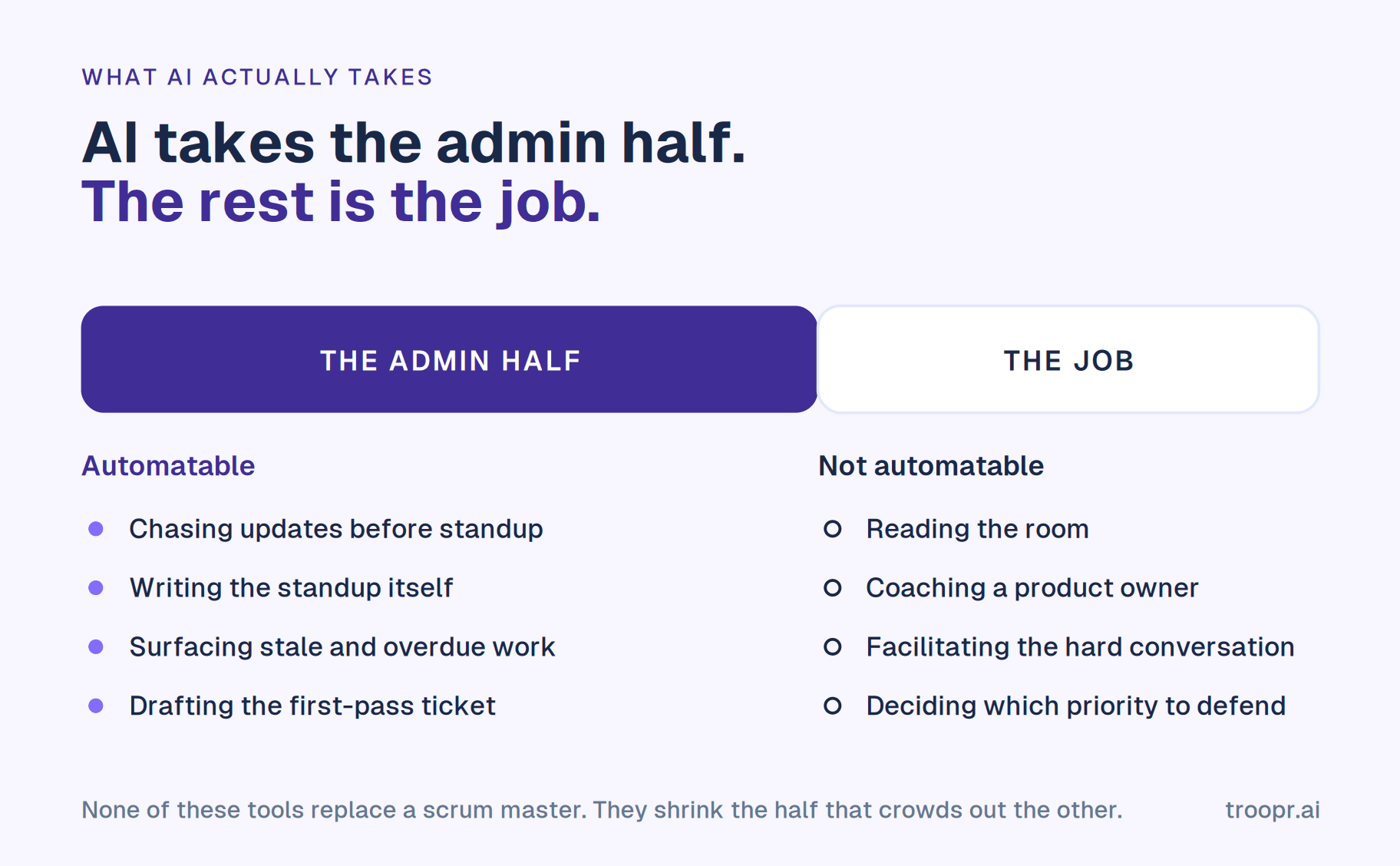
One thing first, because the category name invites it. None of these replace a scrum master. What the good ones remove is the administrative half of the role, which is also the half that crowds out coaching, facilitation and the conversations that change how a team works. That is the frame worth holding while you read.
Why AI matters for scrum masters
The preparation is the cost, not the ceremony. A refinement session that starts with twenty minutes of working out which items need discussing has spent a third of its budget on data entry. Same for planning, same for retro. AI is genuinely good at assembling that picture beforehand, which is the single highest-value thing it does in this role.
Self-reported status is unreliable, and always was. What people report at standup is what they remember to say. A tool that reads the tracker and the code host knows that a pull request merged on Tuesday while the ticket still says in progress. That gap is where sprints quietly go wrong, and finding it by hand is a scan no human does every morning.
Distributed teams broke the synchronous ceremony. Three timezones means no good shared slot, and forcing one costs somebody their evening every day. Async ceremonies work, but only if something synthesises the input into a view worth reading.
The admin scales faster than the coaching, which is what most scrum master AI tools are bought to fix. A scrum master with one team can hold the whole picture in their head. With three, they cannot, and the role degrades into status relay. This is the point where the job stops being what anyone signed up for.
What AI does not do is the part of the role that matters most. It does not read the room, notice that two engineers have stopped talking to each other, coach a product owner who is overcommitting, or decide which of three competing priorities the team should defend. Nothing on this list changes that, and a vendor implying otherwise is selling.
.png)
The future of AI in scrum
Three things are actually changing, as distinct from the things vendors say are changing.
1. Status is becoming a read, not a report. The direction of travel is clear: the tool forms its own picture from real activity and people correct it, rather than people producing the picture from memory. The daily standup as a round of verbal updates is the ritual most exposed by this, and it is already going on distributed teams.
2. Tools are moving from telling to doing, with a confirmation step. The interesting boundary in 2026 is not whether AI can notice a ticket is wrong, which is easy, but whether it can propose the fix, route it to whoever owns the work, and write it only when that person agrees. Scoped, confirmed action is where the useful ground is. Fully unattended agents writing to your board are a bad idea for the obvious reason: a wrong write is worse than a missing one, and the scrum master is the person who inherits the mess.
3. AI is becoming a metered line item. This is the change most likely to affect your budget and the least discussed. Four of the seven tools below charge for AI usage in credits on top of the seat price. Atlassian ran Rovo's allowance without billing for overage through most of 2026, then announced on September 1 that charging for excess credits begins on December 3. Grace periods end. Price a tool on what it costs when the meter is live.
What is not changing is the role. Scrum's framing of the scrum master is accountability for the team's effectiveness, and no part of that is automatable. What is automatable is the reporting layer that has accumulated around it.
The top 7 AI tools for scrum masters
1. Troopr
Troopr is the AI project management agent for engineering teams, and the tool on this list that takes the most of the administrative half of the role.
The difference from most things marketed as an AI scrum master is where the information comes from. Most of them listen to a meeting and turn what was said into tickets. Troopr reads each person's Jira activity, their pull requests and commits including the code diffs behind them, and the team's Slack channels, then forms its own view of what the team is doing. It holds a per-team memory of who owns what, what done means using your real Jira status names, and where work repeatedly stalls.
What it does for the ceremonies:
- The standup writes itself. Each person's update is drafted from their own activity and posted to the channel, with Troopr asking someone directly only when it genuinely cannot tell. Snowflake's engineering teams eliminated roughly 86% of their weekly status-meeting time this way.
- Live standup capture on Google Meet, Zoom and Microsoft Teams, where Troopr joins as a silent participant, announces itself, listens with speaker attribution, and cross-references the recap against live Jira and GitHub state instead of transcribing one call. Live and async updates merge into one report.
- Retrospectives, planning poker and team mood run as check-in types on the same team, async at each participant's local time, with anonymous submission and voting. Poker writes the agreed estimate back to the Jira issue, and retro action items become linked Jira issues.
- Routines are standing instructions in plain English rather than chart pickers. A report reads Jira and changes nothing, a nudge asks one person about their own work, a proposal offers a change nobody writes until someone confirms. Any of them can run as a watch that stays silent until its condition is true, so hearing nothing means nothing is wrong.
- It proposes the Jira changes that follow. When a pull request merges and the ticket still says in progress, the proposal goes to whoever owns the work. Each one is typed from a closed vocabulary, carries its evidence, is revalidated against live Jira state at the moment of confirmation, and executes under that person's own Jira login.
- Two-way Slack and Jira sync, so thread replies become Jira comments as their author and the decision made in a thread reaches the ticket, plus thirteen entry points for creating an issue from Slack.
- Ask Troopr answers plain-language questions on team state in the web app, by Slack DM, or with a slash command in any channel, returning the answer privately.
Stack and security: Slack and Microsoft Teams, Jira Cloud, Server and Data Center, GitHub read-only. SOC 2 Type II, ISO 27001 and GDPR, OAuth that inherits Jira permissions, no training on customer data, no raw message storage. Netflix's engineering team cited the internal security clearance as a deciding factor and reported roughly 67% less time finding and updating Jira issues. Roku reported about 1.8 focused hours back per engineer per day.
Pricing: Free forever for 10 seats, with 3 synced channels and 3 routines and every feature included, no credit card. Standard is $6 per seat per month billed annually, $8 monthly. Only people who take action count as seats, so passive readers are free, and nothing the AI produces is metered: a routine raising ten proposals in a week is one unit.
One trade-off: Jira-first, with GitHub read at signal level. A team tracking work in Linear or Asana is not the fit yet.
Start for Free. Ten seats, every feature, no credit card.
2. Atlassian Rovo
Rovo is Atlassian's AI across Jira, Confluence and Jira Service Management. For a scrum master already living in Jira it needs no install, no new vendor and no procurement conversation, which is a real advantage no feature comparison captures.
For the scrum master's work specifically: chat over the backlog, agents that can be triggered as a step in a Jira automation rule, and since June 2026 natural-language work item creation in Slack through @jira, which reads thread context to fill in the fields. That last one arrives through the official Atlassian Slack app, so if that app is your current baseline, Troopr compared with Jira Cloud for Slack is the closer comparison.
Pricing: included with paid Jira Cloud plans, metered in credits pooled across the organisation and reset monthly with no rollover. Jira includes 25 credits per user per month on Standard, 70 on Premium, 150 on Enterprise. Search and summaries are free; chat and agent requests cost about 10 credits each. From December 3, 2026, Atlassian charges for usage above the allowance at $0.01 per credit, with overage enabled by default and admin controls to cap or disable it. Verified on atlassian.com and support.atlassian.com, September 17, 2026.
One trade-off: no Rovo on Jira's Free plan, and 25 credits per user a month on Standard works out at roughly two and a half requests each. Rovo also sees what Atlassian sees, so a decision made in Slack reaches it only once someone enters it in Jira. There is a fuller breakdown in Troopr compared with Rovo.
3. Spinach AI
Spinach is the most polished of the meeting-first tools, and the best known product marketing itself as an AI scrum master tool. It joins standup, planning or retro on Zoom, Google Meet, Microsoft Teams or Webex, transcribes in more than 100 languages, summarises by meeting type, and turns spoken commitments into Jira tickets with owners before the call ends. Recaps post to Slack and documentation goes to Confluence.
If your team has decided to keep its ceremonies and the pain is the follow-up, this is the direct answer.
Pricing: Starter free with unlimited recording and transcription, basic summaries, and calendar plus Slack integration. Pro is $2.90 per meeting hour, pay as you go, and adds advanced summaries, Ask Spinach and the project management integrations. Business is $19 per user per month billed annually, $29 monthly. Enterprise custom with SAML SSO and SCIM. Verified September 8, 2026.
One trade-off: the Jira integration is not on the free plan, and everything Spinach knows comes from what was said on a call. If the ceremony does not happen, or if what was said and what shipped disagree, there is nothing to work from.
4. ScrummerAI
ScrummerAI, whose assistant is called Sasha, is a newer entrant aimed squarely at this term. It joins meetings on Google Meet and Microsoft Teams, captures decisions and requirements rather than just notes, runs async check-ins and blocker follow-ups in Slack, and creates and updates Jira work from what it captured. Its higher tier adds requirement and scope change detection across meetings, which is a genuinely useful idea for a scrum master watching a sprint drift.
Pricing: Explore is free with 5 meetings a month, one workspace, 7-day summary storage and limited agent actions. Core is $15 per user per month billed annually, $19 monthly, and is where the Jira integration, daily check-ins and blocker follow-up begin. Flow is $29 annually, $39 monthly, adding GitHub and Confluence, advanced Jira workflows, sprint planning and refinement intelligence, and delivery risk detection. Enterprise custom with SSO and SCIM. Verified on scrummer.ai/pricing, September 17, 2026.
One trade-off: the free tier's five meetings a month will not cover a fortnight of standups, and Jira is gated behind Core. Worth noting on security: their site describes the product as designed for SOC 2 aligned expectations rather than claiming the certification, which matters if your organisation's review asks for the report.
5. Teamline
Teamline also markets itself as an AI scrum master and covers more ceremonies than most: automated standups, retrospectives, backlog refinement, estimation with planning poker tools, and team culture and 360 surveys, across Slack, Microsoft Teams, Jira and Trello. Its distinctive piece is time tracking collected through the standup conversation, feeding a collaborative timeline that compares estimates against actual hours and forecasts deadlines.
That combination is unusual and genuinely useful for agencies and service organisations who have to bill against delivery, which the product openly targets.
Pricing: Free for up to 5 active contributors with 25 AI credits renewed weekly and limited summaries. Standup Lite is $2 per active contributor per month for up to 35 contributors with no AI insights at all. AI Manager is $49 a month for up to 15 contributors with 300 AI credits, time tracking and AI analytics, with extra credits at $0.20 each. AI Team is $129 a month for up to 75 contributors with 1,200 credits and extra credits at $0.15. Enterprise custom with SSO, SIEM and an SLA. Verified on teamline.ai/pricing, September 17, 2026.
One trade-off: the AI is credit-metered at every tier and the useful tiers are priced per bundle rather than per seat, so a team of 16 jumps from $49 to $129. The standup-only tier is explicit that it includes no AI, which makes the naming on this one worth reading carefully. On ceremony breadth Teamline is the closest tool here to Standuply, so Troopr compared with Standuply covers most of the same ground.
6. Geekbot
Geekbot is the most recognised name in async standup bots, used by more than 200,000 people across Slack and Microsoft Teams. It asks each participant your configured questions on a schedule and posts the responses, with more than 25 templates covering standups, retros and wellbeing checks, plus participation and sentiment analytics, anonymous reporting, and Geekbot AI for asking questions about what the team has reported.
For a scrum master whose only tooling gap is the daily standup, it is the simplest thing that works.
Pricing: Starter free for up to 10 users. Basic $2.50 per participant per month billed annually, $3 monthly, charging only for people actually in a standup. Polls and surveys are billed separately at $0.75 per respondent annually. Enterprise quote-based. Verified September 8, 2026.
One trade-off: Jira sits in the enterprise integration tier, so a Jira-tracking team on Starter or Basic gets standups with no ticket context. And Geekbot AI reasons over what people reported, which is a different thing from what shipped. See Troopr compared with Geekbot for the row-by-row view.
7. Parabol
Parabol has the best retrospective experience in this list and is the tool a scrum master would pick if facilitation quality is the priority. Multiplayer grouping, anonymous reflections, dot voting, structured phases, more than 40 templates across retros, standups, check-ins and sprint poker, and AI summaries on the paid tier. It is open source and self-hostable, which decides it for some regulated buyers.
Pricing: Starter free with up to 2 teams, 10 meetings a month, unlimited users, 30 days of meeting history and 2 custom templates. Team is $8 per active user per month, adding unlimited teams and history, private teams, team health checks and AI meeting summaries. Enterprise is a flat annual contract with SAML SSO. Verified September 8, 2026.
One trade-off: the meeting happens in Parabol's web app rather than in chat, so it is another place to go, and ten meetings a month runs out quickly for a team running weekly retros and refinement. If retros are the decision, our breakdown of retrospective tools for Slack goes deeper on that category.
The seven compared
Eight points read across all seven tools, so you can scan the dimension you care about. The honest summary is that the best AI scrum master tools differ less on model quality than on what the model is allowed to see and do.
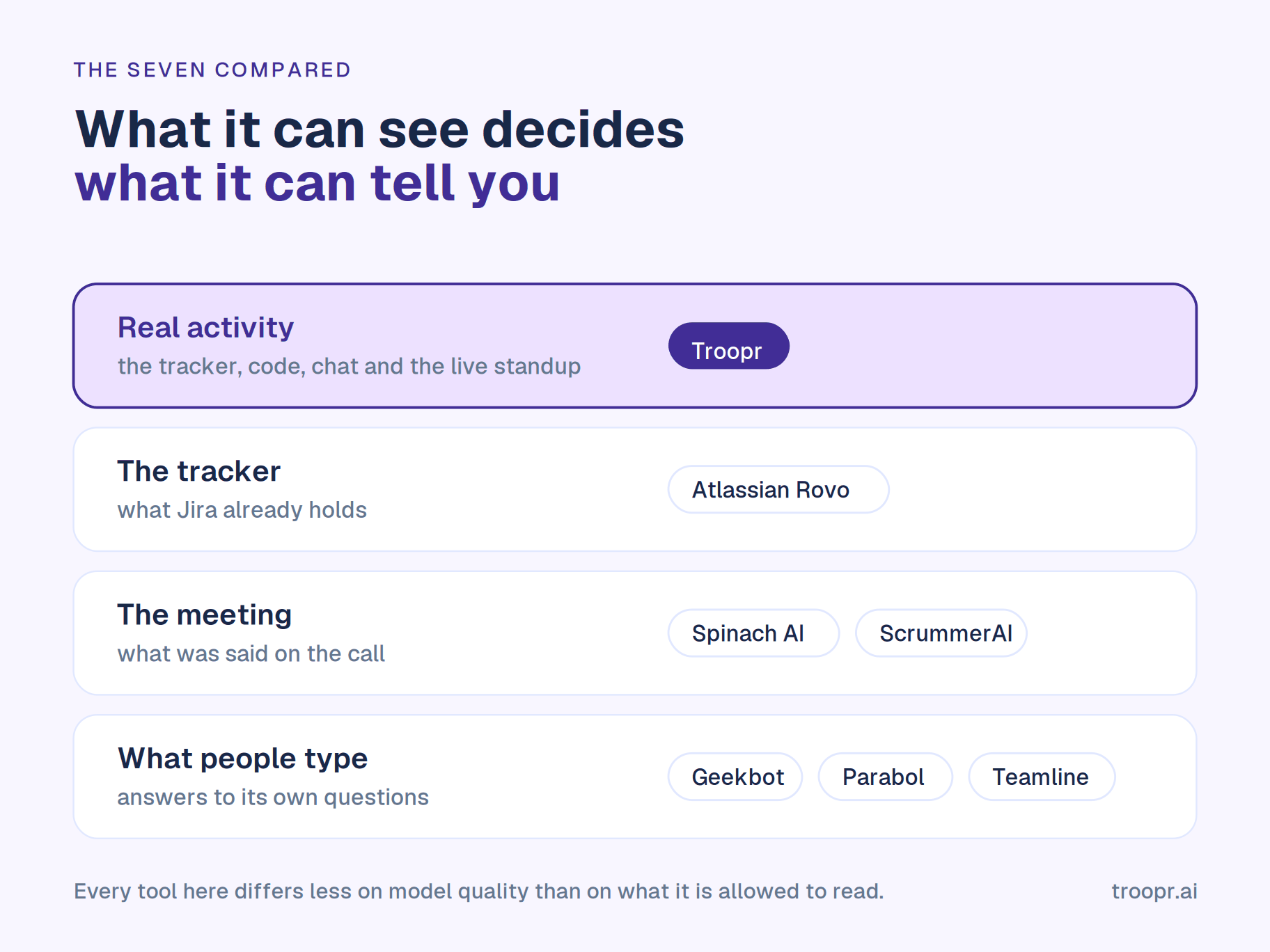
Where the tool gets its information. Troopr: Jira, GitHub, chat and the live standup. Rovo: the Atlassian estate. Spinach: the meeting transcript. ScrummerAI: the meeting transcript plus Slack check-ins. Teamline: answers to its own standup interviews, plus Jira and Trello. Geekbot: what people type. Parabol: what people type in the meeting.
Who writes the standup. Troopr drafts it from real activity. Every other tool on this list collects it from people or from a call.
Ceremony coverage. Troopr: standup, retro, poker, team mood. Teamline: standup, retro, refinement, poker, surveys. Parabol: retro, poker, standup, check-ins. Spinach and ScrummerAI: whatever meeting you hold. Geekbot: standup plus templates. Rovo: none directly.
Proposes Jira changes for the owner to confirm. Troopr: yes, typed and revalidated at confirmation. Rovo: agents can act when a rule triggers them. ScrummerAI: creates and updates Jira work from meetings. Spinach: creates tickets from meetings. Teamline, Geekbot, Parabol: no.
Reads code activity. Troopr: yes, pull requests, commits and diffs. ScrummerAI: GitHub on its top tier. Teamline: connects Git systems for worklog prediction. Rovo: through Rovo Dev, a separate subscription. Geekbot, Parabol, Spinach: no.
Is the AI metered. Troopr: no, flat per seat. Rovo: credits, with overage billing from December 3. Teamline: credits at every tier, extra at $0.15 to $0.20 each. Spinach: billed per meeting hour on Pro. ScrummerAI, Geekbot, Parabol: seat-priced.
What the free tier really gives you. Troopr: 10 seats with every feature. Geekbot: 10 users. Parabol: 2 teams and 10 meetings a month. Teamline: 5 contributors and 25 weekly credits. ScrummerAI: 5 meetings a month, no Jira. Spinach: recording and transcription, no Jira. Rovo: nothing, it needs a paid Jira plan.
Starting paid price. Troopr $6 per seat a month annually. Geekbot $2.50 per participant. Teamline $2 per contributor for the no-AI tier, $49 a month for the AI one. Parabol $8 per active user. ScrummerAI $15 per user. Spinach $2.90 per meeting hour. Rovo included with paid Jira.
How to select the right AI tools for your agile practice
Six questions, in the order that actually narrows the field.
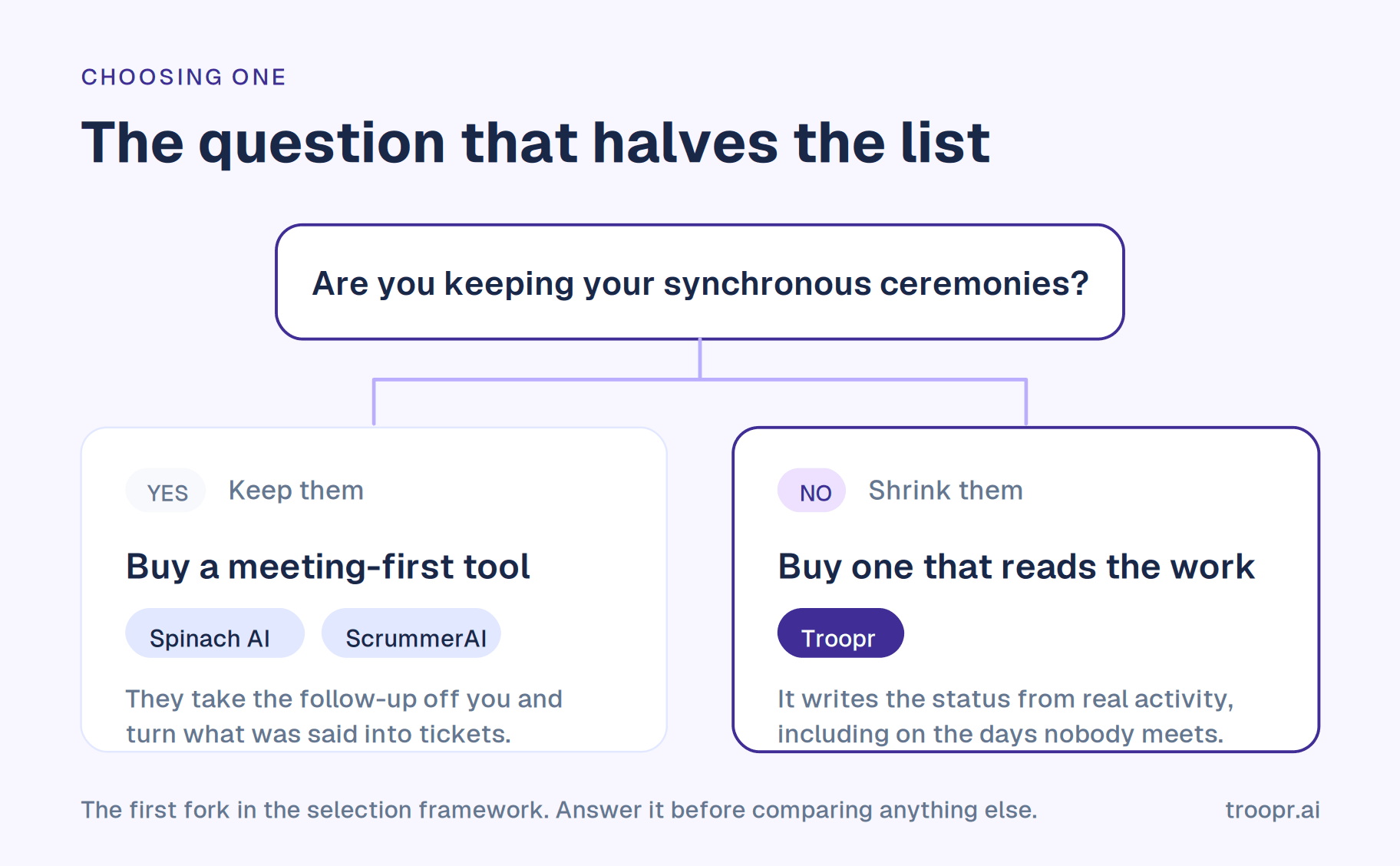
1. Are you keeping your synchronous ceremonies? This is the first fork and it eliminates half the list. If the team intends to keep meeting, a meeting-first tool like Spinach or ScrummerAI takes the follow-up work off you. If the ceremonies are the thing you are trying to shrink, a meeting tool has nothing to work from on the days you do not meet, and you want something reading the tracker instead.
2. Where does your team's truth live? If the answer is Jira and GitHub, prioritise tools that read both. A tool reasoning only over what people typed into it will always describe a partial picture, and the gap between the tracker and the code is precisely where a scrum master earns their keep.
3. Do you need it to act, and under what confirmation model? Reporting is the easy half. Ask whether the tool can transition an issue or set an assignee, whether a human approves first, whether the write runs under that person's own credentials and permissions, and whether the proposal is re-checked against live state at the moment of confirmation. This is the question with the most variance in the answers.
4. What does the AI cost when you actually use it? Four of the seven meter AI on top of the seat price. Work out what a fortnight of standups plus a retro plus a refinement session consumes, then check whether the pool is per user or shared and what happens when it empties mid-month.
5. Will it clear security review? Ask for the certifications and the procurement package by name, and read the wording carefully. Designed to SOC 2 aligned standards is not the same as holding the report, and the difference will surface at exactly the wrong moment.
6. Can you trial it on a real team? A free tier with the AI switched off is a demo. Check whether the free plan runs your actual workflow for a full sprint, because that is the only trial that tells you anything.
How Troopr helps
Troopr is built for the second answer to question one: the scrum master trying to shrink the ceremony overhead rather than document it. It reads Jira, GitHub and Slack, forms its own view, and produces the standup rather than collecting it, which is what makes the output useful on a day nobody met.
On question three it has the most conservative model here, and deliberately. Every proposed change is typed from a closed vocabulary, routed to the person who owns the work, revalidated against live Jira at the moment they confirm, and written under their own login. A proposal that stops being true, including because someone already did it by hand, clears itself with a reason. Nothing a model decides reaches the board on its own.
On question four it is the exception in this set: flat per seat, only people who take action are billed, and what the AI produces is never counted. On question six the Free tier carries every feature for 10 seats permanently, so a full sprint's trial runs the real product rather than a cut-down version of it.
And because standups, retros, poker, team mood, Jira reporting and issue management all run in one app in Slack, the usual outcome of assembling this from parts, four tools and four partial pictures of the same team, does not happen.
Conclusion
The useful question is not which AI tool is best for scrum masters. It is which half of your week you are trying to get back.
If it is the meeting follow-up, buy a meeting tool. If it is the facilitation, buy a retro tool, or start with one of the free retro tools. If it is the reconstruction work, chasing status, reconciling the board against what shipped, preparing the ceremonies so they are worth holding, then buy something that forms its own view of the work and keeps the board honest without you.
That last one is the biggest slice for most scrum masters, and it is the slice that grows every time another team gets added to your name.

Frequently asked questions
What is the best AI tool for scrum masters?
It depends which part of the role you are automating. For a scrum master on Jira and Slack who wants the standup produced and the board kept honest, Troopr. For teams keeping synchronous ceremonies who want the follow-up handled, Spinach AI or ScrummerAI. For AI inside the tracker with no new vendor, Atlassian Rovo. For retrospective quality, Parabol. For standups only, Geekbot. For ceremonies plus time tracking, Teamline.
Will AI replace scrum masters?
No, and the tools marketed as an AI scrum master do not actually claim it when you read past the name. What they automate is the administrative layer: collecting updates, writing summaries, creating tickets, chasing stale work. What they do not do is coach a team, facilitate a difficult conversation, notice that two people have stopped collaborating, or decide which priority to defend. The realistic outcome is that the admin half shrinks and the coaching half gets the time back.
What can AI actually do for a scrum master today?
Reliably: draft the standup or summarise the ones collected, surface stale, overdue and unassigned work, cluster retro input into themes, generate a first-pass ticket from a conversation, and answer questions about the state of the board. Increasingly: propose specific changes to the tracker for a person to confirm. Not yet, and arguably not ever: decide priority, or judge whether a theme raised in a retro is the real problem.
Do these work as AI tools for agile coaches too?
The ones that produce a view of the team do, more so at coach level, because a coach usually covers several teams and cannot hold all of them in their head. Tools that read real activity and report across teams give a coach something to work from that is not a manager's self-assessment. The meeting-capture tools are less useful in that role, since a coach is not in every ceremony.
Are there free AI tools for scrum masters?
Several, with the catch usually being that the AI is what is missing. Geekbot is free to 10 users. Parabol is free for 2 teams and 10 meetings a month. Teamline's free tier covers 5 contributors with 25 weekly AI credits. ScrummerAI gives 5 meetings a month with no Jira. Spinach's free plan has no Jira integration. Rovo needs a paid Jira plan. Troopr's Free tier is permanent, covers 10 seats, and includes every feature with no credits to budget.
Why do so many AI scrum tools charge for credits?
Because inference costs the vendor per use, and seat pricing does not track that. It is a reasonable model and an awkward one for a scrum master, because the workflows you want are daily rather than occasional. Atlassian is the clearest example of where this goes: Rovo ran without overage charges through most of 2026 and begins billing for excess credits on December 3, 2026, with overage enabled by default. Budget for the metered price, not the introductory one.
Can AI run a daily standup?
It can run the information part. A tool that reads each person's tracker and code activity can draft the update, post the team report, and flag what needs attention, which removes the round-robin entirely. What it cannot do is the part where someone hears hesitation in an answer and follows up afterwards. Most teams that move to async standups keep a short weekly synchronous session for exactly that. There is more on how this works for Jira teams specifically in our write-up on running a Slack standup with live Jira context.
Which AI scrum tools work with Jira?
Most integrate at some level, but check which plan it sits on, because that is where the surprises are. Geekbot puts Jira in its enterprise tier. ScrummerAI starts Jira at Core. Spinach's project integrations are not on the free plan. Rovo is Jira-native but needs a paid Atlassian plan. Troopr supports Jira Cloud, Server and Data Center on every plan including Free, with two-way sync rather than one-way ticket creation. Our guide to the best Jira Slack integration covers what to look for at the integration layer.
How many AI tools should a scrum master use?
Fewer than the market wants to sell you. The common end state is four subscriptions producing four partial pictures of one team, which costs more in reconciliation than the tools save. Start with the largest slice of your week, buy one thing for it, and add a second only when a different slice is clearly the next biggest.


The AI project manager for engineering teams. Forms its own view of the work and does the coordination, right where your team already works.
2035 Sunset Lake Road, Suite B-2, Newark, DE 19702, United States.