

Async standup: how to run one your team actually reads
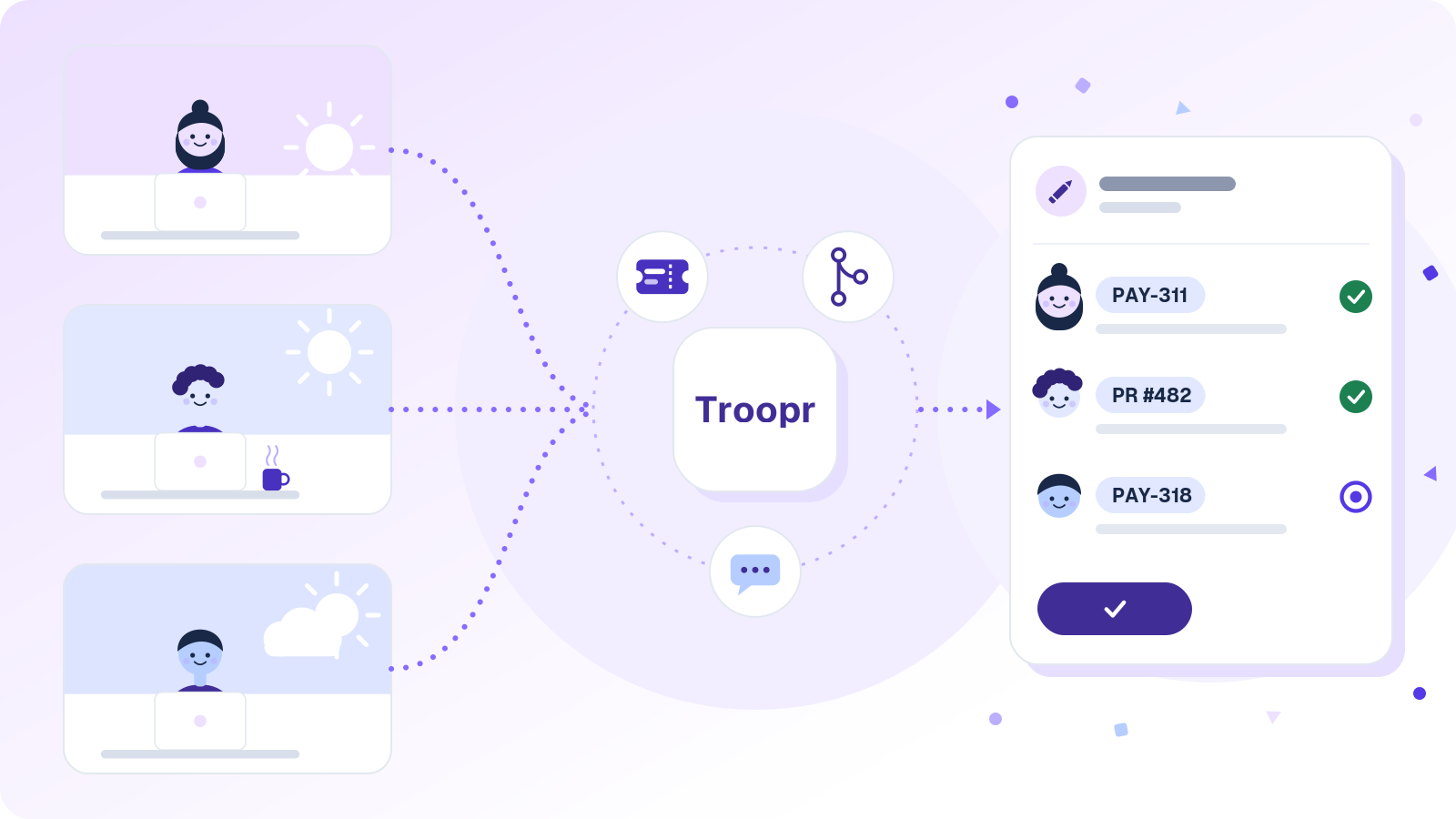
An async standup (asynchronous standup) is a daily standup without the meeting. Each person posts a short written update in a shared channel on their own schedule, covering what changed, what's next, and what's in the way. Teammates read it and reply when it suits them.
On paper, it's the obvious move for a team split across Bengaluru, Berlin, and Austin, and done well it pays for itself: Snowflake's engineering teams eliminated ~86% of their weekly status-meeting time after moving to async check-ins with Troopr. Done badly, it's a channel full of updates nobody reads. LogRocket's product team ran fully async standups for six weeks and wrote up what happened: two great weeks, then the updates turned into noise, problems took longer to solve, and morale slipped.
Most of that traces back to one design flaw: the typical async standup asks every engineer to retype, from memory, work that's already recorded in the tickets and the repo, then hopes somebody reads it. The short version: put blockers first, give them a clock, make reading visible, and let the update write itself from real activity. The rest of this guide shows how, with a template, a realistic Slack thread, and the failure modes to watch for.
How an asynchronous daily standup works
The mechanics are simple, which is half the appeal.
- A prompt goes out at the start of each person's day, in their own time zone. A Slack standup bot, a workflow, or a recurring reminder all do the job.
- Everyone answers the same two or three questions in a thread or a dedicated channel, linking the tickets and pull requests they mention.
- Teammates read within an agreed window, react to show they've seen it, and reply in thread when they can help.
- Anything blocked gets an owner the same day. If a thread starts going in circles, the people involved jump on a quick call and post the outcome.
That's the whole ritual. Keeping it alive past the honeymoon is the hard part.
One caveat if you run Scrum by the book: the 2020 Scrum Guide describes the Daily Scrum as a 15-minute event held at the same time and place every working day, so a thread alone doesn't replace it. The guide leaves the structure to the Developers, though, as long as the team inspects progress toward the Sprint Goal and leaves with a plan for the next day of work. A common compromise is to post async updates first and keep the live Daily Scrum short.
Why teams go async
Teams usually go looking for asynchronous alternatives to the daily standup for three reasons. Time zones come first: once a team spans more than a few hours, every meeting slot is someone's 7 a.m. or 9 p.m. Then there's focus. Paul Graham's essay Maker's Schedule, Manager's Schedule compares a meeting on a maker's calendar to "throwing an exception," and a 10 a.m. standup leaves an engineer with two stubs of morning instead of one real block. And there's the paper trail. Written updates stay searchable, so Tuesday's decision is still findable on Friday, and a stakeholder can read the channel instead of booking another status meeting.
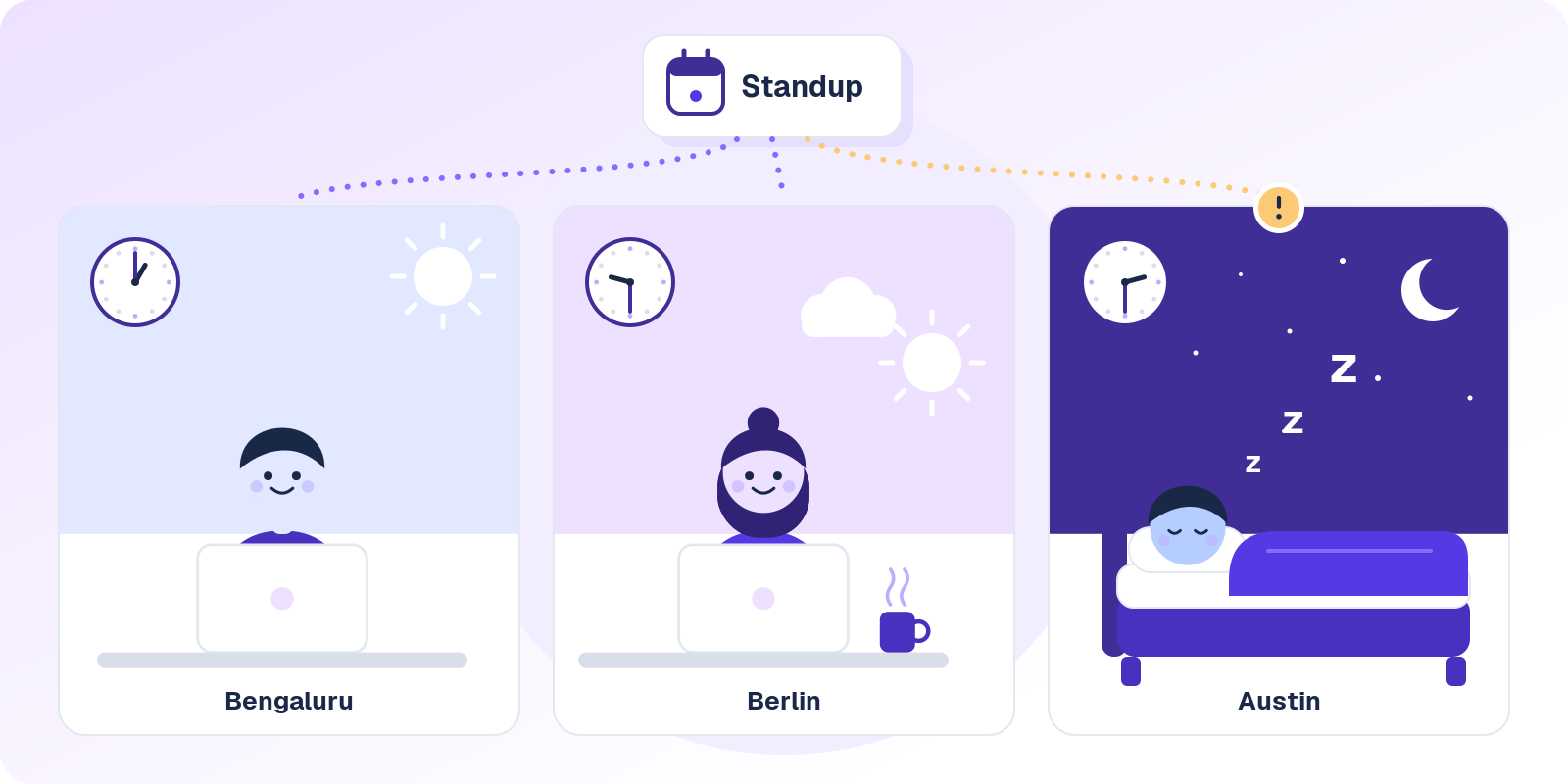
One 9:30 standup in Berlin is lunch in Bengaluru and 2:30 a.m. in Austin.
Async vs sync standup, and the version that writes itself
Most comparisons stop at two options. The third one changes the math.
| Live standup | Typed async standup | Written from real activity (Troopr) | |
|---|---|---|---|
| When it happens | Same time for everyone, usually on a call | Each person's morning, inside a posting window | A draft is ready at the start of each person's day |
| Who writes the update | Nobody. It's spoken and gone. | Each person, from memory | Troopr drafts it from the person's own work, and they confirm or fix it |
| What it's based on | What people remember to say | What people remember to type | What actually moved: tickets, pull requests, commits, threads |
| Daily cost | 15 minutes plus a context switch for everyone | A few minutes to write, more to read | A quick confirm, plus a short summary to read |
| Blockers | Raised live, usually solved after the call | Wait until the right person reads the thread | Called out in a needs-attention section |
| The board afterwards | Updated later, if someone remembers | Updated later, if someone remembers | Troopr proposes the change to the owner, and nothing is written until they confirm |
| Time zones | Someone is always on at 7 a.m. or 9 p.m. | Works across zones | Works across zones, at each person's local time |
| Best for | Co-located teams with tightly coupled daily work | Small teams with light dependencies | Teams that want status without the daily ritual |
Scroll sideways to see all three columns.
Why most async standups quietly fail
Async standups rarely blow up. They fade, and usually in one of five ways.
Nobody reads them. In week one, everyone reads every update. A few weeks in, the channel is a wall of text and people skim for their own name. LogRocket's team hit exactly this: most people admitted they no longer read the updates, or knew who was stuck on what, unless someone mentioned them directly. At that point the standup is a team diary.
Updates shrink to "same as yesterday." Writing from memory is a chore, so people do the minimum. Jason Yip's catalog of standup patterns lists I Can't Remember among the classic smells, and async makes it worse, because there's no teammate across the table to jog anyone's memory, only an empty text box at 9 a.m.
Blockers wait. In a live standup, someone hears the problem and says "grab me after." In a thread, the blocker sits until the right person happens to read it, and LogRocket noticed problems took longer to solve the longer their experiment ran. That's the strongest argument for keeping the meeting, and most of the norms below exist to answer it.
The board drifts anyway. The update says PAY-311 is done and the PR merged. The ticket still says In Progress, because typing the standup felt like updating it. Now the team has two places to be out of date instead of one, and the manager becomes the reconciliation layer between what people said and what the board shows.
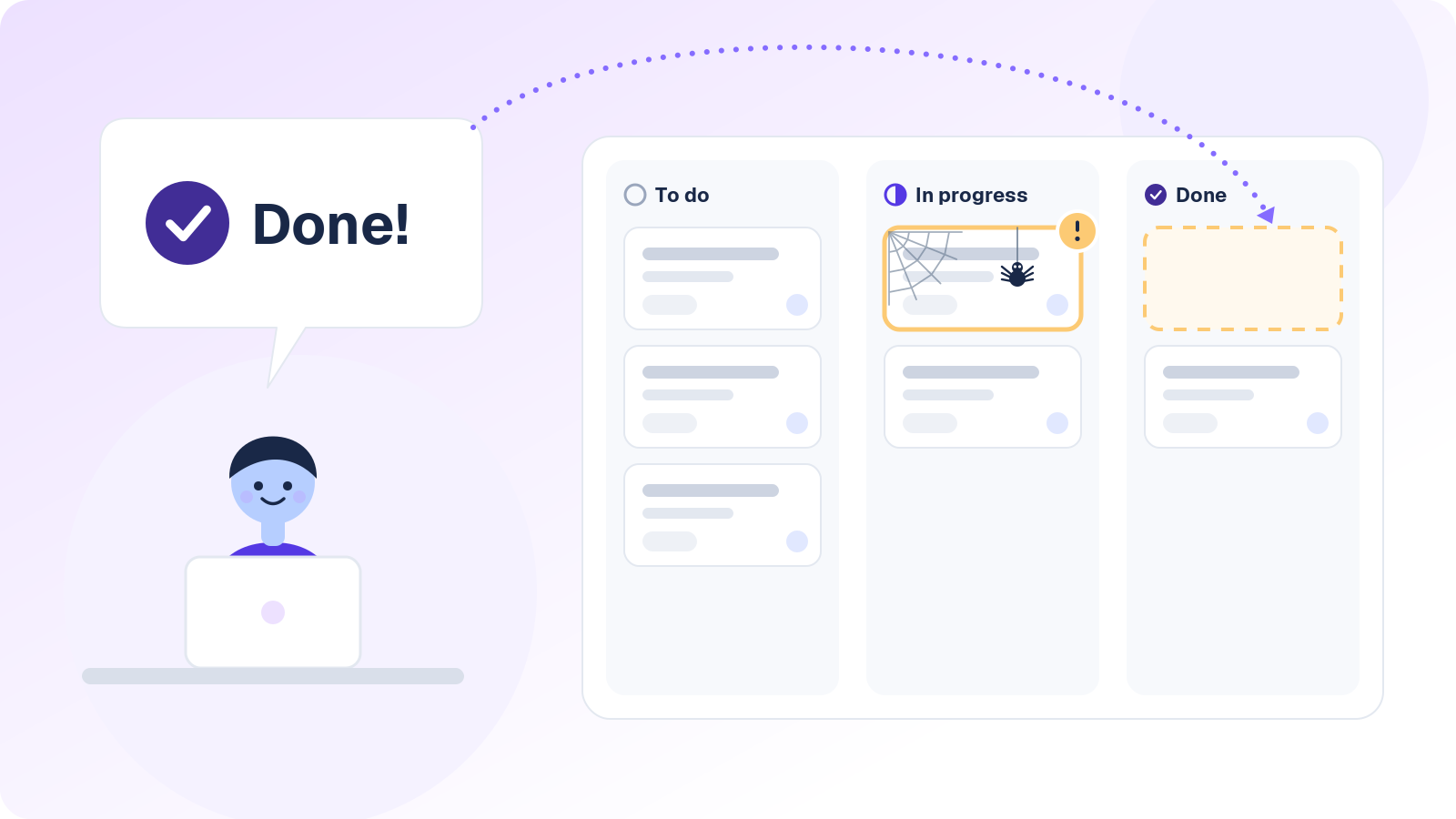
Done in the thread, still In Progress on the board.
Now the team has two places to be out of date instead of one.
Self-reported status runs on memory and optimism. People report what they remember and what sounds reasonable, which is how "almost done" survives four standups in a row. The work itself (the merged PR, the ticket that hasn't moved since Thursday) tells a more honest story, and a typed standup never looks at it.
How to run an async standup that works
Six habits fix most of the fade in asynchronous standups, and none of them need a new tool.
Make every line about the work
Yip's patterns make the case for letting the work items attend instead of the people: talk about the tickets and what's moving them, and the update stops being about who looks busy. In writing, that means every line points at a ticket or a pull request. "Worked on the refund flow" tells the team nothing. "PAY-318: idempotency keys done locally, PR up today" tells them exactly where it stands.
Set a posting window and a reading window
Pick a local-time cutoff for posting (10:30 a.m. is a sensible default) and a window for reading, say before lunch. Make reading visible: an 👀 reaction means "read it," and the manager reacts to every update by midday. It sounds petty, and it's the cheapest fix there is for the nobody-reads-it problem.
Put blockers first, and put a clock on them
Blockers go at the top of every update, ahead of what moved. Yip's walk-the-board pattern borrows the same order from Pawel Brodzinski: blockers, then urgent work, then anything that hasn't moved since the last standup, then everything else. Each blocker names the person who can clear it. If it hasn't had a first reply within two of that person's working hours, escalate by DM or a quick call. And if a thread passes five replies without settling, move it to a ten-minute huddle and post the outcome back in the thread.
Update the ticket in the same breath
If an update says done, the ticket says done before the update goes out. Otherwise the standup turns into a second, unofficial tracker that disagrees with the real one. Linking the ticket in the update keeps the status change one click away.
Keep one live touchpoint a week
Going async daily still leaves room for one meeting a week, and you'll want it. Yip counts helping people identify as a team among the reasons standups exist at all, and LogRocket's team added a weekly coffee chat and still missed the daily contact. A short weekly sync or a retro keeps the human part alive and gives real back-and-forth a home.
Check it's working after two sprints
Three signals beat a survey: how long blockers wait for a first reply, how many updates link a ticket or pull request, and whether the board matches what people wrote. If blocker waits creep up or the board keeps disagreeing with the thread, tighten the norms before you blame the format.
Async standup template
Paste this async daily standup template into whichever tool runs your standup. If you're still choosing one, here are the free Slack standup bots worth a look. The questions are short on purpose, and the norms underneath do most of the work.
Daily async standup
Post in this thread by 10:30 your time, blockers first.
React 👀 once you've read everyone's update.

🚧 In my way
What's blocked, and @who can clear it. Write "nothing" if nothing.

✅ Moved since yesterday
[PAY-123 or PR #456] What changed, in one line.

🎯 Pushing forward today
[PAY-124] What "done for today" looks like.

💬 Heads-up (optional)
Decisions, risks, time off.

Team norms
1. Blockers get a first reply within two working hours. No reply? Escalate by DM.
2. Thread past five replies? Take it to a 10-minute huddle and post the outcome here.
3. If your update says done, the ticket says done.
4. Off today? Skip it. No backfilling.
5. One live sync a week. Everything else stays in writing.
Skip the typing. Troopr drafts each person's update from their real Jira, GitHub, and Slack activity, so the team confirms or fixes it instead of writing from memory.
Start for FreeFree for 10 seats. Unlimited check-ins. No credit card.
What a good async standup looks like in Slack
Here's a realistic thread from a four-person payments team split across Bengaluru, Berlin, and Austin, with Dana as the engineering manager. Times are each person's local time, and the tickets are made up.
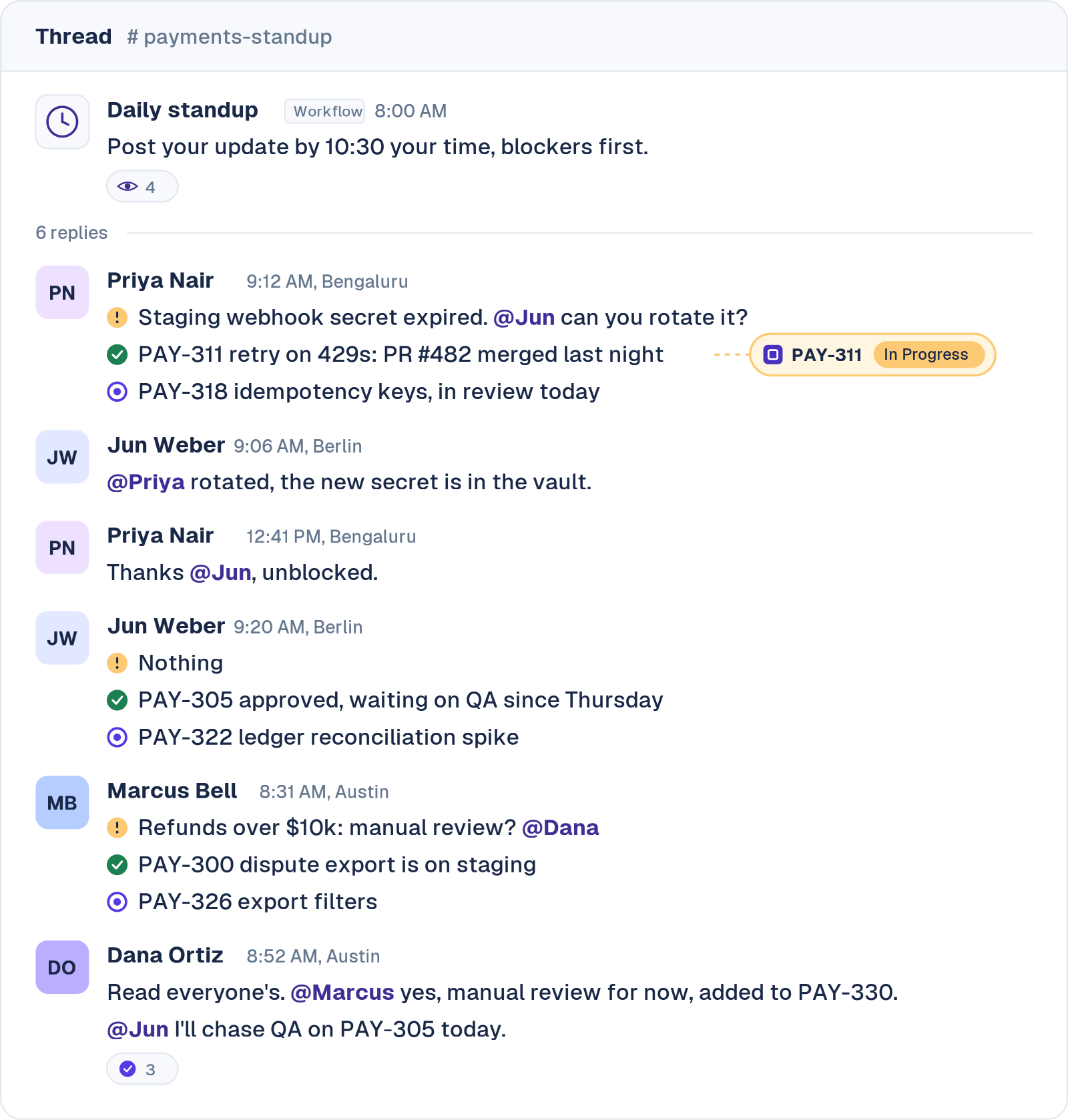
Example thread. Each person's local time is shown; the team and tickets are made up.
That's a good async standup. Priya's blocker named the one person who could clear it, and Jun cleared it six minutes into his day. Marcus got his decision in writing, and it landed in a ticket. Dana read everything and caught the QA wait.
Now count the cost. Four people wrote from memory, Dana had to read every line closely to spot the stale ticket, and PAY-311 still says In Progress even though PR #482 merged last night. The thread is right, the board is wrong, and nobody will notice until sprint review.
The async standup that writes itself
The thread above works because four people wrote carefully and one manager read everything. That's a daily tax, and it's the part Troopr Check-ins removes. Troopr is the AI project management agent for engineering teams, and its standup starts from what the team actually did instead of what people remember.
Each update is drafted from real activity
Troopr reads each person's Jira transitions and comments, their GitHub pull requests and commits, and the team's Slack threads, then drafts their update. It reads the diffs too, so a commit called "fix stuff" can't hide a day of real work. People confirm the draft or edit it, their edit always wins, and Troopr only asks a direct question when it genuinely can't tell what someone worked on. Coralogix's engineering and R&D teams got ~20 minutes per person per day back from the daily sync.
It checks what people say against what the work shows
Troopr holds live Jira and GitHub state plus the team's history, so it knows what changed since the last standup, which updates the data backs up or contradicts, and what's new versus already tracked. In the thread above, it would have spotted PR #482 merged while PAY-311 still says In Progress, and proposed moving the ticket to Done.
Priya gets that proposal once, in a DM, with the evidence attached. She taps Confirm and the change runs under her own Jira login. Nothing is written until she does, and if someone moves the ticket by hand first, the proposal clears itself.
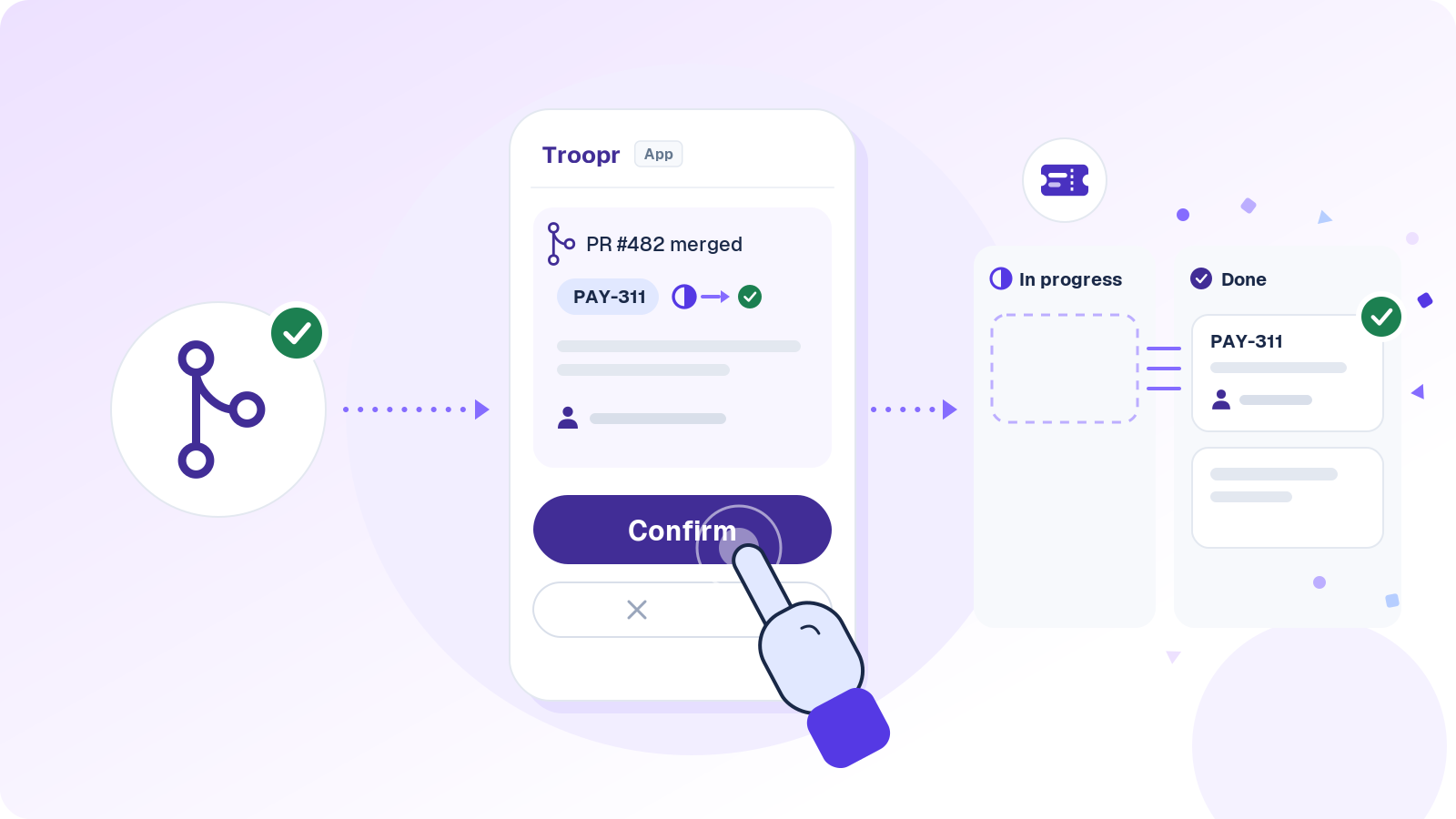
A merged PR becomes a proposal, and nothing changes in Jira until the owner taps Confirm.
Blockers and stuck work come to you
Each standup report includes a read on the day and a needs-attention section that names specific people and items. Jun's ticket, sitting in QA since Thursday, belongs there, so catching it stops depending on Dana reading every line. Add a nudge if you want one: a stale work check asks the owner about work that hasn't moved, and a blocker follow-up checks back on anything flagged as blocked. Either one can run as a watch, silent unless something is wrong.
Live days and async days land in one report
Keep a live standup on Mondays? Troopr joins the Google Meet, Zoom, or Microsoft Teams call as a silent participant, announces itself in the meeting chat, listens, and posts a recap cross-referenced against Jira and GitHub. Live and async updates merge into a single report, so mixing modes never double-counts anything.
The manager stops being the relay
Each check-in comes with a summary of blockers, themes, and action items. Between standups, Ask Troopr answers questions like "who's blocked?" or "what shipped this week?" from the team's real activity, and asking through /t in any channel brings the answer back privately. Yahoo's process-automation team saved managers ~3.8 hours a week on meeting logistics.
Also in Troopr Check-ins
- Runs in Slack and Microsoft Teams, at each person's local time
- Holidays, planned absences, reminders, late submissions, skip, and answer-ahead
- Anonymous participation when the team wants it
- Task check-ins, where each person updates their assigned Jira issues inline
- Retrospectives, team mood, and planning poker that writes estimates back to Jira
- Action items from any check-in turned into Jira issues that link back
- Slack Connect check-ins with one shared report (Standard and Enterprise)
- Report, Insights, and History views, PDF export, and a web page for every standup
- A private memory view where each person can see, edit, or delete what Troopr learned about them
- SOC 2 Type II, ISO 27001, and GDPR, with no training on customer data and no raw message storage
- Jira Cloud, Server, and Data Center
$6 per seat/month. Everything included. Free for 10 seats. You only pay for people who take action, like answering a check-in or confirming a proposal, and anyone who only reads is free. Start for Free
When to keep the meeting
A live standup still earns its slot in a few situations: a co-located team pairing all day, an incident or launch week where plans change by the hour, and a brand-new team that hasn't built trust yet. GitLab's handbook frames the trade-off in terms any engineer will recognize: build everything async and you get "a system that scales beautifully but can't make a decision."
The mix that tends to hold up for distributed teams is async every day, one short live sync a week, and a huddle whenever a thread stalls. If you're keeping a meeting, our guide to running standups for remote teams covers how to keep it tight.
Async standup FAQ
What is an async standup?
An async standup is a daily standup held in writing instead of in a meeting. Each team member posts what moved since yesterday, what they're working on next, and what's blocking them, in a shared channel or tool and on their own schedule. Teammates read and reply in threads, so blockers get handled without pulling everyone onto a call.
What does async mean in a meeting?
Async is short for asynchronous, meaning people don't have to be present at the same time. In an async meeting, the updates, discussion, or decisions happen in writing or in recordings, and each person contributes when it fits their day. GitLab's handbook describes asynchronous communication as moving work forward without needing others to be available at the same moment.
What are the three standup questions in Agile?
The classic three are what did I do yesterday, what will I do today, and what's blocking me. The 2020 Scrum Guide dropped them and lets Developers choose any structure, as long as the Daily Scrum inspects progress toward the Sprint Goal and ends with a plan for the next day. For async updates, a work-first order reads better: what's in my way, what moved since yesterday, and what I'm pushing forward today.
What is a standup in Agile?
A standup is a short daily check-in where a team syncs on progress toward its current goal and surfaces anything blocking it. In Scrum it's the Daily Scrum, a 15-minute event for the Developers. For running the meeting version well, see our guide to daily standup meetings.
Are daily standups micromanagement?
They turn into micromanagement when the standup becomes a daily report to the manager instead of a coordination tool for the team. Async can make that worse if the update feels like a timesheet. Keep updates about the work rather than the hours, let teammates answer each other, and use what's written to unblock people rather than grade them. In Troopr, each person can review and correct their own draft before it posts, and has a private view of what Troopr has learned about them that they can edit or delete.
Let the standup write itself
Troopr drafts each person's update from their real work, flags where the thread and the board disagree, and proposes the fix to the owner.
$6 per seat/month. Everything included. Free for 10 seats.


The AI project manager for engineering teams. Forms its own view of the work and does the coordination, right where your team already works.
101 Arctic Circle, Round Rock, Texas 78664, United States.