

8 Jira best practices that keep the board true, not just tidy
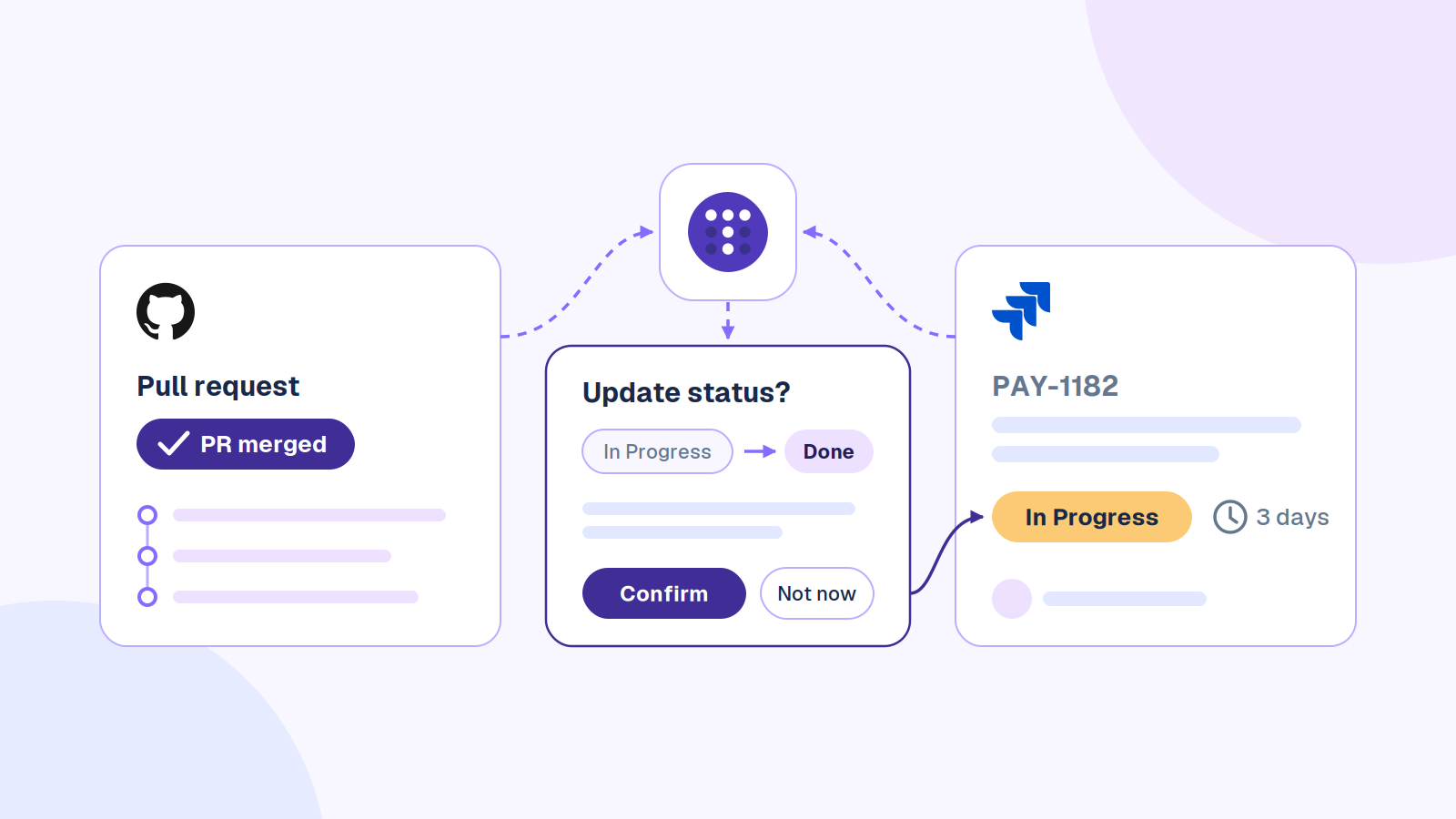
The pull request merged on Tuesday. It’s Friday, and the ticket still says In Progress.
Jira best practices come down to three habits: a short workflow where every status means one thing, tickets someone can act on without a meeting, and a weekly check that the board still matches what shipped.
Or you can stop doing the checking yourself. Troopr, the AI project management agent for engineering teams, reads what your team actually did in Jira, GitHub, Slack and the live standup. The day that PR merged, it would have asked the ticket’s owner one question: move PAY-1182 to Ready to Deploy? One tap on Confirm, and Jira updates under their own login. Nothing is written until they tap it. Start for Free on up to 10 seats, or read on: every practice below works without Troopr, and each one ends with the part Troopr takes off your plate.
The 8 Jira best practices at a glance
- Keep the workflow to five or six statuses, each with an exit rule.
- Write tickets someone can pick up cold, with a “Done when”.
- Give every ticket one owner: whoever acts next.
- Let code events move tickets by putting the key in every branch.
- Give priority, labels and components one meaning each.
- Prune the backlog every month.
- Run a 10-minute Jira hygiene audit every Friday.
- Use standup to fix the board, not to read it aloud.
Most guides stop at setup. They describe a tidy board, and a tidy board on Monday is fiction by Thursday, because updating Jira is a second job people do after the real one. So each practice here has four parts: why it matters, how to set it up, how to keep it true next week, and what changes with Troopr.
What Troopr does with Tuesday’s merged PR
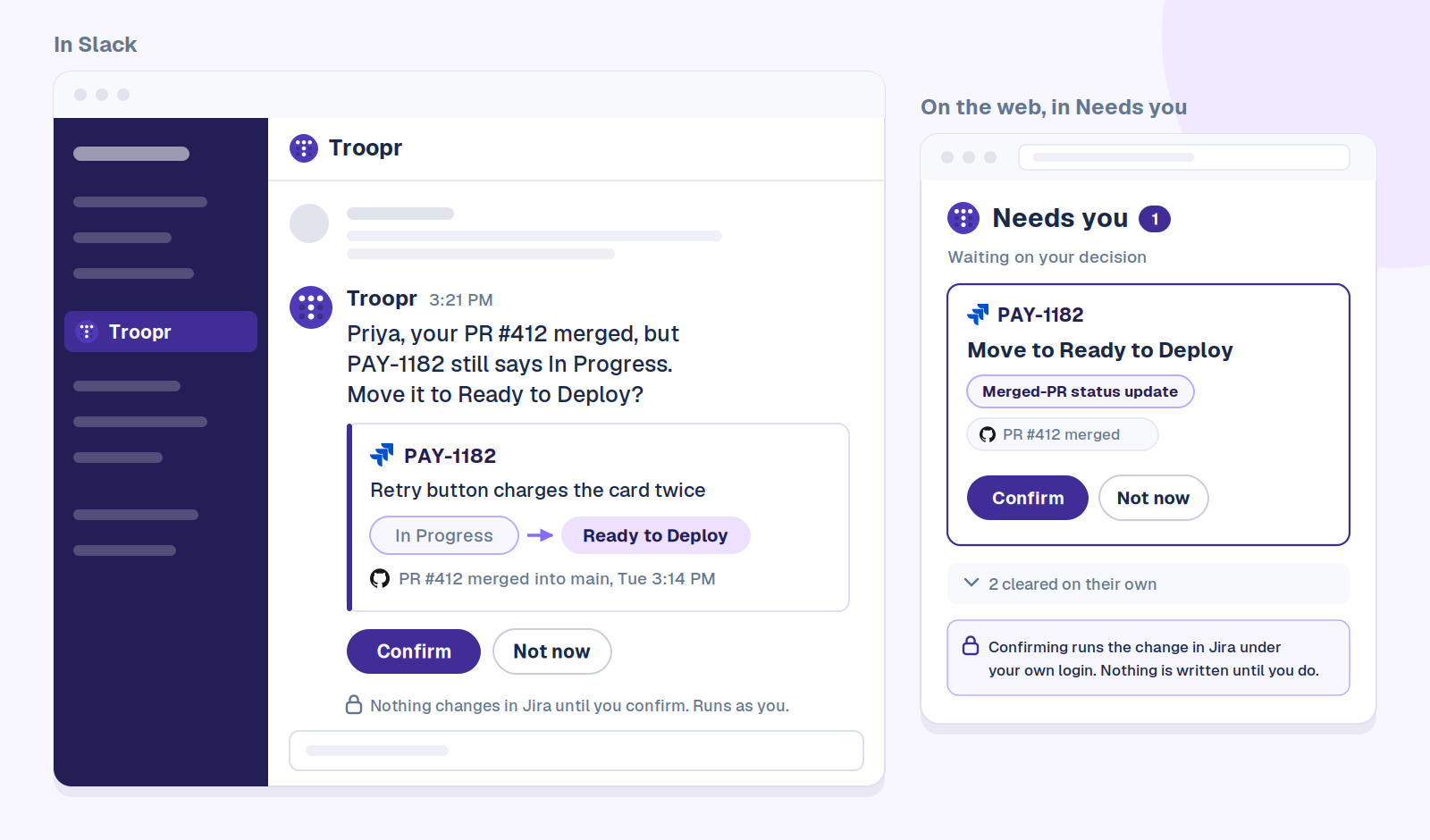
The owner gets one DM the day the code merges, with the evidence attached: which pull request merged, and when. Confirm runs the change in Jira under their own login. Not now leaves Jira untouched. The same item waits in Needs you on the web, with anything that cleared on its own folded away. Netflix’s engineering team spends ~67% less time finding and updating Jira issues with Troopr.
A note on words: Atlassian is renaming issues to work items and projects to spaces in Jira Cloud, so your screen may say either. Existing JQL keeps working, as Atlassian’s JQL reference confirms. This guide says ticket, because that’s what your team says.
Why do Jira boards go stale?
Not because engineers are lazy. Every board that goes bad goes bad the same way.
Work happens in three places: the code, the conversation, and someone’s head. Jira only finds out when a person stops what they’re doing and tells it. That update is a context switch with no payoff for the person making it. They already know the state. The update is for everyone else.
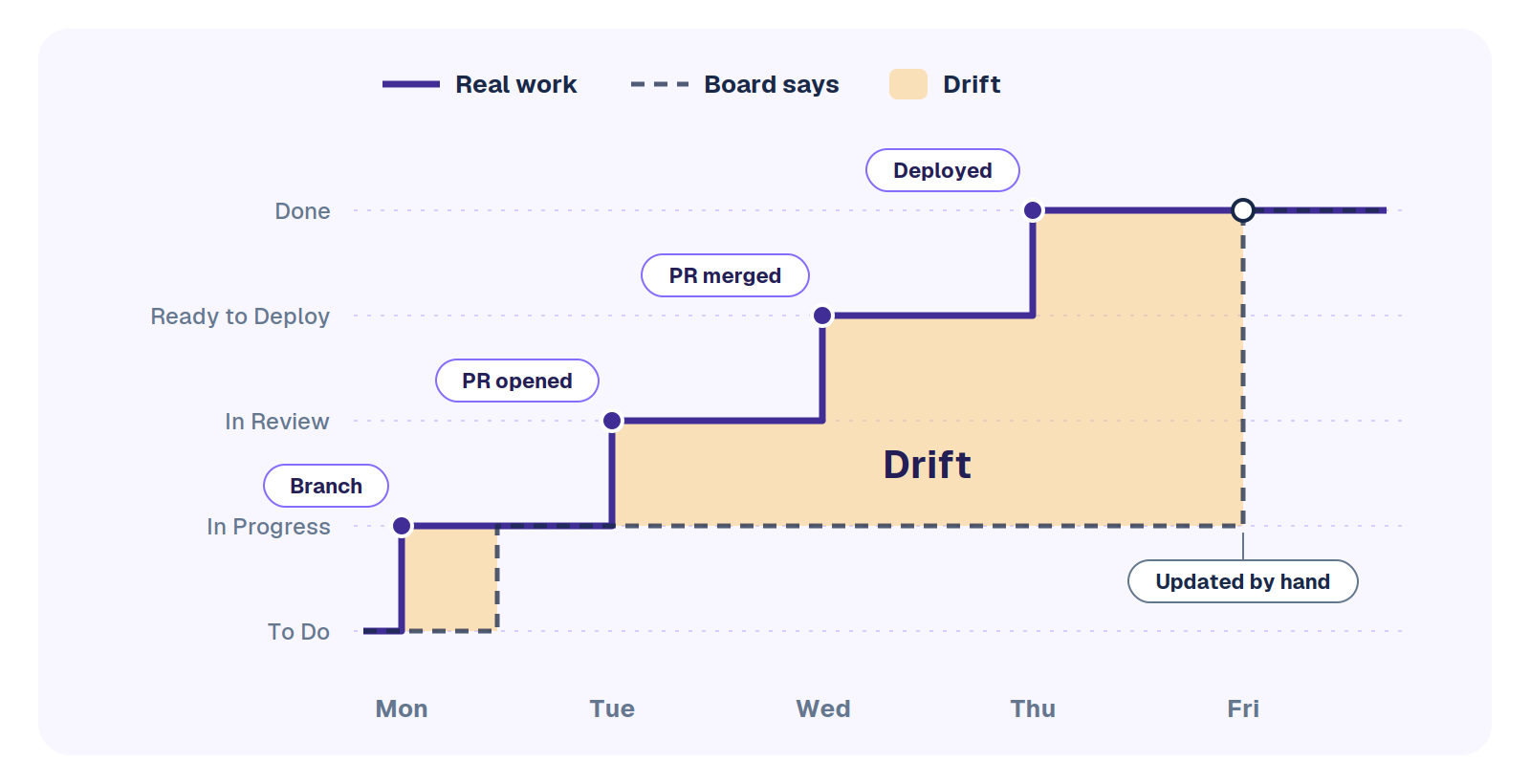
So the board lags. A branch opens on Monday and the ticket stays in Ready. The pull request merges midweek and the ticket stays In Progress. Thursday’s decision to cut scope lives in a Slack thread. By Friday the board describes last week, and whoever owns it starts making the updates themselves, or chasing people to make them.
The authors of Fixing Your Scrum describe the same scene from the Scrum Master’s side: badgering developers to update their tasks, then a sprint review where finished work looks unfinished. Their useful move is to ask whether the problem is the team or the process around it.
That’s the test for every practice below. Does it make the board more accurate without asking more of the people doing the work?
1. Keep the workflow short and give every status an exit rule
Why it matters. Every status is a decision someone has to make correctly, on every ticket, every time. Eight statuses is eight chances to be wrong. Most Jira workflow best practices, Atlassian’s own included, land in the same place: keep only the statuses and transitions your team needs, and build the workflow with the people who’ll use it.
Set it up. Five or six statuses covers most software teams. Map each one to one of Jira’s three status categories, To Do, In Progress and Done, because boards, reports and JQL lean on the category. A filter on statusCategory keeps working after someone renames a status. A filter on the name doesn’t.
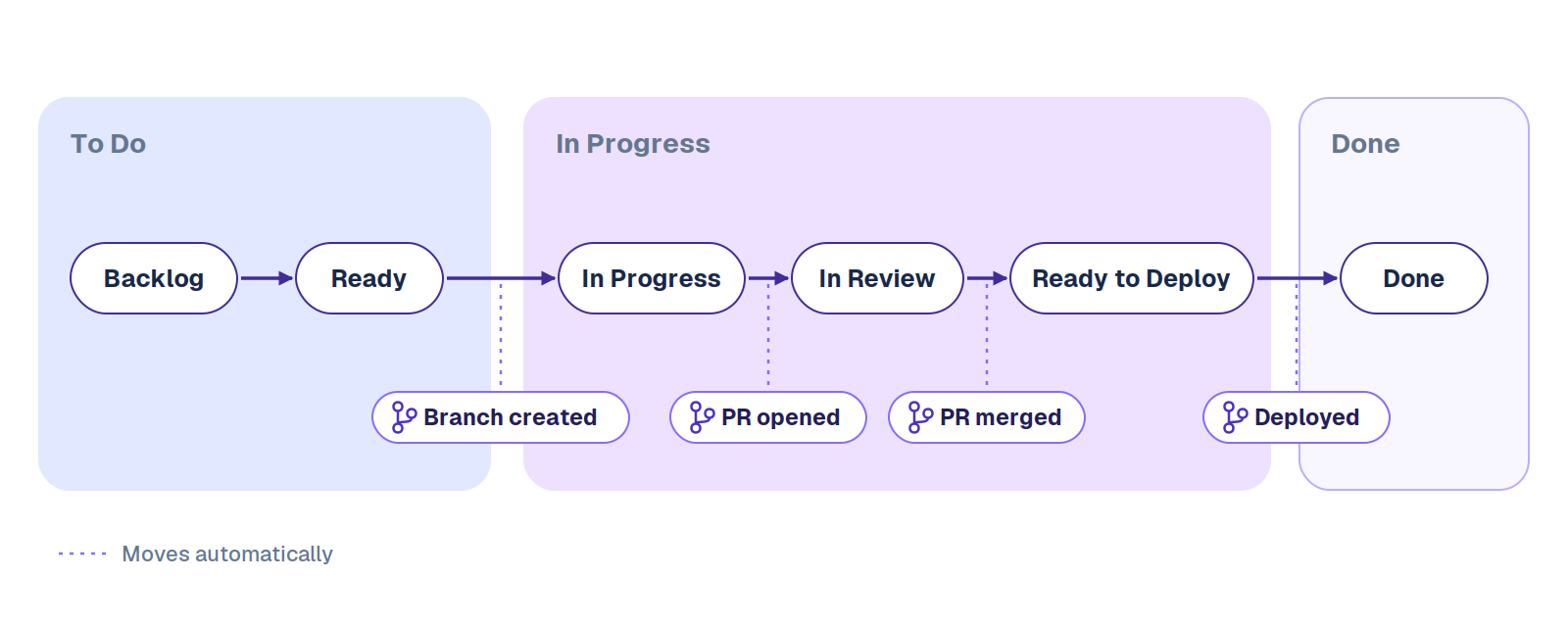
Then write the exit rule: one line per status saying what has to be true to leave it. Almost nobody does this, and it’s what makes a status mean the same thing to everyone.
| Status | Category | Leaves when | Moves automatically on |
|---|---|---|---|
| Backlog | To Do | It has an outcome and a “Done when” | Nothing. A person decides |
| Ready | To Do | Someone starts and opens a branch | Branch created |
| In Progress | In Progress | A pull request is open for review | Pull request created |
| In Review | In Progress | The pull request is approved and merged | Pull request merged |
| Ready to Deploy | In Progress | It’s running in production | Deployment successful |
| Done | Done | Never. If it breaks, open a new ticket and link it | Nothing |
Keep it true. Once a quarter, look at the columns with the team. A status that’s held nothing for a month should go. A status holding half the sprint is two statuses pretending to be one. And if people keep inventing a Blocked status, use Jira’s flag instead: the ticket shows as flagged on the board and keeps its place in the flow.
With Troopr: nobody polices the exit rules. Troopr learns your real status names and what “done” means for your team, then sorts every ticket into in progress, in review, ready to deploy and shipped in a daily team report, with a needs-attention section that names the specific tickets and people, each with a suggested next step.
2. Write tickets someone can pick up cold
Why it matters. A ticket is a message to someone who wasn’t in the meeting. Often that someone is you, three weeks later, trying to remember what “fix login” meant. A ticket that needs a conversation before work can start isn’t ready, and it sits in Ready looking like progress.
Good Jira ticket best practices fit on an index card. Here’s the same ticket twice.
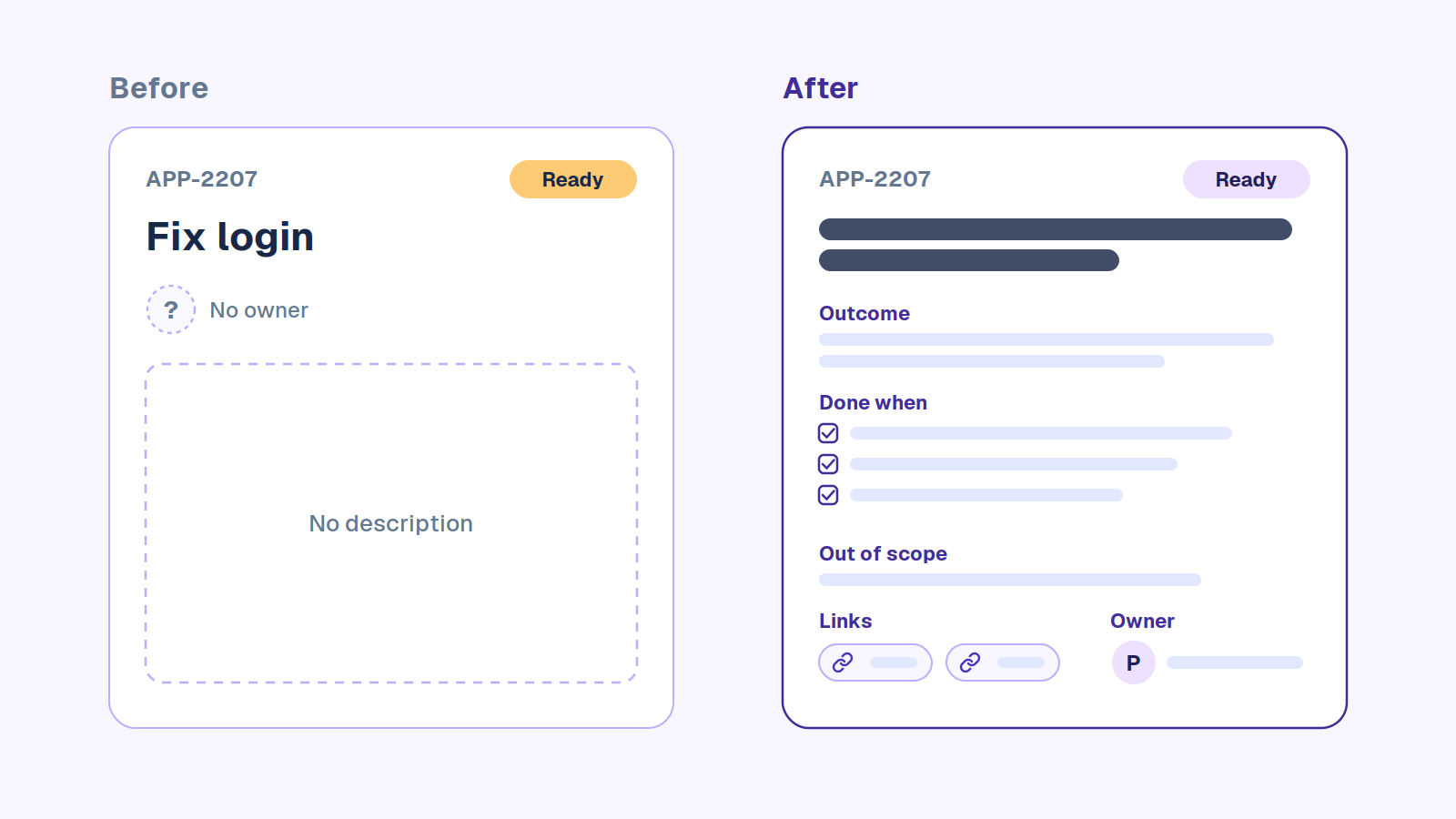
Before: APP-2207, “Fix login”. No owner, no description, status Ready.
After: APP-2207, “Login: SSO users land back on the sign-in page after a password reset”.
- Outcome: SSO users who reset their password land on their dashboard, signed in.
- Done when: a reset from the email link signs the user in once, an end-to-end test covers it, and it’s verified on staging with both identity providers you support.
- Out of scope: the wording of the reset email (APP-2210).
- Links: the Slack thread where support reported it, and the error tracker issue.
- Owner: Priya.
A Jira ticket template you can copy
The template behind the “after” is short enough that people will actually use it.
Summary: [Area]: [what's wrong or needed, in plain words]

Outcome
What changes for the user or the system when this is done.

Done when
- [A condition anyone can check]
- [Another condition]
- Tested by: [the test or check that proves it]

Out of scope
What this ticket deliberately leaves out, with links to where it lives.

Links
Slack thread, design, incident, customer report, related tickets.

Owner
Whoever acts next.
Set it up. Put the template where tickets get made. In Jira Cloud, an automation rule on ticket creation can fill an empty description with it. If most of your tickets start life as a Slack message, create them from Slack so the thread and the reporter come along automatically. Here’s every way to create a Jira ticket from Slack.
Keep it true. Make “Done when” the price of entry to a sprint. In refinement, a ticket without one doesn’t get pulled in. That single rule does more for ticket quality than any template.
With Troopr: the ticket can start as the Slack message that reported the problem. Task It turns that message into a Jira issue with the title, description, priority and a suggested assignee already filled in. And anything raised in a check-in that no ticket covers yet comes back as a proposed ticket, so “we should look at that” stops evaporating.
3. One owner per ticket, and the assignee means “acts next”
Why it matters. An unassigned ticket in an active sprint belongs to nobody, and tickets that belong to nobody don’t move. The quieter failure is a ticket still assigned to the person who started it after the work has moved on. The board says Ana is on it. Ben is reviewing it. Nobody’s sure who’s blocked.
Set it up. Agree on one rule and write it down: the assignee is whoever acts next. When a pull request goes to review, either the reviewer takes the ticket, or the team agrees In Review tickets stay with the author and the reviewer lives in a separate field. Either works. Mixing them doesn’t.
Keep it true. Unassigned work in the current sprint is one of the checks in the Friday audit below. It should come back empty.
With Troopr: the unassigned work and assignee fix proposals catch it the day it happens, not on Friday. Each goes to the person who owns the work, and work nobody clearly owns goes to the manager to decide.
4. Let the code move the ticket
Why it matters. The most-skipped Jira update is the status change after a code event, and it’s the easiest one to hand off, because the code already knows.
Set it up.
- Connect your repositories with the GitHub for Jira app, or your code host’s equivalent.
- Put the ticket key in every branch name, like PAY-1182-retry-double-charge, and in pull request titles. Jira links the branches, commits and pull requests that carry the key.
- Add workflow triggers to your transitions, so a new branch moves Ready to In Progress, an opened pull request moves it to In Review, and a merge moves it on. Team-managed spaces can do the same with an automation rule.
Keep it true. Triggers only see what carries a key. A pull request titled “quick fix” is invisible to Jira, so make the key part of code review. Then notice what triggers can’t see at all: the decision in a thread to split a ticket, the reassignment when someone goes on leave, the due date that slipped in standup. Code events are the easy part of the drift. The rest happens in conversation.
With Troopr: Troopr reads pull requests, commits and the code diffs behind them, so a commit message that says “wip” doesn’t hide the work. When code merges and the ticket hasn’t moved, it proposes the status update to the owner, and it proposes links for pull requests that never got a key. It also catches what no trigger can: the scope cut in a Slack thread, the date that slipped in standup.
5. Give every field one meaning
Why it matters. Priority, labels and components drift the same way statuses do. Everyone uses them slightly differently until they mean nothing, and every dashboard and report built on them quietly lies.
Set it up. Jira’s default priorities run from Highest to Lowest, while plenty of teams talk in P1 to P4. Pick one vocabulary, define each level by what you’ll drop to work on it, and map the names so nobody has to translate.
| Level | Jira priority | Means | You drop |
|---|---|---|---|
| P1 | Highest | Production is down, or customers are losing money or data | Everything, now |
| P2 | High | A core flow is broken for some users and a workaround exists | Planned work, this sprint |
| P3 | Medium | A real problem with limited impact | Nothing. It gets planned into a sprint |
| P4 | Low | Worth fixing when nearby work allows | Nothing. Close it if untouched for two quarters |
Labels are free text, so flaky-test, flakey-test and flaky become three different filters. Use labels for short-lived tags. For anything you’ll report on, use components or a single-select field, because those come from a fixed list an admin controls.
Keep it true. If your P1 list needs scrolling, the scale has stopped meaning anything. Re-triage instead of inventing a P0.
With Troopr: issues by priority, bugs against everything else, and issues missing an estimate run as reports in Slack on whatever schedule you set, so you see the scale drifting before it needs a cleanup.
6. Prune the backlog every month
Why it matters. A backlog nobody can read to the bottom isn’t a plan. Refinement turns into scrolling, duplicates pile up, and the tickets that matter hide among the ones nobody will ever start.
Set it up. Keep the backlog to what the team could plausibly start in the next two or three sprints. Find the rest with the monthly backlog query, the last row of the audit table below, then close them with a resolution such as Won’t Do and a one-line comment saying why.
Keep it true. Run that query in the last refinement session of every month. Closing old tickets feels risky the first time. If something truly mattered, it comes back as a new ticket with fresher context.
With Troopr: a watch on stale tickets checks every day and stays silent until something hasn’t moved in the number of days you choose, and the “where work is piling up” report shows which column is quietly filling.
7. Run a 10-minute Jira hygiene audit every Friday
Why it matters. This is the practice that keeps the others honest. Six saved filters, run once a week, catch most of the ways a board drifts.
Set it up. Replace PAY with your project key, save each query as a filter, and star them so they sit in your sidebar.
| Check | JQL | Then |
|---|---|---|
| Started, board says To Do | project = PAY AND statusCategory = "To Do" AND development[pullrequests].open > 0 | Move it to In Progress, or ask why a pull request exists. |
| Code merged, ticket still open | project = PAY AND statusCategory = "In Progress" AND development[pullrequests].all > 0 AND development[pullrequests].open = 0 | Check the merge and move the ticket on. Declined pull requests land here too. |
| Stale In Progress | project = PAY AND statusCategory = "In Progress" AND updated <= -3d ORDER BY updated ASC | Ask the owner one question: still moving, blocked, or done? |
| Nobody owns it | project = PAY AND sprint in openSprints() AND assignee is EMPTY AND statusCategory != Done | Assign whoever acts next. |
| Overdue | project = PAY AND duedate < now() AND statusCategory != Done | Move the date or cut the scope, and say which out loud. |
| Done without a resolution | project = PAY AND statusCategory = Done AND resolution is EMPTY | Set the resolution, then add it to the transition screen so it can’t recur. |
| Backlog nobody will start (monthly) | project = PAY AND statusCategory = "To Do" AND created <= -180d AND updated <= -90d | Close with Won’t Do and a one-line reason. If it mattered, it comes back fresher. |
Subscribe to the filters and Jira emails the results on a schedule, or post them to a channel with a scheduled automation rule. Our guide to Jira Slack automation walks through that exact rule, including what it costs now that Atlassian meters automation by the step, with extra steps billed from December 3, 2026.
Keep it true. The audit’s weakness is that it’s yours. It runs when you remember, it finds drift a week late, and every row it returns turns into you messaging someone.
With Troopr: every check in this table runs as a routine, daily instead of weekly. Merged code becomes a status proposal to the owner. Missing owners and overdue dates go to the person who should decide. Stale tickets become a one-question nudge to the owner, with the answer coming back to you. And a watch stays silent unless something is wrong, so a quiet day means a clean board, not a skipped audit.
8. Fix the board in standup instead of reading it aloud
Why it matters. If standup is people reading their tickets to each other, the board and the meeting are doing one job twice, badly.
Set it up. Flip it. The board is the agenda, and standup is where the board gets corrected. Anything someone says that the board doesn’t show gets fixed before the call ends, by the person who said it. If your standup has drifted into a status recital, here’s what the daily standup is actually for.
Keep it true. Watch for the status meeting that exists because nobody trusts the board. A true board is how you cancel it, and these alternatives to status meetings only work once the board can carry the weight.
With Troopr: the standup writes itself. Troopr drafts each person’s update from their own activity and asks only when it genuinely can’t tell what they’re working on. Keep a live standup and Troopr joins as a silent participant, then posts a recap checked against Jira and GitHub. Snowflake eliminated ~86% of its weekly status-meeting time with Troopr.
Jira tips and tricks that keep the board current
- Add ORDER BY updated ASC to the end of any filter so the stalest work sits at the top.
- Use status CHANGED DURING (startOfWeek(), now()) to see what actually moved this week. It’s a better standup agenda than the board.
- Put the ticket key in commit messages as well as branch names, so the development panel shows every commit, not just the branch.
- Watch the tickets you’re accountable for but not assigned to, so their changes reach you without you going to look.
- Use bulk change for the first big cleanup, then treat needing a second one as a warning sign: one of the practices above isn’t working.
Jira admin best practices that stop drift at the source
- Grant access through project roles, not named people, so a reorg doesn’t mean editing permission schemes one by one.
- Add a custom field only when a report needs it. Every field is one more thing someone has to keep true.
- Test workflow changes on a copy before the team’s board changes under them. Atlassian suggests a separate space, or a separate site if you have one.
- Record dependencies as links, blocks and is blocked by, rather than in comments, so they show on the ticket and in search.
- Add Marketplace apps for needs the team hits every week, not for one-offs. Every app is one more thing to own when Jira changes.
Hand the audit to Troopr, keep the final say
Read the list again. Every practice depends on someone remembering to type something at the moment they least want to, or on you catching it a week later. Workflow triggers see code and nothing else. Automation rules fire on events inside Jira, and a decision made in a Slack thread is never an event. On one team the Friday audit is a habit. Across three it’s a part-time job.
Troopr does that job continuously. It forms its own view of where each piece of work stands from real activity, then routes each fix to the person who owns the work.
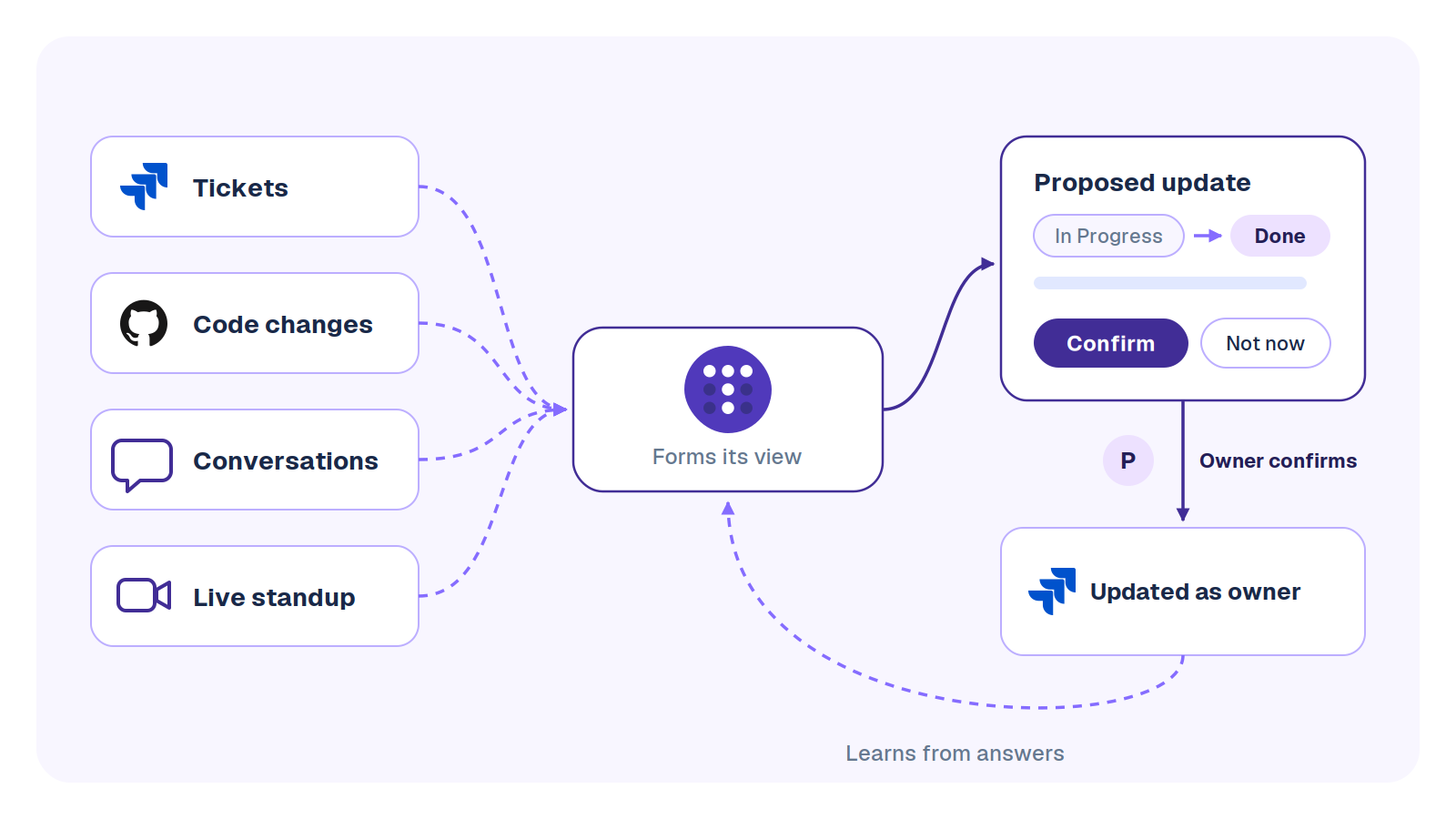
Engineering managers ask about the trust model first, so here it is plainly. Every proposal is a typed action from a short list: move a ticket, set an assignee, set a due date, create a ticket, link a pull request. It goes to the owner of the work, carries its evidence, and is rechecked against live Jira at the moment they confirm. The write runs under their own Jira login, so the history shows their name. If someone already did it by hand, the proposal clears itself and says why. Dismiss one with a reason, and the reason becomes a working agreement that later proposals respect.
Routines are written as plain sentences and previewed before they’re switched on. A report reads the board and tells you. A nudge asks one person about their own work. A proposal offers the change and writes it once the owner confirms. More on how routines work, and on Jira reports in Slack for the read-only side.
Wellthy Therapeutics had the classic version of this problem, plenty of Slack activity and a board that was never current, and now runs its scrum ceremonies asynchronously with better Jira hygiene.
Troopr runs in Slack and Microsoft Teams and works with Jira Cloud, Server and Data Center. The Free plan is the whole product: 10 seats, 3 synced channels and 3 routines, no credit card, and a routine counts once however many proposals it raises. Start for Free and point your first routine at the audit check that embarrasses you most.
Frequently asked questions
What does Jira hygiene mean?
Jira hygiene is how closely the board matches reality: statuses that reflect where work actually is, an owner on every active ticket, current due dates, and tickets clear enough to act on. Good hygiene means you can trust the board without asking anyone.
How do you use Jira effectively?
Keep the workflow to five or six statuses with clear exit rules, write every ticket with a “Done when”, put ticket keys in branch names so code moves the ticket, and audit the board weekly. Jira is working when the board can answer “where are we?” without a meeting.
What is P1, P2, P3, P4 in Jira?
P1 to P4 are priority levels many teams use, with P1 the most urgent, usually production down. Jira’s default priorities are named Highest, High, Medium, Low and Lowest, so teams map P1 to Highest, P2 to High, and so on.
What are the two main types of Jira?
In Jira Cloud the two project types are company-managed, configured by admins with shared workflows and schemes, and team-managed, configured by the team itself. Atlassian now calls projects spaces, and the two board types, Scrum and Kanban, are the other pair people mean.
Is Jira being phased out?
No. Atlassian ended support for Jira Server in February 2024 and ends Data Center support on March 28, 2029, but Jira itself continues on Cloud.
Is Jira difficult to learn?
Using Jira day to day takes an afternoon: find your tickets, move them, comment. Configuring it well is the hard part, which is why a short workflow and a few agreed rules matter more than knowing every feature.
A tidy board is a setup job. A true board is a daily one, and it’s the one worth handing off.
Last checked October 5, 2026 against Atlassian’s documentation on workflows, workflow triggers, development information and JQL fields.
- Free forever for 10 seats
- No credit card
- Runs in Slack and Microsoft Teams
- Jira Cloud, Server and Data Center


The AI project manager for engineering teams. Forms its own view of the work and does the coordination, right where your team already works.
101 Arctic Circle, Round Rock, Texas 78664, United States.