

Jira GitHub Integration: How to Connect GitHub to Jira in 2026
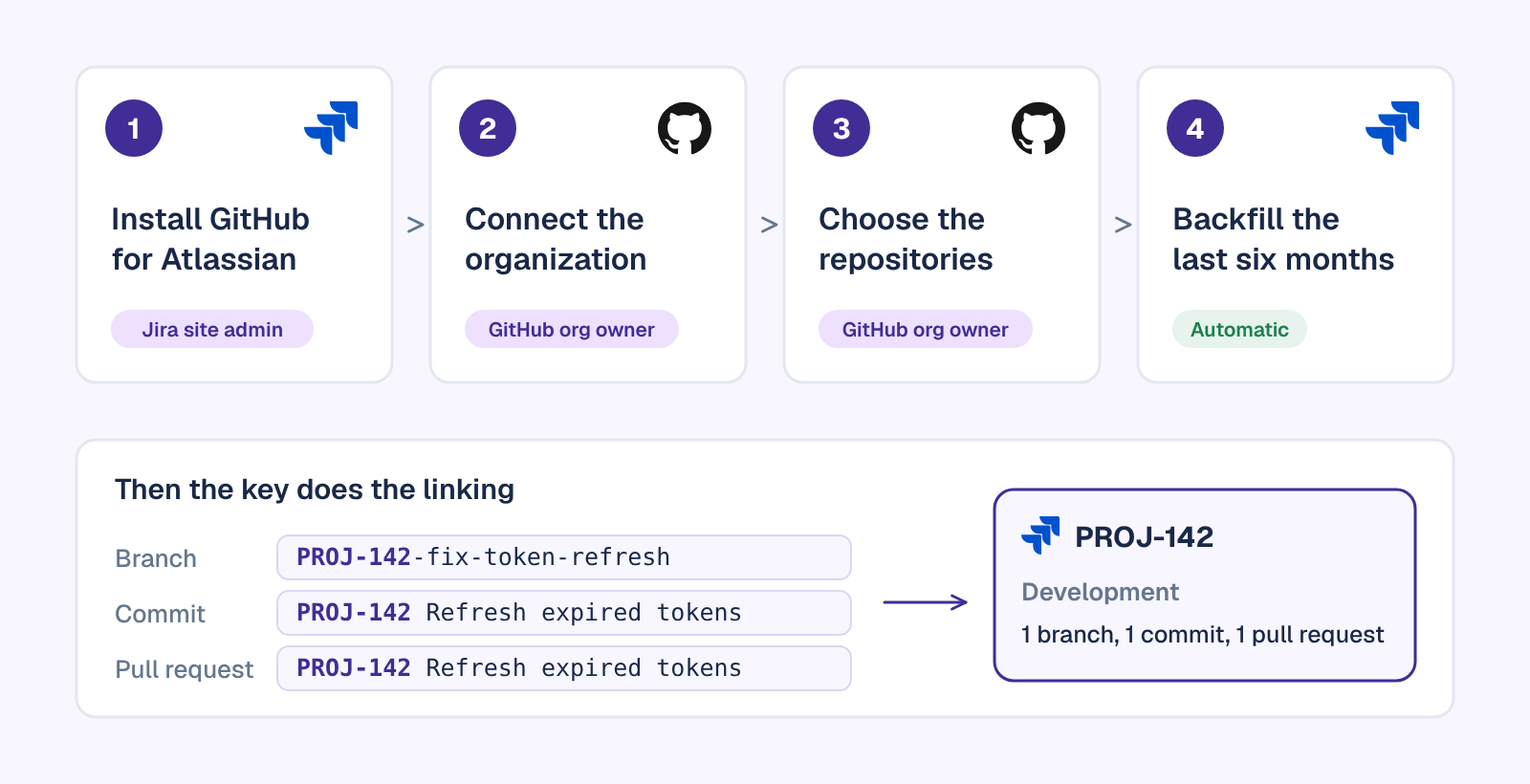
The official Jira GitHub integration is a free Atlassian app called GitHub for Atlassian (it used to be GitHub for Jira). A Jira site admin installs it, a GitHub organization owner connects the organization and picks the repositories, and from then on every branch, commit and pull request that carries a Jira issue key shows up on that issue, on the board and in Jira search.
This guide walks through the setup as Atlassian documents it in November 2026, for GitHub Cloud, GitHub Enterprise Server and Jira Data Center. Then it covers the habits and rules that make Jira move on its own, and the three jobs the integration still leaves to your team, with how Troopr picks them up while keeping GitHub read-only.
What the Jira GitHub integration does
GitHub for Atlassian is published by Atlassian, costs nothing and works with Jira Cloud. It has more than 138,000 installs on the Atlassian Marketplace. It listens to the repositories you connect and attaches what happens there to Jira issues by their key, so a ticket shows the work behind it without anyone pasting links.
Once it is connected, linked development data shows up in six places:
- The development panel on each issue: branches, commits, pull requests, builds and deployments.
- Board cards, as small icons when an issue has a branch, commit, pull request or deployment.
- The Code, Releases and Deployments views of a software space, plus the Development page, which adds pull request cycle time, deployment frequency and, on the classic board view, suggestions such as pull requests with no activity for more than five days.
- JQL, so you can search for issues by their open or merged pull requests.
- Jira Automation, which gains triggers for branches, commits, pull requests, builds and deployments.
- Security views: Dependabot and secret scanning alerts land in Jira's Security tab, and code scanning alerts on the development panel.
Two things it does not do. It links only work that carries an issue key: a branch, commit or pull request without one doesn't appear on any Jira issue. And it doesn't sync GitHub Issues with Jira issues. If part of your team tracks work in GitHub Issues and you want it mirrored as Jira work items, that takes a sync tool such as Exalate.
A note on names: Atlassian renamed the app from GitHub for Jira to GitHub for Atlassian because the same connection now feeds other Atlassian products, including Rovo search. A few admin screens still say GitHub for Jira, and Jira now calls issues "work items" and projects "spaces". They are the same things.
Before you start: who needs to be involved
The setup needs two permissions that rarely sit with one person:
- A Jira site administrator, to install the app.
- A GitHub organization owner, to connect the organization and approve which repositories Jira can read.
If you are only one of the two, the app has a "Send them a link" step that hands the GitHub half to an owner. Settle three more things first and the rest is clicking:
- All repositories or only some. All means new repositories are picked up automatically. Only some means someone adds each new repository by hand later.
- Matching emails. Author names on the development panel, and every Smart Commit, depend on each developer's GitHub email matching their Jira email, with "Keep my email addresses private" turned off in GitHub.
- Who can see it. People need the View Development Tools permission in a space to see the development panel. If your GitHub organization uses an IP allow list, follow Atlassian's allow list setup before you connect.
How to connect GitHub to Jira Cloud, step by step
These steps follow Atlassian's Connect GitHub Cloud to Jira guide as it reads in November 2026. They cover GitHub.com and GitHub Enterprise Cloud.
Step 1: Install GitHub for Atlassian in Jira
- In Jira, select Apps, then Explore more apps.
- Search for GitHub for Atlassian and open it.
- Select Get app, then Get it now.
Step 2: Connect your GitHub organization
- Select Get started, then Continue. If the app was installed earlier, you'll find it under Apps, Manage your apps, GitHub for Atlassian.
- Choose GitHub Cloud, select Next and sign in to GitHub.
- Find your organization and select Connect. Only organization owners see that button. Everyone else gets Send them a link and ask them to connect, which gives you a message and URL to send to an owner.
- Decide whether GitHub data should be searchable in Rovo. The connection works either way.
- Select Next and review the connected organization.
Step 3: Choose which repositories Jira can read
If your organization isn't in the list, the Jira app isn't installed on it yet. Choose Select an organization in GitHub, pick the organization, choose All repositories or Only select repositories, and select Install. A member who isn't an owner sees Request instead, and the owner approves it from the email with Approve & Install.
To add a repository later when you chose only some: in Jira, go to Apps, Manage apps, select Configure under GitHub for Jira, open the organization's menu and select Configure, then add the repository under Repository access in GitHub.
Step 4: Check the connection and let the backfill run
Under Apps, Manage your apps, GitHub for Atlassian, the organization should now be listed. Jira then backfills six months of history: pull requests with the key in the title, description or source branch name; branches whose name, latest pull request or last commit carries a key; and the latest 50 commits from non-default branches. New activity links right away, so nobody has to wait for the backfill to finish. For older history, a Jira admin can open the organization's settings, choose Continue backfill and pick an earlier start date.
Step 5: Put the issue key in the work
This step decides whether the integration is useful. Jira links GitHub activity only through the issue key, written in capitals:
# Branch: the key in the name
git checkout -b PROJ-142-fix-token-refresh

# Commit: the key in the message
git commit -m "PROJ-142 Refresh expired tokens before retrying"

# Pull request: the key in the titlePROJ-142 Refresh expired tokens before retrying

# GitHub comment: the key in square brackets becomes a link
Fixed in [PROJ-142]
| GitHub activity | Where the issue key goes |
|---|---|
| Branch | In the branch name |
| Commit | In the commit message (Jira shows up to 100 commits per issue) |
| Pull request | In the title, or in the source branch name |
| Build | In a commit message or branch name the GitHub Actions run includes |
| Deployment | In the message of a commit included in the deployment |
| Comment on an issue or pull request | In square brackets, like [PROJ-142], to turn it into a link |
Two habits make this close to automatic. Create branches from the issue itself: Create branch on the development panel puts the key in the name for you. And add a pull request template whose first line asks for the key, so a missing one gets caught in review. Our Jira best practices guide shows how to make letting the code move the ticket a team habit.
GitHub Enterprise Server and Jira Data Center
GitHub Enterprise Server with Jira Cloud
The same app connects a self-hosted GitHub, with two extra pieces of work (Atlassian's Enterprise Server guide):
- Open a path through the firewall. Either allow Atlassian's IP addresses to reach the server's public URL, or have your team set up a locked gateway and give Jira its URL, a request header name and an API key.
- Create a GitHub app on the server. After choosing GitHub Enterprise Server and entering the server or gateway URL, let Jira create the app automatically, which Atlassian recommends, or create it by hand from the details Jira shows.
Atlassian lists the usual reasons a server won't connect: its IP addresses aren't allowed through, SAML SSO, a reverse proxy, or a self-signed certificate. Workflow run and deployment data also needs GitHub Actions turned on for the server. And one limit to know before you plan automation: Jira Automation's DevOps triggers don't support self-hosted tools such as GitHub Enterprise Server, so a rule like "move the issue when the pull request merges" won't fire for it.
Jira Data Center
GitHub for Atlassian is a Jira Cloud app, and Atlassian's FAQ says Jira Server isn't supported. Data Center connects through its built-in DVCS connector instead (Atlassian's Linking GitHub accounts):
- In GitHub, signed in as an admin of the account, open Settings, Developer settings, OAuth apps and register a new application named Jira DVCS, with your Jira base URL as both the homepage URL and the callback URL.
- In Jira, go to Administration, Applications, DVCS accounts, choose GitHub or GitHub Enterprise as the host, and enter the team or user account name.
- Paste the OAuth key and secret as the Client ID and Client Secret, leave auto link and Smart Commits on, and select Add.
Register the OAuth app under the organization itself: the connector only lists repositories of organizations the entered account owns. Plan for the calendar too. Atlassian ends Data Center support on March 28, 2029, and Atlassian stopped supporting the DVCS connector in Jira Cloud after March 31, 2024, so a Cloud site still using it should move to GitHub for Atlassian.
Make Jira move on its own: Smart Commits, automation and JQL
Linking shows the work on the ticket. Moving the ticket takes Smart Commits, workflow triggers or automation rules, and all three act only on work that carries a key.
Smart Commits
A developer writes the change into the commit message and Jira applies it when the commit is pushed. Atlassian's Smart Commits reference has three commands: comment, time and any workflow transition.
# Add a comment to the issue
PROJ-142 #comment Retry now waits for the new token

# Log time
PROJ-142 #time 2h 30m

# Transition it (the name must match your workflow) and comment
PROJ-142 #done #comment Merged after review
They fail quietly more often than teams expect. The committer's email has to match exactly one Jira user with permission for the action, and "Keep my email addresses private" has to be off in GitHub. The transition has to exist in your workflow and be allowed from the current status, so a commit can't jump an issue from To Do to Done if the workflow doesn't allow it. A required field on the transition makes it fail without a word, and every command has to sit on one line. Atlassian also points out that Git lets a commit be attributed to someone other than the person who pushed it, and suggests turning Smart Commits off if that is a risk for you.
Jira Automation rules
Automation moves tickets without anyone typing a command. With GitHub connected, Jira Cloud adds DevOps triggers for a branch created, a commit created, a pull request created, merged or declined, and build and deployment events (Atlassian's trigger reference). Three rules cover most teams:
- Branch created: move the issue to In Progress.
- Pull request created: move it to In Review.
- Pull request merged: move it to Done, or to whatever status your team uses before a release.
Jira's workflow triggers do the same job from inside a workflow: attach a trigger to a transition and a branch or pull request event moves the issue, with no separate rule. Either way, someone has to set them up, match them to each workflow's real status names and keep them working as workflows change. They act on keyed work only, and automation rules don't fire for GitHub Enterprise Server.
A JQL check for drift
Development data is searchable, so two saved filters show where Jira and GitHub disagree about keyed work:
# Marked done, but a pull request is still open
statusCategory = Done AND development[pullrequests].open > 0

# Still open, but every linked pull request has merged
statusCategory != Done AND development[pullrequests].all > 0 AND development[pullrequests].open = 0
Run them before standup or sprint review and you'll catch most of the drift on keyed work. Neither can see work that never carried a key.
The three jobs the integration still leaves to your team
With the app connected, Smart Commits on and three automation rules written, Jira and GitHub agree about the work that was done by the book. The trouble is everything else.
1. Moving the ticket when the work moved
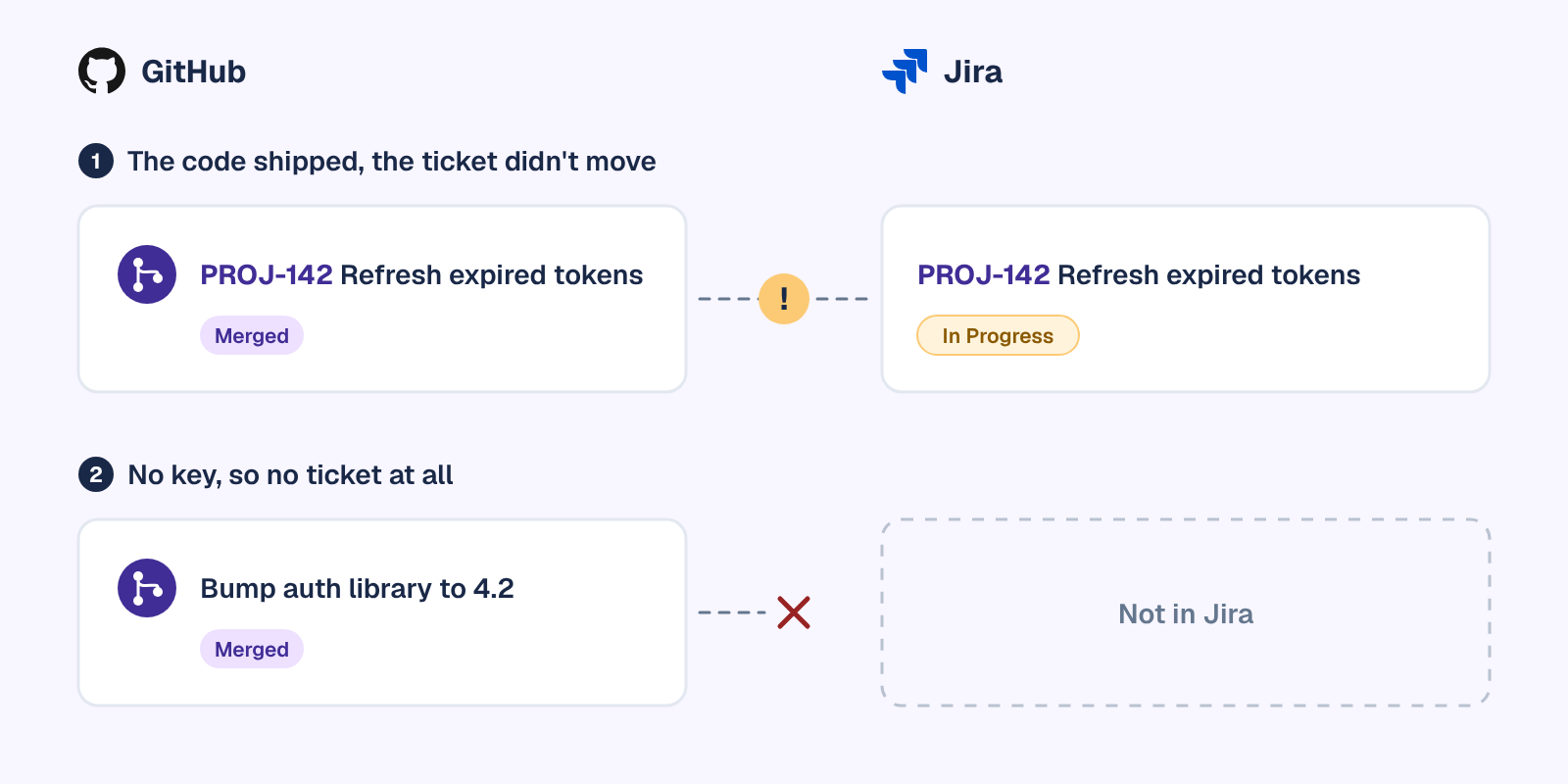
Rules fire on events, not judgement. A pull request with a mistyped key never links. A ticket that needs QA after the merge sits wherever the rule put it. A fix that rode along in someone else's pull request moves the wrong ticket, or none. In each case the code shipped and the ticket still says In Progress, until someone notices in standup or at sprint review and moves it by hand.
2. Writing the update
The development panel is a list of links. It shows that three commits and a pull request exist, not what changed, whether it's finished or what it's blocking. Commit messages like "fix tests" and "wip" don't help. So every engineer still writes a standup line from memory, and the manager still reads pull requests to write the weekly status. That is the work an async standup moves out of the meeting but doesn't remove.
3. Noticing work with no ticket
A dependency bump, a hotfix pushed straight to main, a refactor someone started on Friday: none of it carries a key, so none of it reaches Jira, and the board shows the team doing less than it is. The backfill can't help, because it only links history that already had keys.
How Troopr does those jobs, with GitHub kept read-only
Troopr is the AI project management agent for engineering teams. It reads the same signal a manager reads (Jira, GitHub, Slack and the team's live standup), forms its own view of what each person actually did, and does the coordination. That view is grounded in what happened in the tools, not in what people remember to report. On the GitHub side it reads pull requests, commits across branches and the code diffs behind them, so a vague commit message doesn't hide real work. It never writes to GitHub. GitHub stays read-only by design, and issue and pull request management stays in Jira.
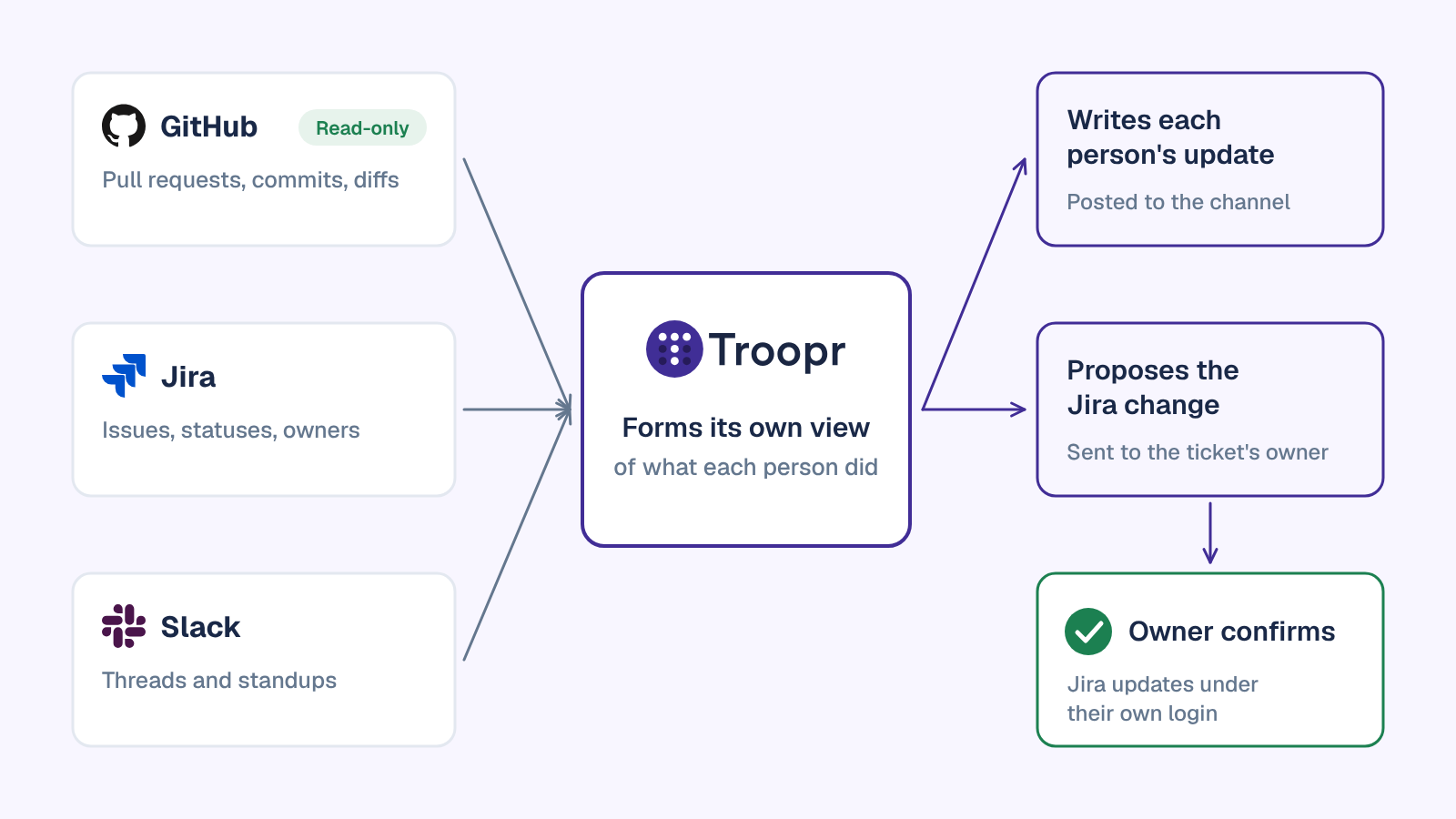
- It proposes the transition. A Merged-PR status updates routine checks for pull requests that merged while their ticket still says In Progress, and sends the move to whoever owns the ticket in a DM, with the evidence attached. Nothing changes until they confirm. Troopr checks the live state again at that moment, and if someone already moved it by hand, the proposal clears itself.
- It proposes the missing link. The PR-ticket links routine proposes linking a pull request to its Jira ticket, and the owner confirms it.
- It writes the update. Troopr's automated standup writes each person's update from their own Jira, GitHub and Slack activity and posts it to the team channel, asking someone directly only when it genuinely can't tell what they're working on. Work with no key still shows up, because Troopr reads the pull request and the diff, not just the key.
- It flags where the tools disagree. The daily team report has a needs-attention section that names specific people and specific items, each with a suggested next step. When the team holds a live standup, Troopr checks what people said against Jira and GitHub and flags contradictions openly.
Every write follows the same rule: the proposal is typed, routed to the person who owns the work, checked against live state when they confirm, and run under their own Jira login. Troopr keeps each person's GitHub, Jira and Slack identities mapped in the team roster, which is what makes the attribution accurate. More on how it reasons is in how Troopr thinks.
The routine itself is one plain sentence a team lead writes once, such as "When a pull request is merged and its ticket still says In Progress, propose moving it." Templates that depend on GitHub say so, and stay unavailable until the team connects a repository.
Customers measure the difference in time. Netflix spends ~67% less time finding and updating Jira issues with Troopr, and Snowflake eliminated ~86% of its weekly status-meeting time.
| GitHub for Atlassian, Smart Commits and Automation | Troopr | |
|---|---|---|
| Move the ticket when the work moved | A transition command in a commit, from a matching email, or an automation rule an admin writes and maintains | Proposes the transition to the ticket's owner; written under their Jira login when they confirm |
| Link a pull request that has no key | Not linked | Proposes the pull request link for the owner to confirm |
| Write each person's update | Not part of the integration | Writes it from their own Jira, GitHub and Slack activity, and asks only when it can't tell |
| Who approves a Jira change | The rule or the commit applies it | The owner confirms, after Troopr checks live state again |
| Access to GitHub | Read and write on contents, issues and pull requests, used to create branches and turn keys into links | Read-only |
| Price | Free | Free for 10 seats, then $6 per seat/month billed annually ($8 monthly) |
Scroll the table sideways to see both columns.
Keep GitHub for Atlassian for the development panel, and let Troopr do the coordination on top. $6 per seat/month. Everything included. Free for 10 seats. Start for Free, or Book a Demo. If your team also lives in Slack, the Slack Jira integration page shows how Troopr manages Jira from there.
Troubleshooting: when the development panel stays empty
- Nothing links at all. Check that the key is in capitals ("PROJ-142", not "proj-142"), that it's in the branch name, commit message or pull request title, that the repository was granted to the app, and that something has been pushed since. A full sync can take a few minutes.
- Some people can't see the development panel. They need the View Development Tools permission in that space.
- Older work is missing. The automatic backfill covers six months and only the latest 50 commits on non-default branches. Run a manual backfill with an earlier start date.
- Author names and avatars are missing. The developer's GitHub email doesn't match their Jira email.
- Smart Commits do nothing. Look for an email mismatch, a private GitHub email, a transition name that isn't in the workflow, a jump the workflow doesn't allow, a required field on the transition, or time tracking turned off for #time.
- No icons on board cards. They only show on boards with fewer than 100 issues.
- An automation rule never fires. The work has no key, the repository is on GitHub Enterprise Server, or the rule's status names don't match the workflow.
- Enterprise Server won't connect. Atlassian's IP addresses aren't allowed through, or the server uses SAML SSO, a reverse proxy or a self-signed certificate.
Atlassian's GitHub for Atlassian FAQ and its permissions page cover the rest.
Frequently asked questions
Is the Jira GitHub integration free?
Yes. GitHub for Atlassian is a free app from Atlassian for Jira Cloud, listed on both the Atlassian Marketplace and GitHub Marketplace. Jira Data Center uses its built-in DVCS connector instead.
What happened to GitHub for Jira?
Atlassian renamed it GitHub for Atlassian. The connection now shares GitHub data across Atlassian apps, including Rovo, and a few admin screens still show the old name.
How do I link GitHub issues to Jira?
The official app doesn't sync GitHub Issues with Jira work items. It links branches, commits and pull requests, and turns a key in square brackets in a GitHub issue or pull request comment, like [PROJ-142], into a link to the Jira issue. For a two-way sync of GitHub Issues and Jira work items, use a dedicated sync app.
Does the GitHub integration work with Jira Data Center?
Not through GitHub for Atlassian, which is a Jira Cloud app. Data Center links GitHub and GitHub Enterprise through DVCS accounts, using an OAuth app you register in GitHub.
Can Jira move an issue automatically when a pull request is merged?
Yes, in Jira Cloud with GitHub Cloud. A Jira Automation rule on the pull request merged trigger can transition the issue, or a developer can add a Smart Commit command such as #done. Both need the issue key in the work, and the automation triggers don't support GitHub Enterprise Server.
Does Troopr replace GitHub for Atlassian?
No. Keep the official app for the development panel and Jira's own views. Troopr reads GitHub read-only and does the coordination on top: it writes each person's update, flags where Jira and GitHub disagree, and proposes the Jira change for the owner to confirm.


The AI project manager for engineering teams. Forms its own view of the work and does the coordination, right where your team already works.
2035 Sunset Lake Road, Suite B-2, Newark, DE 19702, United States.