

The Best Developer Productivity Tools in 2026, Sorted by Where Engineering Time Goes
Most lists of developer productivity tools are lists of coding tools. That covers a small slice of the week. Atlassian's 2025 developer experience survey of 3,500 developers and managers found that coding takes 16% of a developer's time, and half of them lose more than 10 hours a week to organizational friction. A Microsoft study of 484 of its developers found communication and meetings take a bigger share of the actual week than coding does.
So this guide sorts the tools by where engineering time goes: writing code, reviewing and shipping it, and coordinating it. Every price was checked on the vendor's own site on 11 November 2026.
The short answer
Coding tools got good fast. The hours they can't reach are in the work around the code, so the best developer productivity stack in 2026 covers all three slices of the week:
- Writing code: GitHub Copilot if your team already lives on GitHub, Cursor if you want an editor built around an agent, Claude Code for agentic work across a whole repository.
- Reviewing and shipping it: CodeRabbit for a first-pass review on every pull request, GitHub Actions for CI and deploys.
- Coordinating it: Troopr, which writes each person's standup from their Jira and GitHub activity, replaces the status meeting with a daily read in Slack or Microsoft Teams, and keeps Jira current with changes the owner confirms in one tap. Atlassian's free Jira Cloud for Slack app sits underneath for notifications, new work items and quick actions.
| Tool | Slice of the week | What it does | Price (checked 11 Nov 2026) |
|---|---|---|---|
| GitHub Copilot | Writing code | Completions, chat and a coding agent in the editor and on GitHub | Free; Pro $10/month; Business $19 per seat/month |
| Cursor | Writing code | Code editor built around an agent, with cloud agents and Bugbot reviews from the Premium plan up | Free; Teams from $30 per user/month |
| Claude Code | Writing code | Agentic coding tool that reads the codebase, edits files and runs commands | In Claude Pro from $17/month billed annually; Team from $20 per seat/month billed annually |
| CodeRabbit | Reviewing code | AI first-pass review on pull requests, in the IDE and in the CLI | From $24 per developer/month billed annually; free for public repos |
| GitHub Actions | Shipping code | CI/CD workflows that run on GitHub events | Free on standard runners in public repos; included usage on every plan |
| Troopr | Coordinating it | Writes the standup from real activity, posts the daily read, proposes the Jira updates the owner confirms | Free for 10 seats; $6 per seat/month billed annually |
| Jira Cloud for Slack | Coordinating it | Atlassian's official app: Jira notifications, work items and actions in Slack | Free |
| Geekbot | Coordinating it | Async standups, polls and surveys that people answer in Slack or Microsoft Teams | Free up to 10 users; standups $2.50 per participant/month billed annually |
Prices from each vendor's pricing page on 11 November 2026. They change often, so check before you buy.
Where engineering time actually goes
AI made the writing faster. In Atlassian's 2025 State of Developer Experience report, 99% of developers say AI tools save them time, and 68% save more than 10 hours a week. The same survey found that 50% lose more than 10 hours a week, "largely due to organizational inefficiencies." Atlassian's own summary: developers are saving 10 hours a week with AI and losing 10 hours a week to inefficiencies.
The friction is not in the code. Atlassian lists finding information, adapting to new technology and switching between tools as the top time-wasters, and notes that collaboration with other teams moved up the list this year. Coding wasn't named as a source of wasted time in either 2024 or 2025.
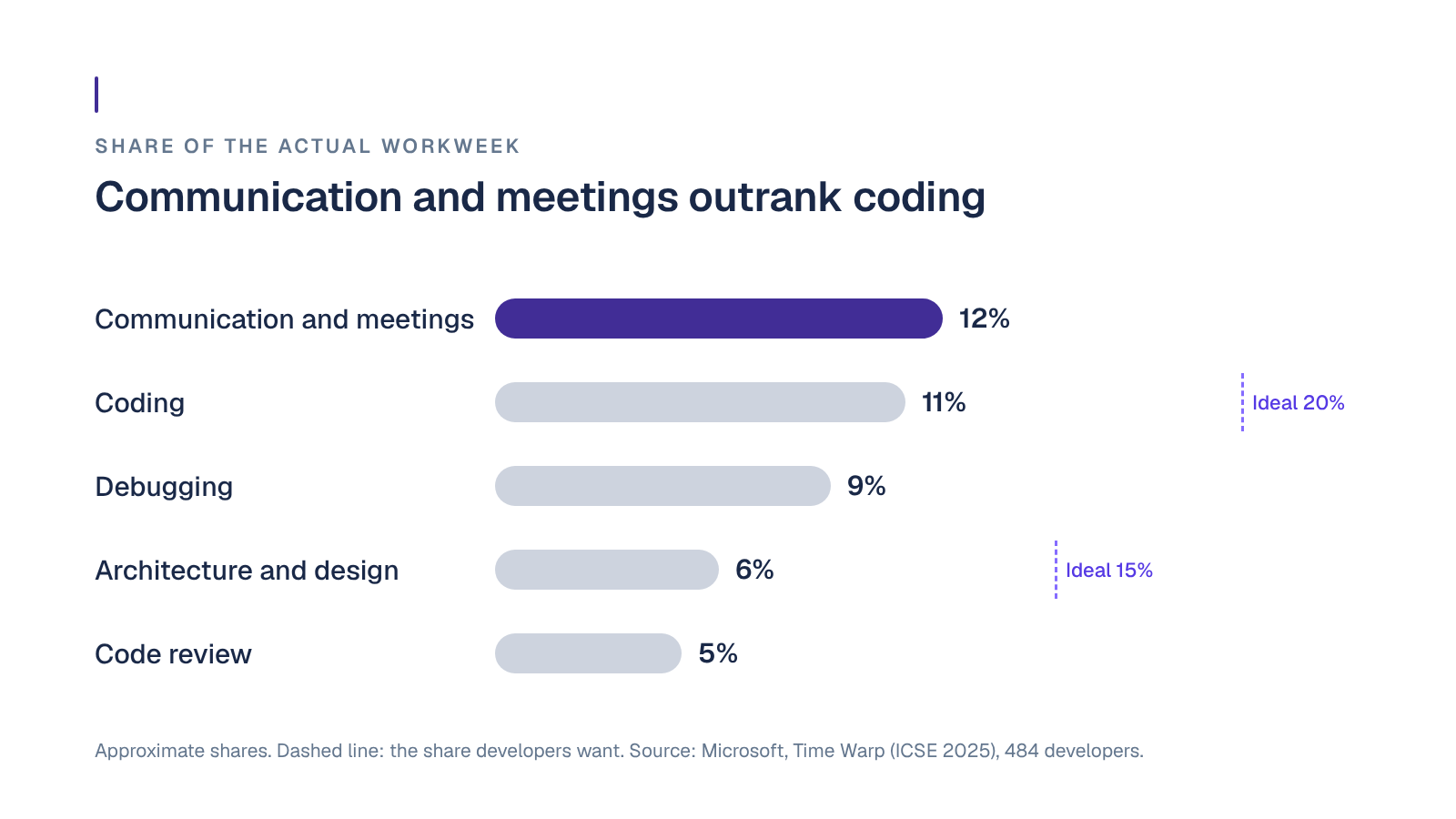
Microsoft's Time Warp study (ICSE 2025) asked 484 of its developers how their actual week compares with their ideal one. Communication and meetings took the largest share of the actual week, about 12%, ahead of coding at about 11%. Developers wanted coding closer to 20% and system design closer to 15% (from about 6%). The biggest gaps between actual and ideal were in communication and meetings, and in task creation and management.
Bain's Technology Report 2025 puts numbers on the ceiling. Teams using AI coding assistants see 10 to 15% productivity gains, and part of the limit is arithmetic: writing and testing code is only about 25 to 35% of the time from idea to launch. Companies that pair AI with changes across the whole process report 25 to 30%.
So the next hours are in coordination: the standup, the status meeting, the "is this done yet?" message, the ticket that still says In Progress after its pull request merged, and the update a manager assembles for their own manager. The top-ranked lists of developer productivity tools barely touch it. This one gives it a full section.
How we picked these tools
- Which slice of the week it gives back. Writing, reviewing and shipping, or coordinating. A team rarely needs two tools for the same slice.
- Whether it does the work or asks people to. A tool that drafts the code, the review or the update beats one that collects it.
- Whether it works from what happened or from what people report. Commits, pull requests and ticket changes are the record. A typed update is someone's summary of it.
- What it changes, and who confirms. Anything that writes to your repo or your tracker should show its evidence and let a person approve the change.
- How it's priced. Per seat, per participant or by usage credits. Usage-based plans need someone who owns the budget.
Tools for writing code
Every other list covers this slice well, so we keep it short. Most teams need one of these three, not all of them.
GitHub Copilot
What it is: GitHub's AI coding assistant, with code completions, chat and a coding agent in the editor and on GitHub itself.
Best for: teams whose code, reviews and CI already live on GitHub.
Worth knowing: the paid individual plans include the coding agent and code review, and chat and agent use draws on a monthly allowance of AI credits, so heavy use needs a spending decision.
Pricing: Free (2,000 completions a month), Pro $10/month, Pro+ $39/month, Max $100/month. For organizations, Business is $19 and Enterprise $39 per seat/month (GitHub Copilot plans).
Cursor
What it is: a code editor built around an AI agent. Paid plans from Premium up add cloud agents and automations, code hosting and Bugbot AI code reviews.
Best for: developers who want the editor itself built around AI rather than an assistant added to the IDE they already use.
Worth knowing: third-party models are billed separately at API list price, and the $8 Plus plan is limited to Grok models. Teams adds centralized billing, usage analytics and SAML/OIDC SSO.
Pricing: Free; Plus $8/month; Premium $30/month; Teams from $30 per user/month; Enterprise custom (Cursor pricing).
Claude Code
What it is: Anthropic's agentic coding tool. It reads your codebase, edits files, runs commands, and creates commits and pull requests, from the terminal, the IDE, a desktop app or the browser.
Best for: multi-file changes, test writing and refactors you'd rather describe than type.
Worth knowing: it's included in Claude subscriptions rather than sold on its own, and the free Claude plan doesn't include it.
Pricing: Pro $17/month billed annually ($20 monthly), Max from $100/month, Team standard seats $20 per seat/month billed annually (Claude pricing).
Tools for reviewing and shipping code
Faster writing pays off only if the code doesn't then sit in a queue. These two keep pull requests moving.
CodeRabbit
What it is: AI code review that gives every pull request a first pass, with reviews in the IDE, the CLI and coding-agent loops before a pull request is opened.
Best for: teams where pull requests wait days for their first review.
Worth knowing: each plan carries an hourly review allowance per developer (5 on Essentials), and reviews beyond it can be billed per file.
Pricing: Essentials $24 per developer/month billed annually ($30 monthly), Team $48, Advanced $72, Enterprise custom. Free for public repositories (CodeRabbit pricing).
GitHub Actions
What it is: CI/CD built into GitHub. Workflows build, test and ship code, triggered by GitHub events such as a push or a pull request.
Best for: GitHub teams that want CI without another vendor.
Worth knowing: private-repository usage beyond the monthly included amount is billed by the minute, $0.006 a minute on a standard 2-core Linux runner.
Pricing: free on standard GitHub-hosted runners in public repositories. Private repositories get included usage each month, $12 of compute on GitHub Free and $18 on Team (GitHub Actions billing).
Tools for coordinating the work
This is the slice the other lists skip, and where Microsoft's developers saw the biggest gap between the week they have and the week they want. Three tools cover it in very different ways: one does the coordination itself, one relays Jira into Slack, and one collects updates people type.
Troopr: our pick for coordination
What it is: the AI project management agent for engineering teams. Troopr reads the team's Jira, GitHub and chat activity and its live standups, forms its own view of what each person is working on, and does the coordination work itself. It runs in Slack and Microsoft Teams, on Jira Cloud, Server and Data Center.
Best for: engineering teams on Jira and Slack or Microsoft Teams that spend more time reporting on the work than they'd like.
What it takes off the week:
- The standup that writes itself. Troopr drafts each person's update from their own Jira, GitHub and Slack activity, including the code diffs behind vague commit messages, and posts it to the team channel. It asks someone directly only when it genuinely can't tell what they're working on. Nobody types "yesterday I worked on" again (Check-ins).
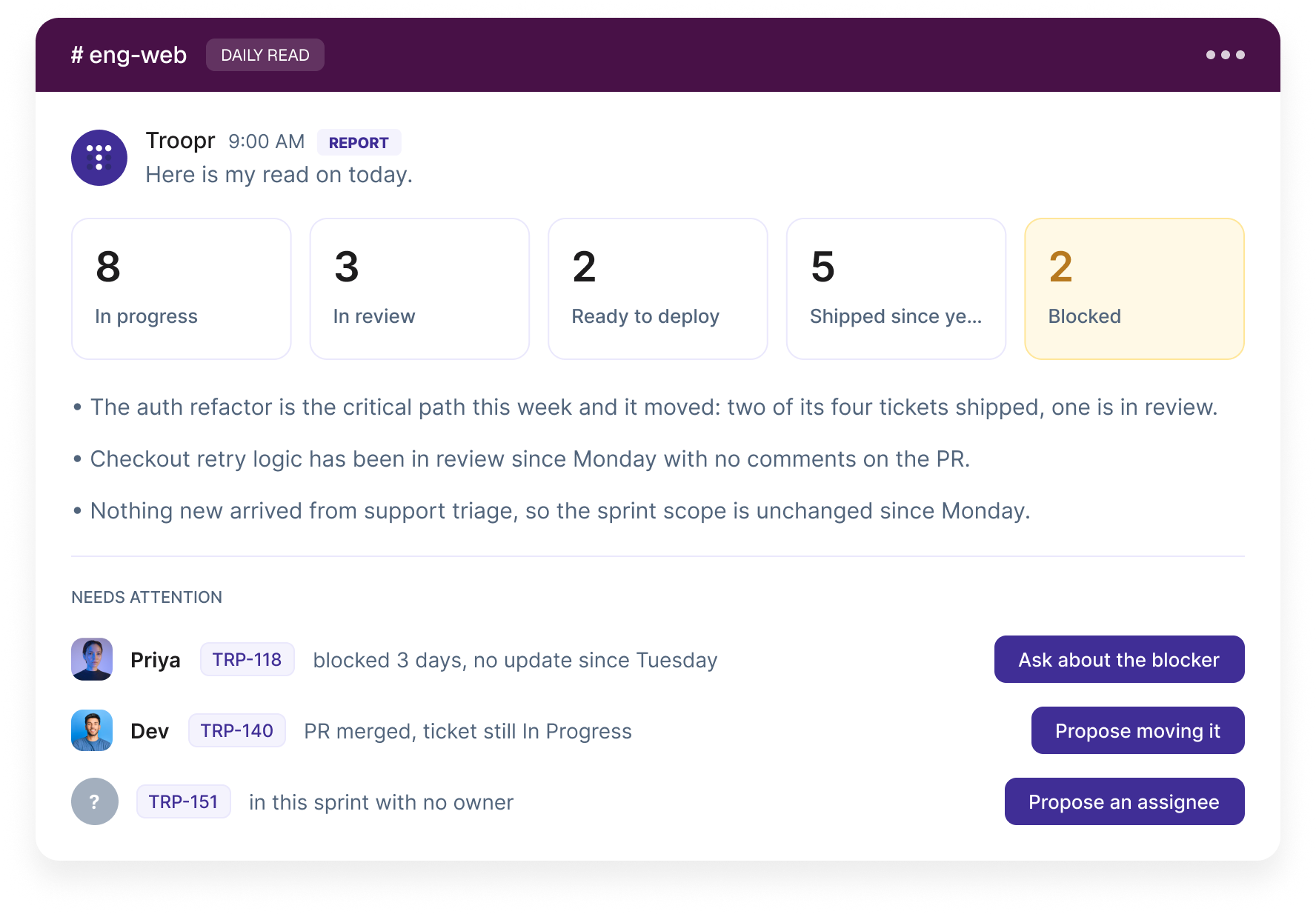
- A daily read instead of a status meeting. Each morning the team channel gets what's in progress, in review, ready to deploy, shipped since yesterday and blocked, plus a needs-attention list that names specific people and items, each with a suggested next step.
- Jira kept current without data entry. When a pull request merges and its ticket still says In Progress, Troopr proposes the move to whoever owns the work. Nothing is written until they confirm, the change is checked against Jira's live state first, and it runs under their own Jira login.
- Routines in plain language. A routine is a standing instruction in plain English, and it's one of three types: a report reads Jira and changes nothing, a nudge asks one person about their own work, and a proposal offers a change the owner confirms. Any routine can be a watch that stays "Silent unless something is wrong."
Also included: live standup capture on Google Meet, Zoom and Microsoft Teams, cross-referenced against Jira and GitHub; Task It, which turns any Slack message into a Jira issue with the title, description, priority and suggested assignee filled in; bidirectional Slack and Jira sync for threads and channels; retrospectives, planning poker and team mood check-ins; and Ask Troopr for questions like "what shipped this week?", answered from the team's real activity. See the Slack and Jira integration for the full list.
Proof: Netflix's distributed engineering teams moved weekly syncs and retros into async check-ins and act on Jira issues from Slack. They report ~82% less time in status-update meetings and ~67% less time finding and updating Jira issues (Netflix and Troopr). Wayfair had built its own Slack and Jira bots first, then replaced them with Troopr once maintaining them pulled engineers off the product. By Wayfair's internal estimate, that's ~380k engineering hours a year reclaimed across the teams using Troopr (Wayfair and Troopr).
Security: SOC 2 Type II, ISO 27001 and GDPR. Troopr doesn't train on customer data, keeps distilled facts rather than raw messages, and no model writes anything without a person confirming it (Troopr security).
Pricing: Free for 10 seats with every feature, no credit card. Standard is $6 per seat/month billed annually ($8 monthly). A seat is only someone who takes action, so people who just read the daily read are free (Troopr pricing).
Start for Free or Book a Demo.
Jira Cloud for Slack (Atlassian's official app)
What it is: Atlassian's own free app that brings Jira Cloud into Slack. It sends personal Jira notifications to your DMs, subscribes a channel to a Jira space, and lets people create, update and assign work items in plain language from any channel. It turns a Slack message into a work item with Rovo filling in the details, syncs a Slack thread as comments on a work item, shows a live, editable card when someone pastes a link or a key, and lets people comment, transition or assign from a notification.
Best for: every team on Jira Cloud and Slack. It's free and built by Atlassian, so most teams should have it installed (Atlassian Marketplace listing).
Worth knowing: it acts when someone asks it to. It doesn't write the standup or notice on its own that a ticket is behind its pull request. Many teams run it alongside Troopr, which does that part.
Pricing: free.
Geekbot
What it is: async standups, polls and surveys that people answer in Slack or Microsoft Teams, with the answers collected into a report.
Best for: teams that want a simple written standup and don't need it tied to their tracker.
Worth knowing: each person still writes their own update, and the Jira integration sits on the Enterprise plan.
Pricing: Starter is free for teams of up to 10 users with 3 months of history. Basic standups cost $2.50 per participant/month billed annually ($3 monthly). Enterprise goes through sales (Geekbot pricing).
For a deeper look at replacing the meeting itself, see our guides to status meeting alternatives and async standups.
Should you build coordination bots yourself?
Plenty of engineering teams try. A bot that posts a Jira filter into a channel is a small project. The cost is everything after it ships: someone has to own it, patch it when Slack or Atlassian changes an API, and fit it around roadmap work that never budgets for it. That's the path Wayfair took before switching. Build your own only when the need is narrow and won't change, like one scheduled post from one filter.
Which stack fits your team
- Up to 10 engineers on GitHub, Jira and Slack. One coding assistant per developer (Copilot Pro at $10 a month, or a Claude or Cursor plan), GitHub Actions within its included usage, and Troopr's Free plan, which covers all 10 seats. For 8 developers on Copilot Pro that's $80 a month in total, with coordination at $0.
- 10 to 100 engineers across several teams. Add CodeRabbit when pull requests start waiting for a first review, and move coordination to Troopr Standard. Seats count only people who act, deduplicated across teams, so 40 engineers who update Jira and answer check-ins cost $240 a month billed annually, and the product managers and executives who only read stay free.
- Enterprise, often on Jira Server or Data Center, with security review first. Copilot Business or Enterprise run $19 or $39 per seat/month, and Cursor Enterprise goes through sales. Troopr runs on Jira Cloud, Server and Data Center, and Netflix's engineering team picked it because it was "cleared by our internal security team" and worked with their hosted Jira server.
How to tell whether a tool is working
Measure the slice a tool targets before you roll it out, and again a month later:
- Writing and reviewing: how long a pull request takes from opened to merged, and how long it waits for its first review.
- Shipping: DORA's delivery metrics, such as change lead time, deployment frequency and change fail rate.
- Coordinating: hours a week each person spends in standups and status meetings, and how long tickets sit in In Progress after their pull request merged.
Then ask the team. In Atlassian's survey, 63% of developers said leaders don't understand their pain points, up from 44% a year earlier. A tool your developers didn't ask for rarely gives anyone their week back.
Frequently asked questions
What are developer productivity tools?
Developer productivity tools give engineers back time or attention. They fall into three groups: tools for writing code (AI coding assistants and editors), tools for reviewing and shipping it (AI code review and CI/CD), and tools for coordinating the work around it (standups, status updates and keeping the tracker current).
What are the best developer productivity tools in 2026?
For writing code, GitHub Copilot, Cursor and Claude Code. For reviewing and shipping it, CodeRabbit and GitHub Actions. For coordinating the work, Troopr, which writes each person's standup from their Jira and GitHub activity and keeps Jira current, alongside Atlassian's free Jira Cloud for Slack app.
How can engineering teams increase developer productivity?
Find the slice of the week that's losing time before buying anything. Coding is about 16% of a developer's time in Atlassian's 2025 survey, so the biggest gains usually come from cutting coordination work: status meetings people only listen in on, standups people type by hand, and tickets someone has to update after the code already shipped.
Do AI coding tools actually improve developer productivity?
Yes, on the coding slice. Bain puts the gain from AI coding assistants alone at 10 to 15%, rising to 25 to 30% when companies also change the process around them. In Atlassian's survey, 68% of developers save more than 10 hours a week with AI, but half lose more than 10 hours a week to organizational friction.
What is the difference between developer productivity and engineering productivity?
Developer productivity usually means one engineer's output and experience: how fast they can write, review and ship code. Engineering productivity is the team view: delivery speed, quality, and how much of the week goes to coordination instead of building.
Are there free developer productivity tools?
Yes. GitHub Copilot Free includes 2,000 completions a month, CodeRabbit and GitHub Actions are free for public repositories, Jira Cloud for Slack is free, Geekbot's Starter plan covers up to 10 users, and Troopr's Free plan covers 10 seats with every feature and no credit card.


The AI project manager for engineering teams. Forms its own view of the work and does the coordination, right where your team already works.
2035 Sunset Lake Road, Suite B-2, Newark, DE 19702, United States.