

Jira notifications in Slack: set them up, filter them, and stop the noise (2026)
.png)
Run /jira notify in Slack for your own Jira notifications, /jira connect in a channel for the team's, and open Jira space settings when you need JQL precision. That takes ten minutes. Getting notifications into Slack is the easy part. Tightening them so people keep reading is where most teams go wrong.
$6 per seat/month. Everything included. Free for 10 seats. No credit card.
Last verified September 2026 against Atlassian's Get Jira notifications in Slack documentation and docs.troopr.ai. The notifications section of our complete Jira and Slack setup guide covers the wider integration; this page carries the depth.
.png)
The same Slack channel and the same hour of Jira activity under three subscription settings: every event as 22 messages, a JQL filter as 9 messages, and an hourly digest grouped by issue as 1 message.
Why do Jira email notifications get missed?
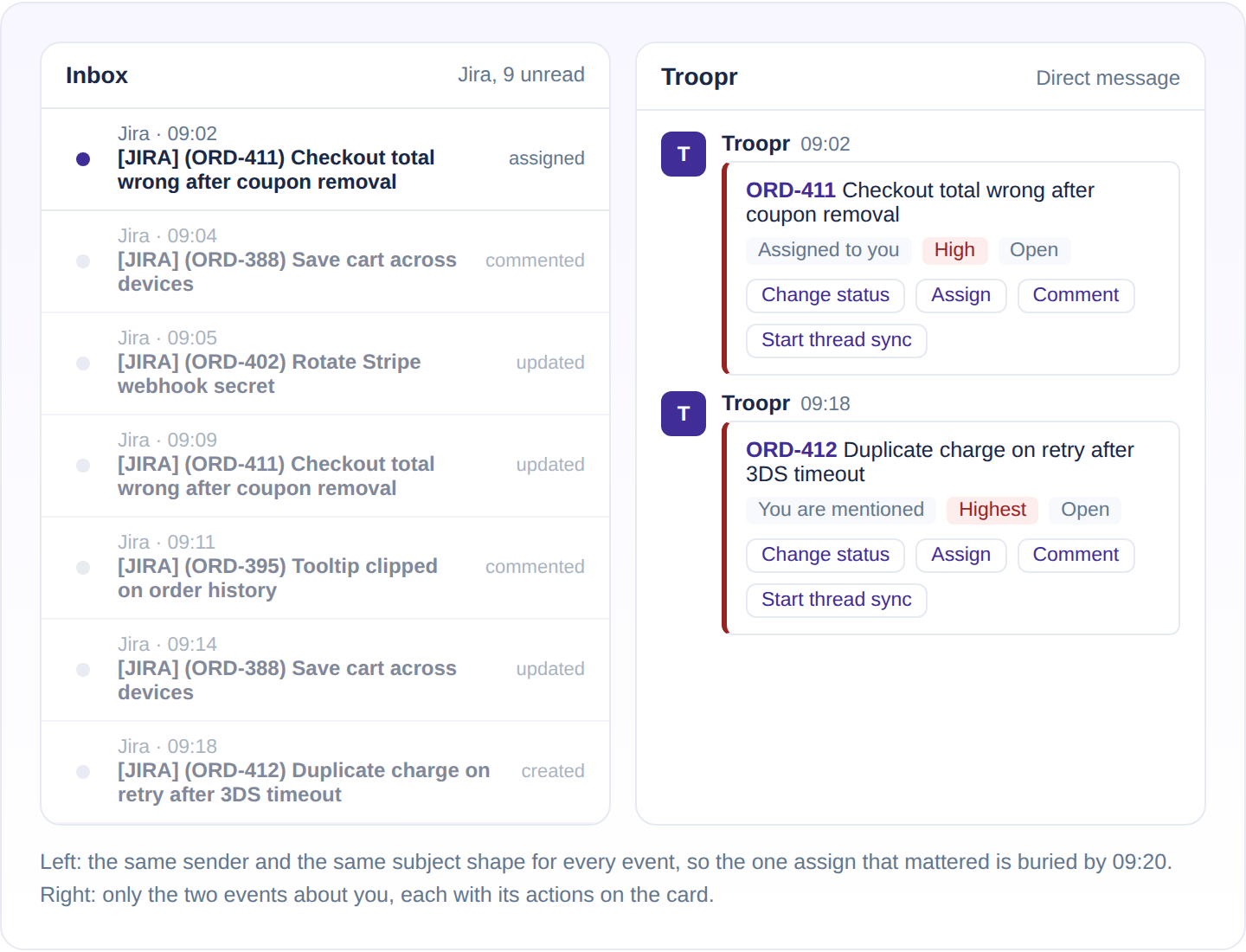
Jira email is one person's feed of everything they ever touched. A watch set in March, a comment on a ticket reassigned in June, and today's P1 arrive with the same subject shape from the same sender, so after a week the Jira filter gets muted and the one assign that mattered goes with it. Email also has no room to act: you can read that a status changed, but you cannot transition or reassign without leaving the inbox. Slack fixes both problems, provided the stream stays readable. A channel that mirrors every event in a project is a louder inbox with a different logo.
Bringing Jira work into Slack pays back in focus. Roku's engineering teams reduced Slack to Jira context switching by about 45% with Troopr, about 1.8 focused hours per engineer per day.
The rest of this page is about keeping the stream readable: what Atlassian's own app gives you, how to scope notifications to one person or one channel, how mentions work, how Troopr's subscription model differs, and how to keep a busy project from turning its channel into a firehose.
How do I set up Jira notifications in Slack?
Atlassian's Jira Cloud for Slack app handles personal and channel notifications, and personal ones are on by default the moment you connect your Atlassian account. The steps below cover Atlassian's app. Troopr takes over when a channel needs more control than the app gives it.
Personal notifications with /jira notify
Open a DM with @Jira, or any channel the bot has joined, and type /jira notify. Pick Essentials or All. Essentials covers work assigned to you, mentions, comments on your work items, and status changes on items you watch, which is the right default for almost everyone. Narrow further by space, work type, or priority if you need to. Each DM shows the title, status, priority, assignee, and what changed, with actions on the card.
Channel notifications with /jira connect, and from Jira space settings with JQL
In the channel, type /jira connect, choose the Jira site and space, then filter by work item type, priority, and event type. For anything the picker cannot express, start from Jira: open the space, choose More actions, then Space settings, then Notifications, and under Connect to Slack select Get started. Space admins can choose a basic or extended card format there and add JQL-based advanced filtering. Later, /jira manage in the channel lists every subscription with options to update its filters, pause it, or disconnect the space. The rest of the official app's slash commands, and Troopr's /t equivalents, are in our Jira Slack commands reference.
Everything above is Jira Cloud. Self-hosted teams use Atlassian's separate Slack for Jira Data Center app for notifications, and Troopr connects to Jira Cloud, Server, and Data Center on every plan.
Turn Jira email off once Slack works
Atlassian's own setup guide suggests it, so repeat it to your team. Once Slack is receiving personal notifications, open Jira Settings, then Notification settings, and switch off "Send me emails for work item activity." Two copies of every assign is how people end up muting both.
Which Jira notifications belong in a channel, and which belong to a person?
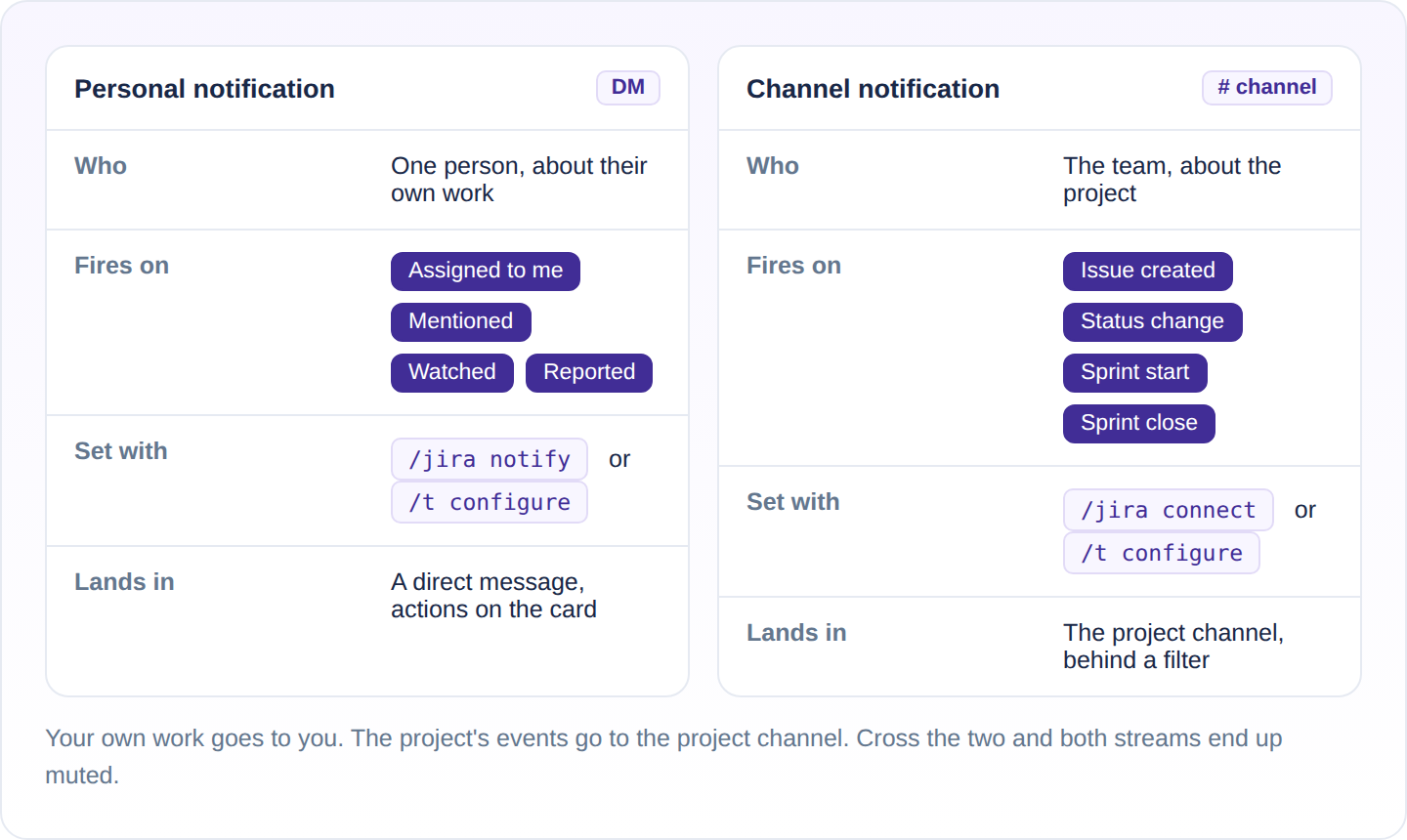
The split that keeps both streams readable is simple. Anything about your own work is a personal notification: assigned to you, a mention, a comment on an item you reported or watch. Anything the whole team needs to see at the same moment is a channel notification: a new bug in the project, a status change on the board, a sprint starting or closing. When a channel subscription carries personal events, everyone reads everyone else's assignments and the channel gets muted. When personal DMs carry project-wide events, the person gets the whole project in their inbox and the DM gets muted.
Set channel subscriptions for team events with a filter tight enough that each message is worth reading, and let personal notifications carry the rest. Troopr enforces the split from its side too: if a channel you belong to already carries an event, you do not get the DM for it as well.
How do I get Jira notifications for only my tickets?
The answer depends on the app.
With the official app, do not try to make a shared channel personal. /jira notify with Essentials already limits your DMs to work assigned to you, mentions, comments on your items, and status changes on items you watch, and a space filter narrows it further. A channel subscription belongs to the whole channel.
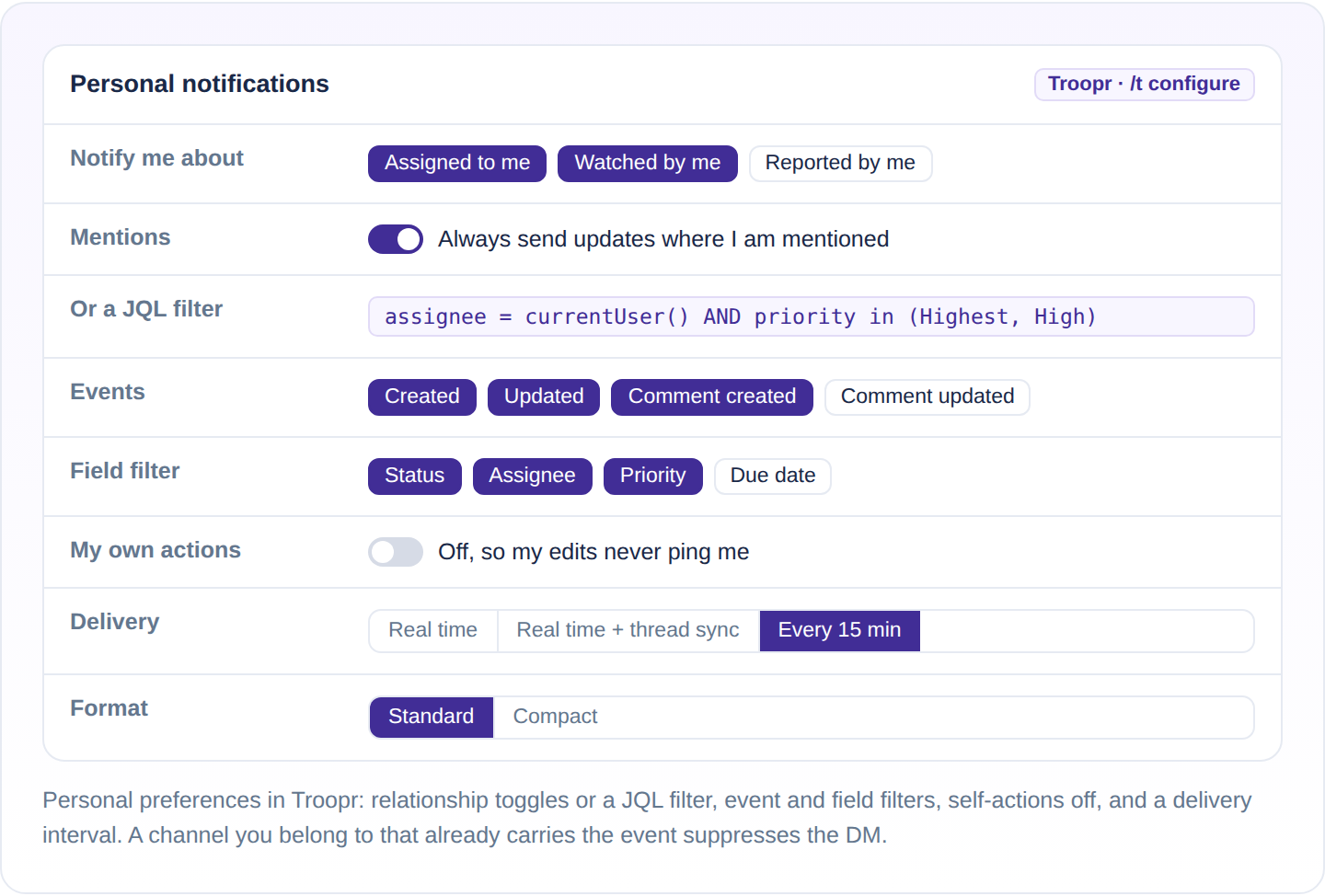
With Troopr, open your personal notification settings from the Troopr App Home in Slack, or from the preferences link on any Troopr notification. Turn on any of assigned to me, watched by me, and reported by me, or replace the toggles with a personal JQL filter such as assignee = currentUser() AND priority in (Highest, High). Add event and field filters when only some changes matter, and switch off self-actions so your own edits never ping you. Delivery is real time or batched, in standard or compact format. If a channel you belong to already carries the same event, Troopr skips the DM rather than telling you twice.
How do I turn Jira notifications off in Slack?
There are six levers.
- Run
/jira notifyagain to narrow what triggers a DM: switch from All to Essentials, or add a space, work type, or priority filter. The prompt sets what arrives, not whether anything does. - Run
/jira unsubscribeto stop receiving notifications you no longer want, as Atlassian's command list describes it. - Run
/jira managein the channel to pause a subscription, edit its filters, or disconnect the space, which takes that space's notifications out of the channel. To stop one kind of message, such as status changes, take that event type out of the subscription's filters and leave the rest running. /jira logoutsigns you out but leaves channel subscriptions running, so it is not an off switch for the channel.- Mute the @Jira DM in Slack to silence personal notifications, or mute the channel when the subscription is right for the team and wrong for you.
- On the Troopr side, every notification footer carries a preferences link, and a channel admin can pause, edit, or delete a subscription from
/t configurewithout losing its settings.
Troopr also posts a short transparency message in the channel whenever someone configures alerts there, so nobody has to guess where a stream came from.
How do Jira mentions work in Slack?
A mention is the notification people least want to miss and most often lose in email. In Slack, the official app's Essentials set includes mentions, so a DM from @Jira arrives whenever someone @-mentions you on a work item.
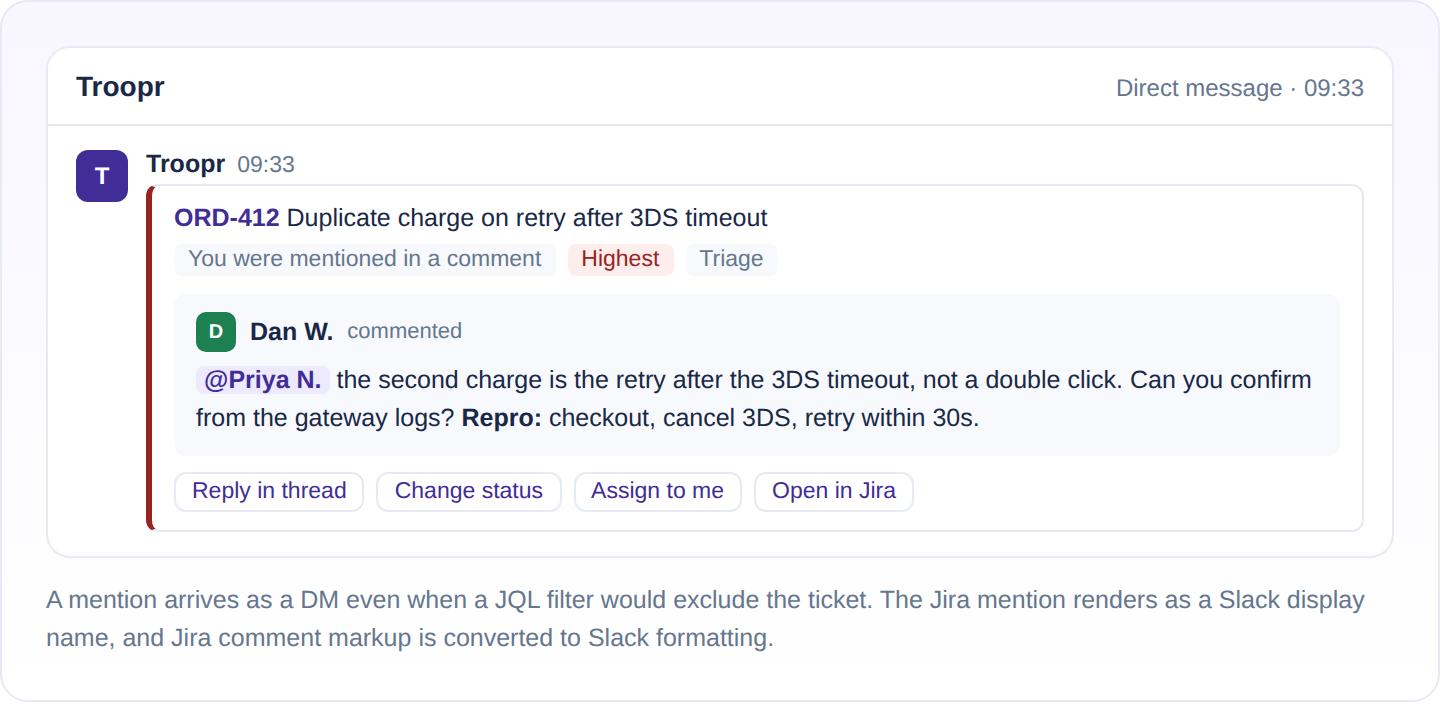
Troopr treats mentions as their own class. Personal notifications have an always-send option for mentions, so mentions keep arriving even with the other relationship toggles off. In the message, Jira mentions render as Slack display names with avatars, and Jira comment markup converts to Slack formatting.
Can Jira Automation send notifications to Slack?
Yes, without the Jira Cloud for Slack app. A Jira automation rule with the Send Slack message action posts through an incoming webhook that you create in Slack and paste into the action. It can post to a private channel, or to one person by their Slack member ID, which is not their display name (Atlassian, Use Slack with Automation).
The trigger decides what the alert is about. Work item transitioned fires when an item moves from one status to another, so a rule can post only when work moves into Triage. Scheduled runs at a fixed rate or on a cron expression and can take a JQL query, so a rule can post the open blockers every weekday morning (Atlassian, Jira automation triggers). The message is yours to write in the action, with smart values for the work item's fields.
Our Jira Slack automation guide has the steps, six rules worth copying and the cost math. When one channel needs several of these alerts, a single Troopr subscription carries the transition condition, the JQL, the batching and the format, as the section below shows.
How does Troopr handle Jira notifications in Slack?
Troopr is the AI project management agent for engineering teams. It reads the team's real Jira, GitHub and Slack activity, forms its own view of what is happening, and does the coordination that would otherwise fall to a manager, including keeping Jira current through changes the owner confirms. Notifications are one of its plainer jobs, and the reason they are worth a section is the subscription model underneath them.
Any Slack channel can carry any number of subscriptions. Each one covers one or more Jira projects, and one project can feed several channels with different rules, so #bug-triage and #engineering can watch the same project and hear completely different things. Every subscription has four parts, and every part is set independently.
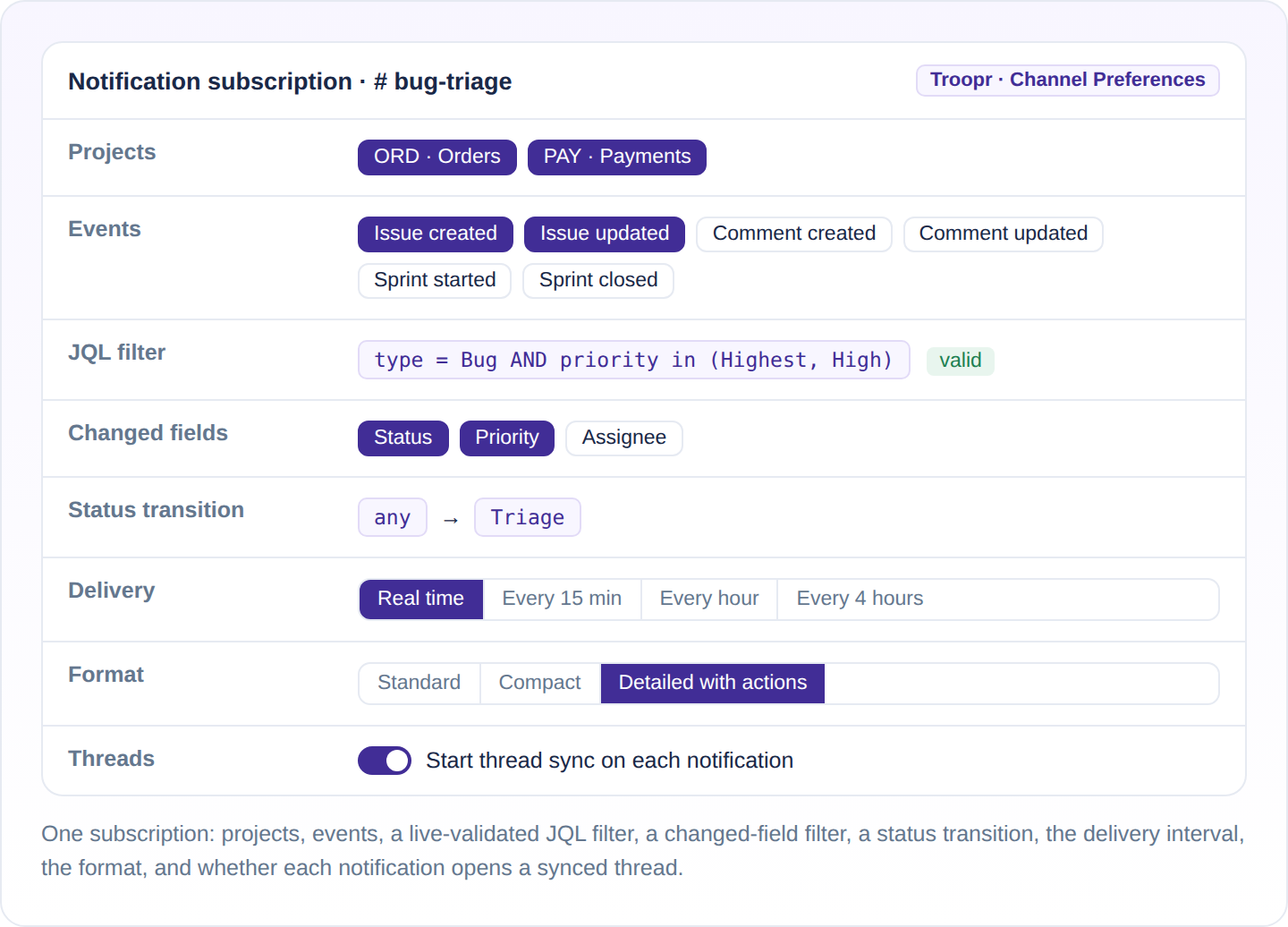
Events you can subscribe to
Issue created, issue updated, comment created, comment updated, sprint started and sprint closed. A subscription can carry any combination, so a release channel can hear about sprints and nothing else, and a triage channel can hear about new issues and nothing else.
Filters: JQL, changed fields and status transitions
Three filters, all on the same subscription. A JQL query, validated against Jira as you type it, so a typo fails in the editor rather than silently matching nothing. A changed-field filter, so an update fires only when a field you care about moved. And a status transition condition, from any status or a specific one to a specific status, which is how a channel hears about a Bug moving into Triage and nothing else about that Bug. The three stack, so "Bugs at High or Highest, when status moves to Triage" is one subscription rather than a compromise.
Delivery: real time or batched, grouped by issue
Real time, or batched every 1, 5, 15 or 30 minutes, or every 1, 2, 4, 6 or 12 hours. A batch groups its events by issue and pages when it is long, so twenty transitions at standup arrive as one message that reads as a list of issues, each with what changed, rather than twenty cards. Duplicate suppression covers retries and mirrored events, so a change that Jira reports twice appears once.
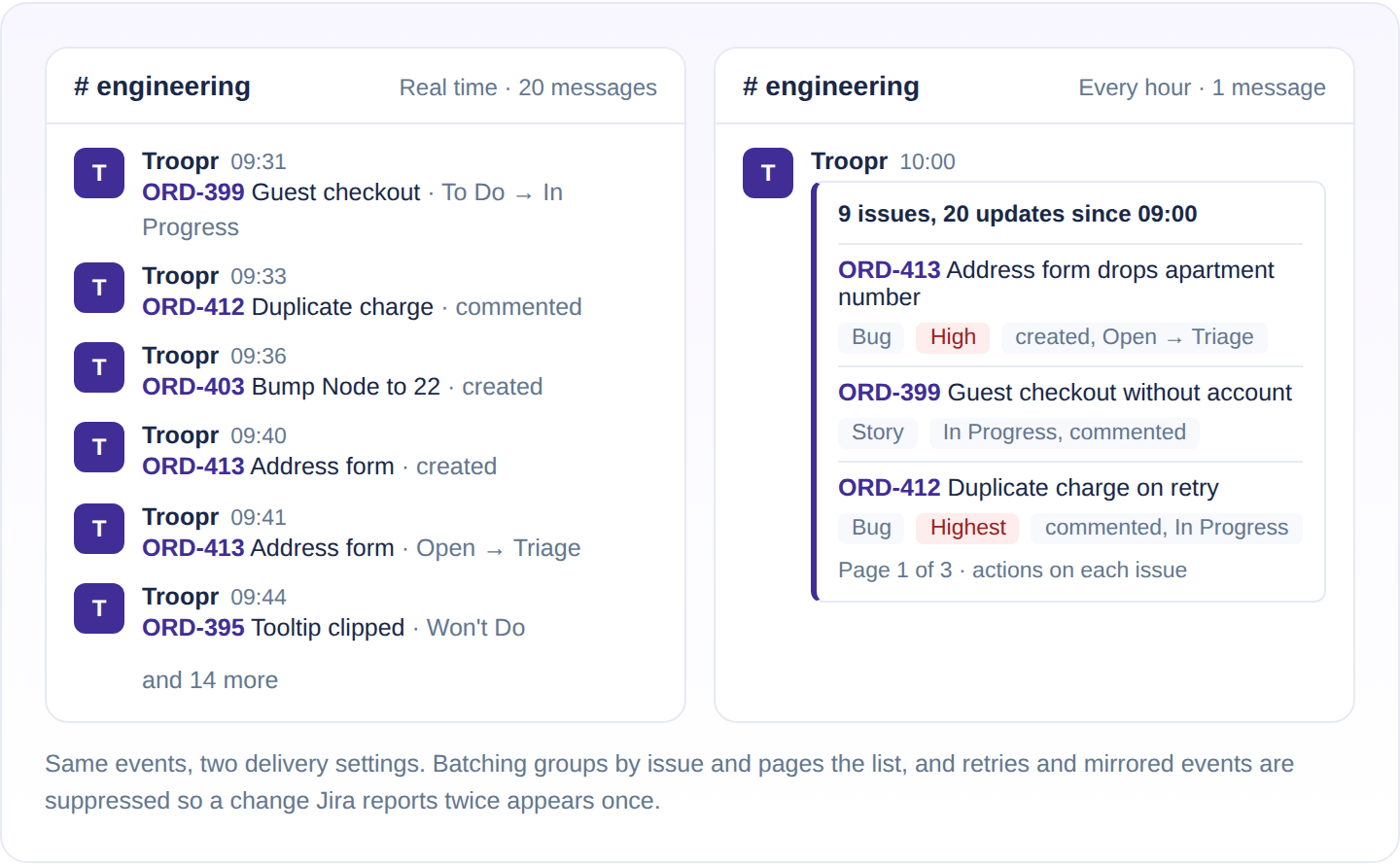
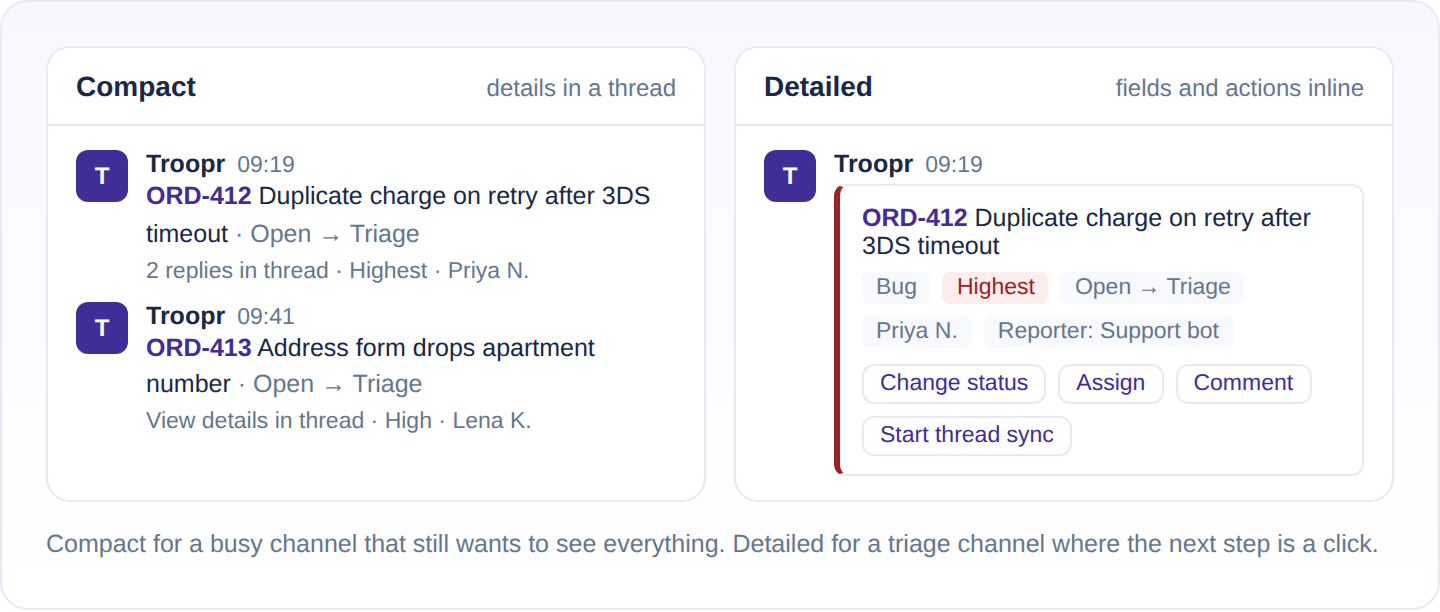
Formats: standard, compact and detailed
Standard shows the card. Compact keeps the card small and puts the details in a thread, which is the right setting for a busy channel that still wants to see everything. Detailed puts fields and actions inline, which is the right setting for a triage channel where the next step is a click. Beyond the three formats you can truncate summaries, collapse the message, hide the card, show or hide the last update, and add a footer message.
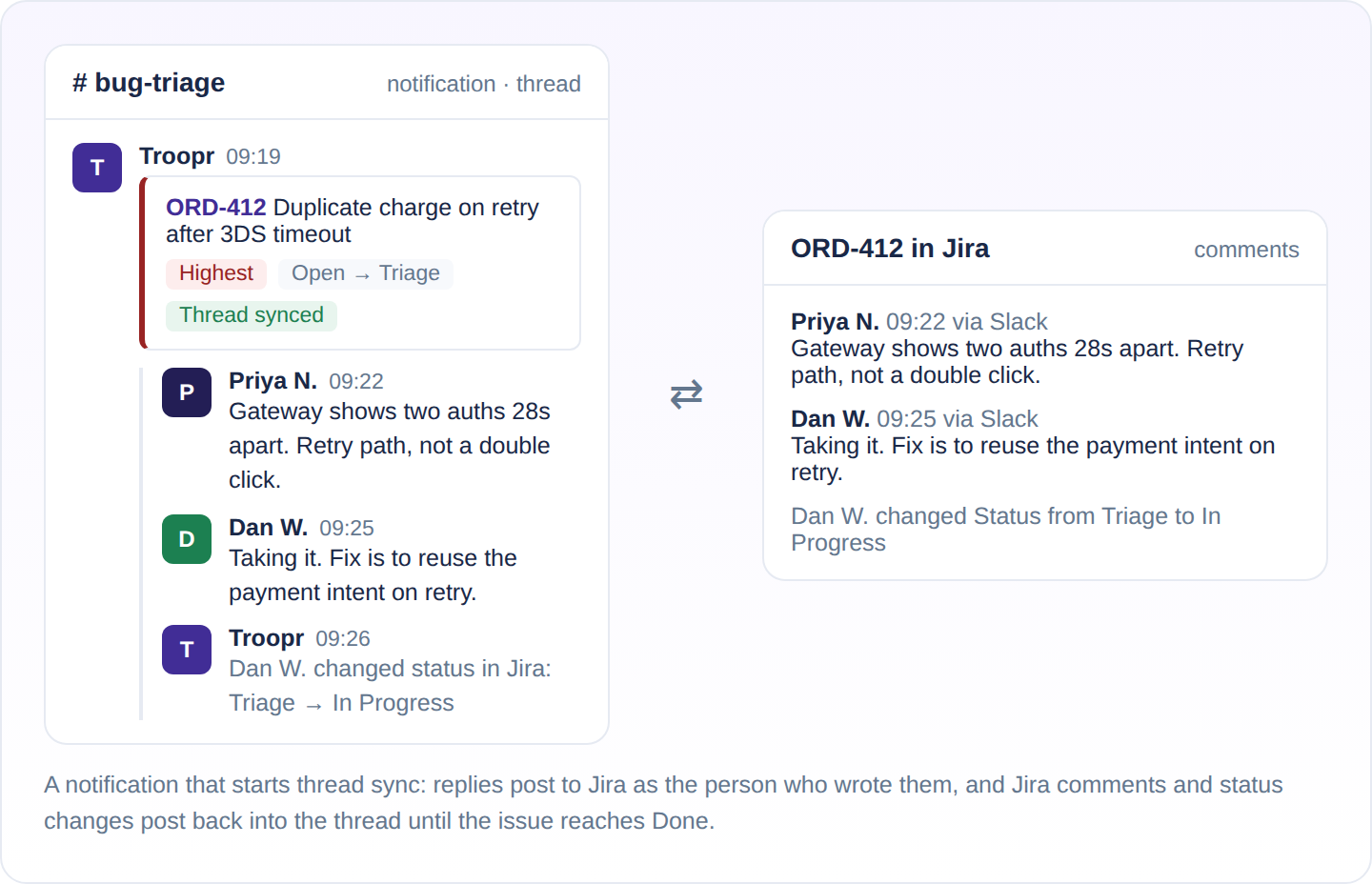
A notification that opens a synced thread
A subscription can post each notification as a threaded message, or start thread sync on it, so a real-time notification becomes a live synced thread: replies in Slack post to Jira as comments as the person who wrote them, Jira comments and status changes post back into the thread, and files move both ways. The conversation about the bug happens under the bug and ends up on the ticket. The sync ends on its own when the issue reaches Done.
Sprint notifications with a velocity chart
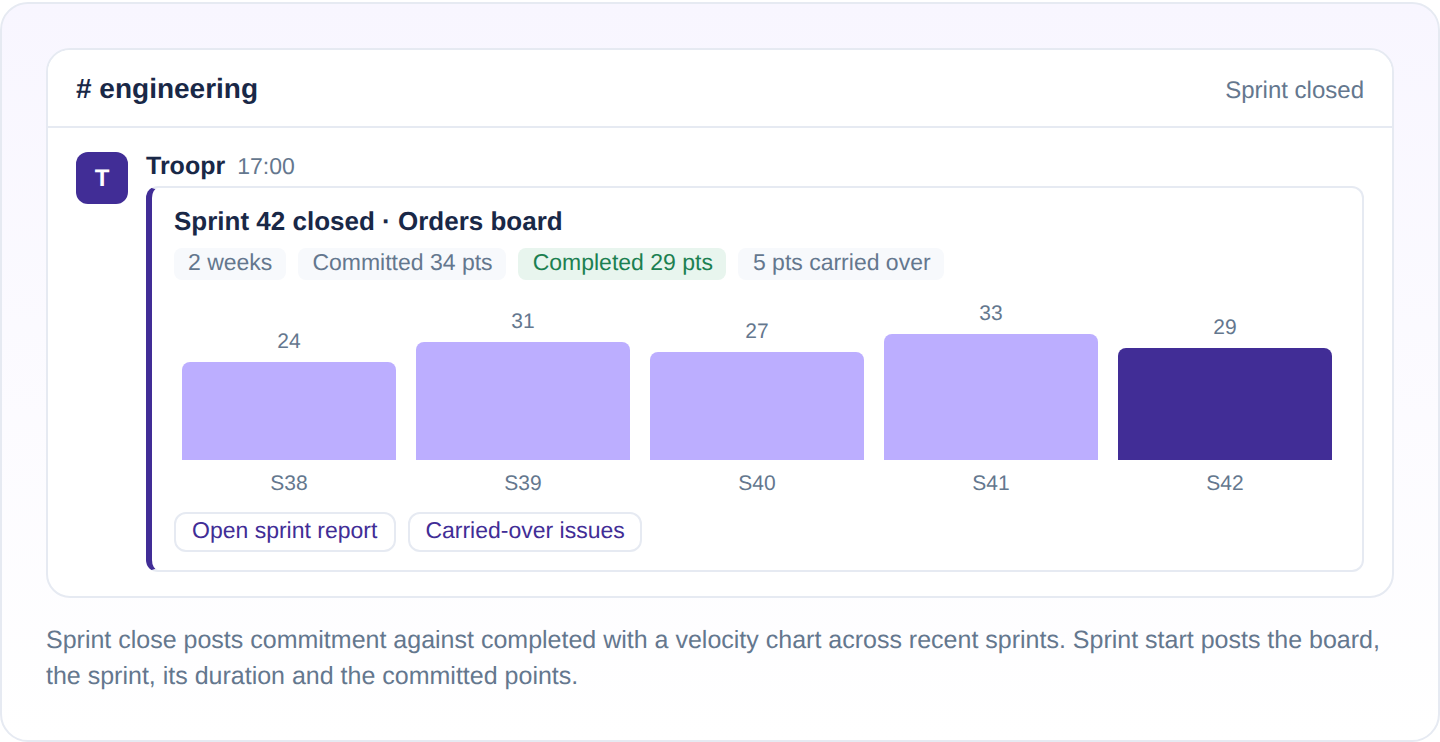
Sprint start posts the board, the sprint, its duration and the committed story points. Sprint close posts commitment against completed and draws a velocity chart, so the retrospective has its first slide before anyone opens Jira.
Personal notification preferences
Personal notifications are evaluated on every event for the assignee, the reporter, watchers and mentioned people. You choose which of those relationships reach you, or replace the toggles with a personal JQL filter, and you can narrow further by event and by field. A self-actions toggle stops your own edits from pinging you. Delivery is real time, real time with a synced thread, or batched, in standard or compact format. Admins can set the defaults on behalf of newly verified users, and every notification carries a preferences link so nobody has to ask where the setting lives.
Emoji markers: the quieter signal
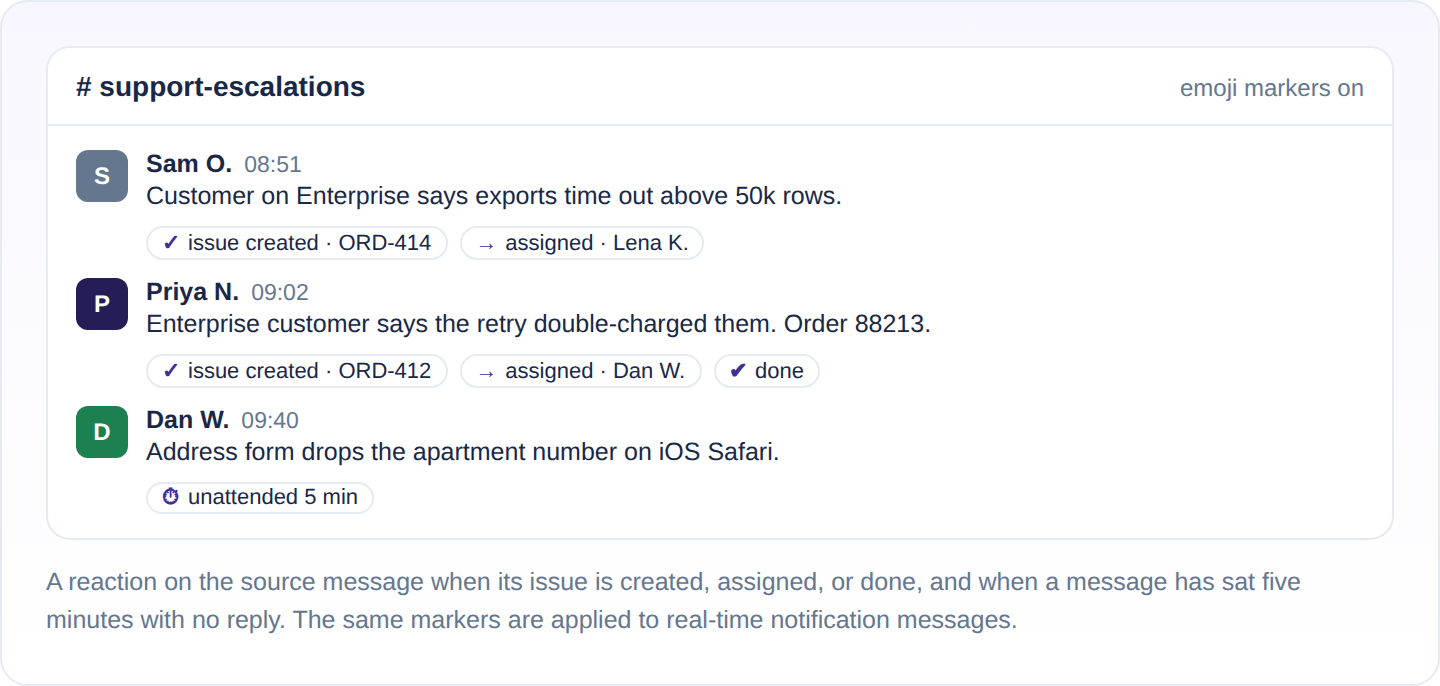
When a message is too much, a reaction on the source message is enough. Per channel you can mark the message when its issue is created, when it is done, when it is assigned, and when the message has sat unattended for five minutes. Done is detected from the statuses or resolutions you choose. The same markers are applied to real-time notification messages, so a glance at the channel shows which reports became tickets and which of those are closed.
Admin controls
A channel admin sets subscriptions from /t configure or from Channel Preferences in the web app, and can enable, pause, edit or delete each one. A transparency message is posted in the channel when alerts are configured. Every notification Troopr sends is written to a per-workspace notification log, and Jira user mentions inside them are translated to Slack display names. People without a Jira licence take part through guest facilitation, acting through an account the admin authorises and attributed to them. Notifications are not metered on any plan; Free covers them without limit.
How do I stop the channel becoming a firehose?
Start with the JQL. Atlassian's space-settings filter can pin a channel to one board, one work type, or one priority band.
When a tight query still produces a stream nobody reads, the problem is shape rather than volume, and this is where Troopr's subscription model does its work. Twenty transitions at standup become one grouped message. A #bug-triage subscription can fire only when a Bug moves into Triage, in real time and in detailed format, opening a synced thread on each one so the conversation lands on the ticket. Every issue in a notification keeps its triage buttons, and every action runs as you through your own Jira connection. The whole two-way surface, including channel sync and Task It, is on the Slack Jira integration that syncs both ways.
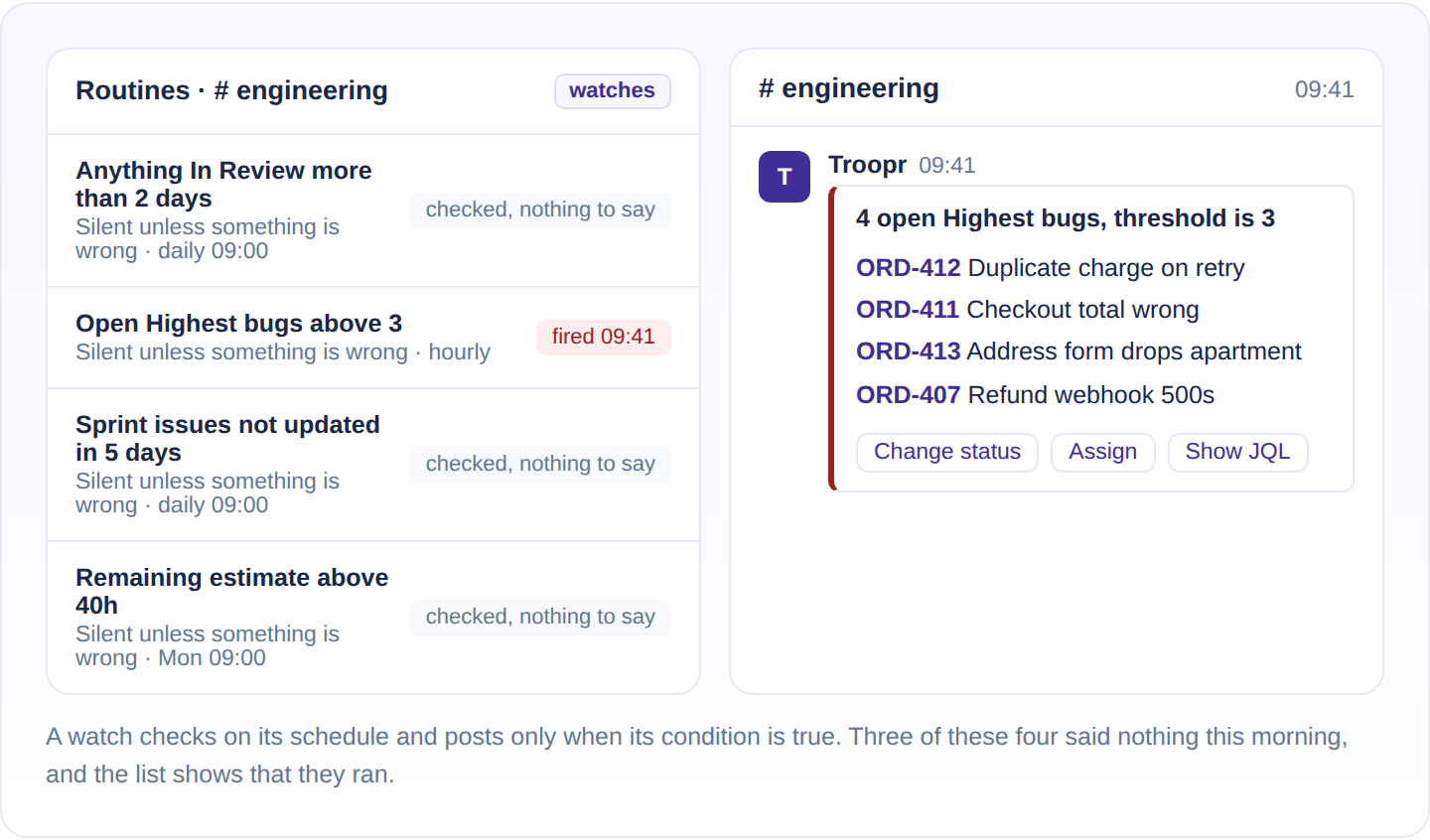
The last lever is not a notification at all. A routine in Troopr Routines is a standing instruction in plain language, and any routine can be set as a watch: it checks on its schedule and posts only when its condition is true. "Tell me if anything in the sprint has been In Review for more than two days" says nothing on a good week. Silence is the signal, and the routine's last result still reads "checked, nothing to say", so a quiet watch is visibly working rather than visibly broken. Watch conditions include an issue count against a threshold, the sum of a numeric field against a threshold, issues not updated in a number of days, and any JQL. At Yahoo, managers on the process-automation team got back about 3.8 hours a week of meeting logistics once their check-ins went async, and the unglamorous precondition for that is channels nobody has muted.
What can't the official Jira Slack app do with notifications?
The official app filters with JQL from space settings and puts actions on the card. For notifications, Atlassian's documentation stops at three points.
No digest.
Atlassian's notification documentation lists no digest or batching interval, so every event arrives as its own card.
No status-transition condition on the subscription.
The documented filters are work item type, priority, event type, and JQL. A condition such as "only when a Bug moves from Open to Triage" is not among them.
A notification does not become a synced thread.
The card lets you comment, transition, assign, or watch, and Atlassian's notification documentation has no option to open a synced thread from it. Troopr's synced thread mirrors comment edits and deletions, attachments, formatting, and mentions in both directions, posts a change line when a status or field changes in Jira, and lets each channel set the direction: two-way, Slack to Jira only, or Jira to Slack only.
That is the complete list for notifications. The full comparison, including creation, custom fields, and guests, is on Troopr vs Jira Cloud for Slack.
What should each channel subscribe to?
| Channel | Events | Filter | Format | Cadence |
|---|---|---|---|---|
| #engineering | Issue created, sprint started, sprint closed | Team board's project; work type in (Story, Bug) | Compact, details in thread | Batched hourly |
| #bug-triage | Issue created, issue updated | Type = Bug; transition any to Triage; priority in (Highest, High) | Detailed with actions; synced thread on create | Real time |
| #releases | Sprint closed, issue updated | fixVersion in unreleasedVersions(); transition to Done | Compact | Batched every 4 hours |
| Personal DM | Assigned, watched, reported, mentioned | Personal toggles or JQL; self-actions off | Standard | Real time; mentions always |
Start with fewer events than you think and add on request; removing a subscription people have learned to ignore is harder than adding one they asked for. Where the bug report itself starts in Slack, the thread can become the ticket, and how to create a Jira ticket from Slack covers every method.
Why are my Jira notifications not showing up in Slack?
With Atlassian's app, five causes cover most cases: @Jira is not in the channel, the subscription leaves the event out, your personal setting is Essentials, the integration is off for the Jira site, or the work item has work-item-level security. With Troopr, six causes cover almost every case. Atlassian's side is from its Integrate Jira Cloud and Slack and Get Jira notifications in Slack documentation.
With Atlassian's Jira Cloud for Slack app
@Jira is not in the channel. A private channel gets nothing until someone invites @Jira to it.
The subscription leaves the event out. A channel subscription posts only the event types its filters include, so one without updates or comments stays quiet when a work item changes status or gets a comment. Run /jira manage in the channel and check the event types.
Your personal setting is Essentials. Essentials sends status changes only for work items you watch. Watch the item, or switch to All with /jira notify.
The Slack integration is off for the Jira site. A Jira site admin has to enable it before anyone can connect, and the message "Connecting with this Jira Cloud instance was disabled by administrator" means it is still off.
The work item has work-item-level security. Atlassian's app sends no Slack notifications for work items with security restrictions applied.
With Troopr
The person has not verified their Jira account. Personal notifications follow each person's Jira identity, so someone who has not verified connects Jira from the App Home, the launcher or the web app. An admin can send verification reminders to one person or a whole channel.
The event is already covered by a channel. If a channel you belong to carries the event, Troopr skips the DM by design. Check the channel before assuming the DM failed.
The subscription's JQL excludes the issue. The filter is validated for syntax, not for intent. Run the same query in Jira and see whether the issue is in the result.
The webhook is not registered. Troopr registers Jira webhooks for created, updated, comment and sprint events when the connection is made, and shows a status card with a copyable URL, an event checklist and a Verify button for the manual path. If the card shows events missing, add them in Jira.
The person cannot see the project in Jira. Troopr respects every Jira project, issue-type, and field permission, so check the person's access in Jira before debugging Slack.
Delivery is batched. A subscription or a personal preference set to every hour will hold the event until the window closes.
Can Jira send notifications to Microsoft Teams?
Yes. Atlassian's Jira Cloud app for Microsoft Teams sends personal notifications to your chat with the app, where typing Notifications sets and adjusts them, and channel notifications once the app is added to a team or channel and you run @Jira Notifications, filtered by space. You can also start from Jira: your avatar, then Notifications, then Space and work item notifications. Jira Automation's Send Microsoft Teams message action posts rule-driven alerts without the app.
Troopr runs in Microsoft Teams as well as Slack, delivering standups, routines, and proposals into team channels. The subscription controls on this page are Troopr's Slack surface.
Frequently Asked Questions
Does Jira integrate with Slack?
Yes. Atlassian's Jira Cloud for Slack app, which is free, connects a Jira Cloud site to a Slack workspace for notifications, previews, creation, and card actions. Troopr is a second layer on top: batching, per-channel JQL and transition filters, notifications that open as synced threads, and channel sync that pairs a Slack channel with a Jira project.
How do I add notifications in Slack?
For Jira, type /jira notify in a DM with @Jira for personal ones, or /jira connect in a channel for the team's. With Troopr, run /t configure in the channel, choose Notification Settings, and add a subscription with events, filters, delivery, and format.
How to set up Jira notifications?
Personal notifications are on by default once you connect your Atlassian account in Slack; /jira notify changes what triggers them. For a team, connect the channel with /jira connect or from Space settings, then Notifications, then Connect to Slack. Then turn off "Send me emails for work item activity" in Jira so nothing arrives twice.
How do I get Jira notifications in a Slack channel?
Type /jira connect in the channel and pick the space, or start from the space's settings in Jira for JQL filtering. With Troopr, run /t configure in the channel and add a subscription: choose the project, the events, a JQL or status-transition filter, the delivery interval and the format.
Can Jira send notifications to Teams?
Yes, through Atlassian's Jira Cloud app for Microsoft Teams, which handles personal and channel notifications, and through Jira Automation's Send Microsoft Teams message action. The steps are in the section above.
Can I get Jira notifications in Slack without Troopr?
Yes. Install Jira Cloud for Slack, keep the default personal notifications, and connect your project channel. Troopr is the layer you add when the stream needs batching, transition filters, or a thread that stays synced with the ticket.
How do I stop missing Jira email notifications?
Move them. Put personal notifications in Slack DMs, put project events in the project channel behind a tight filter, and disable Jira's work item emails. If the channel still floods, batch it and filter by status transition.
What is the difference between official Slack notifications and Troopr?
Both deliver personal and channel notifications with actionable cards and JQL filtering. Troopr adds delivery intervals from one minute to twelve hours with grouping by issue, a status-transition condition on the subscription, and a synced thread spawned from the notification that mirrors comment edits, deletions, and files in both directions.
Can I filter Jira Slack notifications with JQL?
Yes, in both apps. The official app takes JQL from Space settings, then Notifications, then Connect to Slack. Troopr validates a JQL filter on each channel subscription and on personal notifications, and combines it with changed-field and status-transition filters.
Why am I not getting Jira notifications in Slack?
It depends on which app sends them. With Atlassian's app, check that @Jira is in the channel (a private channel needs an invite), that the subscription includes the event type, that your personal setting is All if you want status changes on items you don't watch, that a site admin has enabled the Slack integration, and that the work item has no work-item-level security. With Troopr, the usual causes are an unverified Jira account, a channel that already carries the event so the DM is skipped, a JQL filter that excludes the issue, a Jira webhook missing an event, no access to the project in Jira, or batched delivery whose window has not closed.
Do Troopr notifications replace email?
For work item activity, yes, once you have confirmed the Slack stream is arriving. Keep Jira email for anything Slack is not subscribed to, and do not run both at full volume.
Can a notification start a Slack thread that stays on the Jira issue?
With Troopr, yes. Set the subscription to start thread sync, and each notification opens a thread where replies become Jira comments and Jira comments post back. The sync ends on its own when the issue reaches Done.
Is there a free way to get Jira notifications in Slack?
Yes, twice over. The official app is free. Troopr's Free plan covers 10 seats with every feature, and channel and personal notifications are not metered on any plan.
What Slack command lists my Jira issues?
In Troopr, /t list, scoped to the channel's default project or board, with filters for assigned, reported, watched, and more.
Test Troopr on your busiest channel
If a channel still floods after a tight JQL, or you want the notification to be the place the work finishes, Start for Free and add one subscription to your busiest channel. That is the whole test.


The AI project manager for engineering teams. Forms its own view of the work and does the coordination, right where your team already works.
2035 Sunset Lake Road, Suite B-2, Newark, DE 19702, United States.