

Project Status Report Template for Engineering Teams (Weekly and Sprint, With Example)
Every Friday, someone on an engineering team opens Jira, scrolls the board, skims a week of Slack threads and writes the status report from whatever they can piece together. Most of that time goes into finding the facts, not writing them down.
Below is a one-page project status report template in two versions, weekly and sprint, with a filled-in example. After it come the Jira queries behind every section, so collecting the facts takes minutes, and the version Troopr writes from the team's real activity and posts to Slack on its own.
The project status report template
A status report has one job: tell someone who wasn't in the room whether the work is on track and what they need to do about it. This template does that on one page, in six short sections, in the order a reader asks the questions:
- Overall status. Are we OK? One word and one reason.
- Shipped. What is done since the last report?
- At risk. What might slip, by how much, and what is the plan?
- Blockers. What is stuck on someone outside the team?
- Decisions needed. What do we need from you, and by when?
- Next. The top three things the team does next.
There is no budget pie chart and no Gantt bar. An engineering status report mostly goes to people who need to know whether a date holds and what is being asked of them, and those are the two lines generic templates bury. Paste either version below into Slack, Confluence, a Google Doc or an email, and fill in the brackets.
Weekly status report template
Sprint status report template
For Scrum teams, send this one at the end of each sprint instead. It swaps the week for the sprint goal and adds the two numbers a sprint review always asks for: how much of the commitment got done, and how much came in after the sprint started.
Use the weekly version for kanban teams, cross-team projects and anything leadership tracks by the calendar rather than by sprint. Teams that run sprints often send both: the sprint version to the team, the weekly version to stakeholders.
A filled-in project status report example
Here is the weekly version written for an invented payments platform team in the middle of a migration. The names and issue keys are made up; the shape is the part to copy.
At riskThe card-vault migration is about two days behind because the fraud team's token change landed late. We still expect the Oct 30 cutover if the decision below is made by Wednesday. 1 decision needed.
- Refunds now settle in one step, so support stops seeing "pending" refunds (PAY-412)
- Automatic retries for failed payouts are live for every merchant (PAY-398)
- Retired the old webhook signer, one less service to patch (PAY-377)
- Card-vault migration (PAY-350): about two days behind after the fraud API change. Plan: Priya pairs with the fraud team on contract tests Monday. Owner: Priya
- Token storage (PAY-421) is blocked by the fraud team's new token format (FRD-88) since Oct 13. We need: FRD-88 merged, or behind a feature flag, by Oct 21
- Do we cut over the EU region first or all regions at once? EU first adds a week and limits any problem to one region. We recommend EU first. Needed from Dana by Wed, Oct 21
- Finish the card-vault contract tests
- Dry-run the EU cutover in staging
- Start the payout reconciliation report (PAY-430)
Three things make it work. The status word comes with its reason, so nobody has to ask why it's amber. Every shipped line is an outcome a non-engineer understands, with the issue key in brackets for anyone who wants the detail. And the one thing the reader has to do is written as a question, with a recommendation and a date, and called out in the first line so it can't be missed.
How to write each section
Overall status: one word, one reason
Pick three states and define them once, so they mean the same thing every week:
- On track: the date or sprint goal holds with the current plan.
- At risk: it could slip, and the team has a plan to recover.
- Off track: it will slip unless something changes, and the report says what.
Many teams color these green, amber and red. The color matters less than the definition. A report that stays green until the week it turns red (the watermelon report: green outside, red inside) told its readers nothing for a month.
Shipped: outcomes, not ticket titles
"PAY-412 Refactor settlement service" means nothing to a VP. "Refunds now settle in one step" does. Write the outcome, keep the key in brackets, and count only what reached Done this period. Almost done belongs under at risk or next.
At risk: what might slip, by how much, and the plan
A risk without a size is a worry. Say what could slip, by roughly how much, what the team is doing about it and who owns that. If there is no plan yet, say so; that is useful information too.
Blockers: the dependency and the ask
A blocker is something the team cannot clear on its own. Name what it waits on (a team, a person, another issue), since when, and the specific thing you need. If the team can clear it, it's a task, not a blocker.
Decisions needed: the section that asks for action
This is the only section where the reader has to do something, so write it as a question with the options, your recommendation, who decides and the date you need it by. Then mention it in the overall line, because some readers stop there.
Next: three priorities, not the backlog
Three lines: the work that matters most next. The backlog already has a home.
Keep the whole report short. Will Larson describes his weekly update as a "5-15" report, about fifteen minutes to write and five to read (lethain.com). That's a good budget for this template. The writing fits in it easily; finding the facts is what usually doesn't.
How to fill the template from Jira in five minutes
Save the queries below as Jira filters once, and on Friday each section becomes a list to read rather than a board to search. Each one starts from your team's saved board filter, shown here as filter = "Payments team"; swap in your own filter or project key.
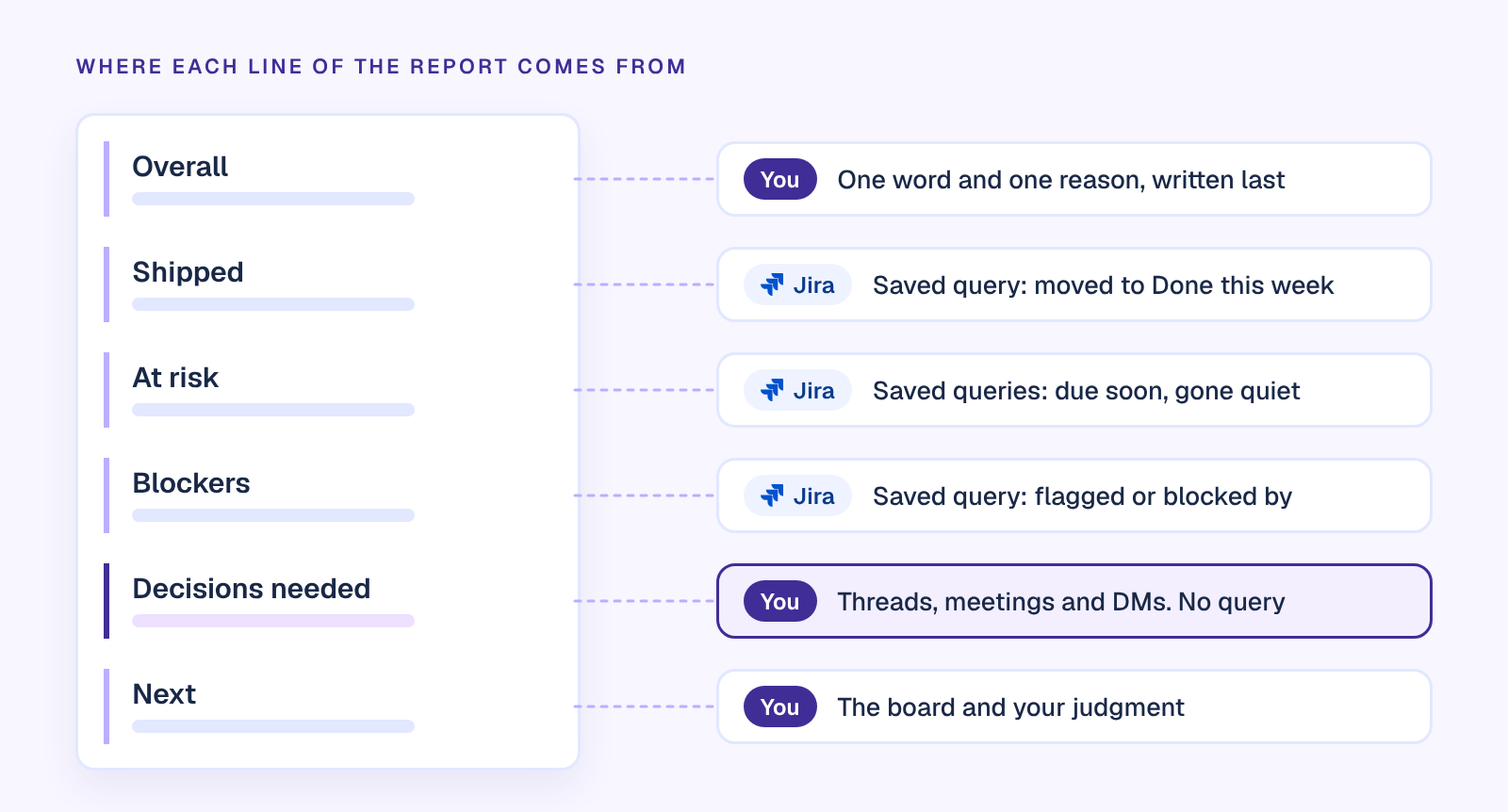
| Section | Jira query (JQL) | What to watch for |
|---|---|---|
| Shipped | filter = "Payments team" AND status CHANGED TO Done AFTER startOfWeek() AND statusCategory = Done | Use your board's done status name. The last clause drops anything reopened since. startOfWeek() counts from Sunday by default; startOfWeek("+1d") starts on Monday. |
| At risk: due soon | filter = "Payments team" AND statusCategory != Done AND due <= endOfWeek("+1") | Everything due by the end of next week that isn't done. Swap the last clause for due < now() to see what is already late. |
| At risk: gone quiet | filter = "Payments team" AND statusCategory = "In Progress" AND updated <= "-3d" | In progress with no update for three days. Ask about these before you call the week on track. |
| Blockers | filter = "Payments team" AND statusCategory != Done AND (Flagged = Impediment OR workItemLinkType = "is blocked by") | Flagged issues show as yellow cards on the board. A blocked-by link stays after the blocker clears, so check the other issue's status. |
| Sprint carryover | filter = "Payments team" AND sprint in openSprints() AND statusCategory != Done | What carries over if the sprint ended today. For committed against completed, use the sprint report. |
| Decisions needed | No query | Decisions live in threads, meetings and DMs. This section is yours. |
Two native Jira features finish the job. The sprint report on a Scrum board gives the sprint version its numbers: the work completed, with an asterisk on anything added after the sprint started. And any saved filter can be emailed to you on a schedule: open the filter's details, add a subscription, and use the Advanced option's cron expression for Friday at 8:00. Each email carries the first 200 results, so the lists are waiting when you sit down to write.
The queries use Jira Cloud's current field names, checked against Atlassian's JQL reference on 20 October 2026. Jira Cloud now calls issues work items; the queries are the same either way. Jira Server and Data Center may name some fields differently.
Why a report built from Jira is still wrong some weeks
Those queries return what Jira says. The reader of a status report wants what happened, and the two drift apart in the same few places every week:
- A pull request merged on Tuesday and the ticket still says In Progress on Friday. It shows up as gone quiet, not shipped.
- A blocker came up in Thursday's standup and nobody flagged the issue. The blockers list comes back empty.
- A decision was settled in a Slack thread on Wednesday and never reached the ticket. The report asks for a decision that was already made.

So whoever writes the report does the reconciliation by hand: opens GitHub, scrolls the threads, sends a few DMs asking whether something is really done. That's where Friday afternoon goes, and it's the same drift that keeps status meetings alive (our guide to running a status update meeting and needing fewer covers that side). Keeping Jira current helps, and our Jira best practices cover the habits. But habits slip in exactly the weeks the report matters most.
The weekly status report that writes itself
Troopr is the AI project management agent for engineering teams. It reads the team's Jira, GitHub, Slack and standups, forms its own view of what actually changed, and does the reporting itself. The report it posts on Friday comes from what happened, not from what someone remembered to update.
Here is how the template maps onto it.
The report is a routine. A routine is a standing instruction in plain language. "Every Friday at 3pm, post what shipped this week, what's at risk and what's blocked to #payments-eng" is a report routine: it reads Jira and changes nothing in it. Troopr's template library already has the pieces of this template as reports, among them what shipped this week, what people are blocked on, the overdue sweep, who is carrying what, and said versus moved, which checks what people committed to in check-ins against what actually moved in Jira. Every template shows exactly what it would send before you turn it on. The filters you saved above work too: any JQL query or saved Jira filter can become a routine, rendered in Slack with action buttons on every issue.
Jira gets fixed before the report runs. When a pull request merges and its ticket still says In Progress, Troopr proposes the move to the person who owns the work. Nothing is written until they confirm, and the change runs under their own Jira login. Nudges cover the rest: a blocker follow-up or a stale work check asks the one person who knows, in a DM, instead of the whole channel. By Friday, the shipped list includes Tuesday's merge.
Watches stay quiet until something is wrong. Any routine can be a watch. "Tell me if anything has been in review for more than two days" checks on its cadence and posts only when it's true. Silent unless something is wrong, so a quiet channel means the at-risk list is empty, not that nobody looked.
A daily read, if Friday is too late. The daily team report is a short narrative of the day with flow numbers (in progress, in review, ready to deploy, shipped since yesterday, blockers) and a needs-attention section that names specific people and items, each with a suggested next step. For the sprint version, burndown and velocity charts render right in Slack.
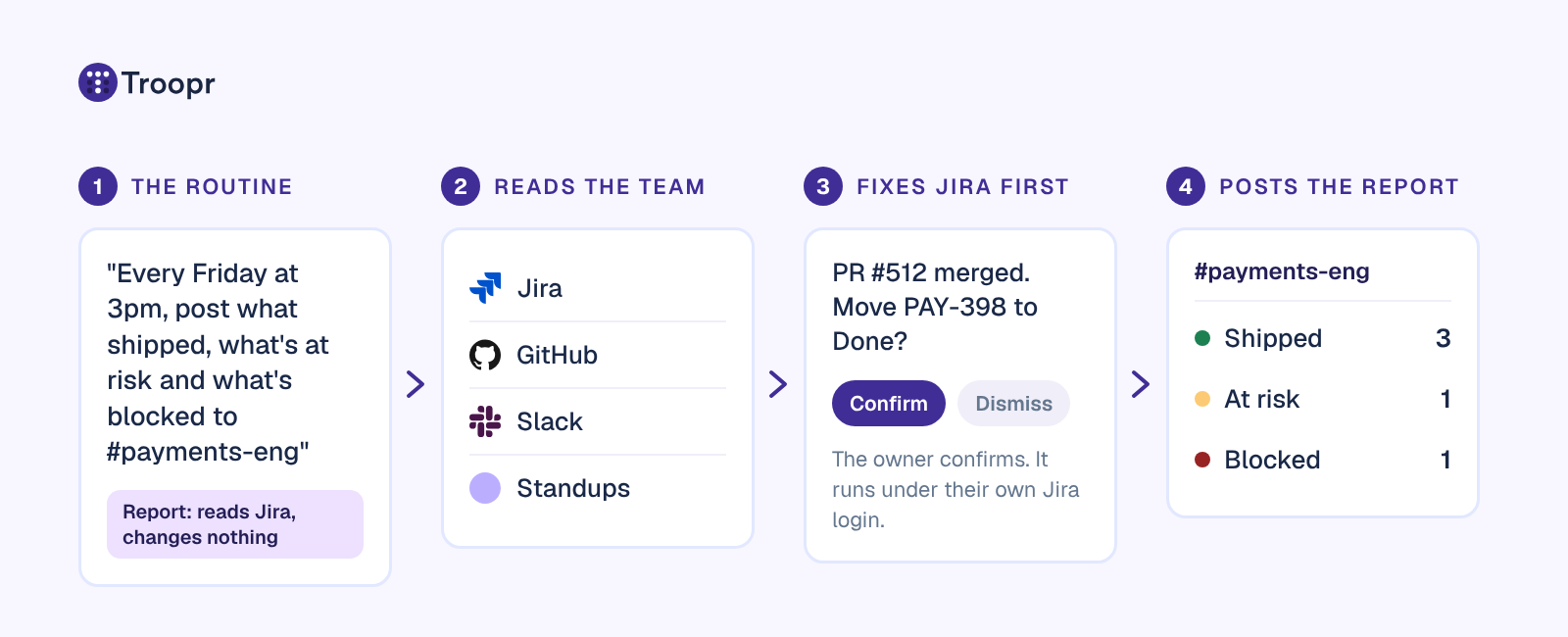
What's left for you is the part only you can write: the decisions you need and what you recommend. That's the fifteen minutes worth spending.
Teams already run their status this way. Snowflake eliminated ~86% of its weekly status-meeting time, and Netflix cut the time spent in status-update meetings by ~82%. Celink's engineering team uses Troopr for Jira hygiene and scheduled progress reports in Slack, and at Ylopo, product stakeholders get scheduled Jira insight without chasing anyone for it.
Troopr runs in Slack and Microsoft Teams, on Jira Cloud, Server and Data Center. It's free for 10 seats with 3 routines and 3 synced channels; after that it's $6 per seat/month billed annually ($8 monthly), everything included. A seat is someone who takes action, so the stakeholders who only read the Friday report are free. See how routines work, look at sprint, burndown and velocity reports in Slack, or Start for Free and have this week's report written for you. Prefer a walkthrough first? Book a Demo.
Frequently asked questions
What should a project status report include?
An overall status with one reason, what shipped since the last report, what is at risk and the plan, blockers with the specific ask, decisions needed with a date, and the next priorities. For an engineering team that fits on one page. Budget and schedule charts only belong if the reader makes budget or schedule decisions from them.
How do you write a weekly status report?
Collect the facts first: what moved to Done this week, what is in progress but quiet, what is due soon, and what is flagged or blocked. Saved Jira filters make that a few minutes. Then write the outcomes, the risks with a plan and the decisions you need, and write the overall status line last, once you know what the rest says.
What are the three main elements of a status report?
Where the work stands against the plan, what changed since the last report, and what happens next, including the risks and what the team needs from the reader. Every section of a good template is a more specific version of one of those three.
What are typical project statuses?
Most teams use three: on track, at risk and off track, often colored green, amber and red. Some add on hold and complete. Inside Jira, each workflow status rolls up to one of three status categories: To Do, In Progress and Done.
How often should you send a project status report?
Weekly suits most engineering teams and the stakeholders around them. Scrum teams add a sprint report at the end of each sprint, and portfolio updates for leadership are often monthly. Pick one cadence and keep the format the same, so readers can see what changed at a glance.
Can a project status report be automated?
Jira alone can collect the lists: saved filters and filter subscriptions email them on a schedule. Troopr goes further and writes the report: a report routine reads the team's Jira, GitHub, Slack and standups and posts the weekly report to a channel, while proposals keep Jira current first, each change confirmed by the person who owns the work.


The AI project manager for engineering teams. Forms its own view of the work and does the coordination, right where your team already works.
2035 Sunset Lake Road, Suite B-2, Newark, DE 19702, United States.