

What Is AI in Project Management? A Practical Guide for Engineering Teams
AI in project management is the use of machine learning, language models and automation to do work a project manager would otherwise do by hand: producing status, forecasting, surfacing risk, maintaining the record and answering questions about a project.
That definition is easy. The useful part is knowing which of those things actually work today, which are still demos, and why the same tooling transforms one team and does nothing for another.
This guide covers the three kinds of AI used in project management, what each is genuinely good at, the prerequisite almost nobody mentions, and how to introduce it without the pilot quietly dying.
What is AI in project management?
AI in project management means applying artificial intelligence to the planning, execution and monitoring of work. In practice it covers five jobs: generating status, forecasting outcomes, detecting risk, keeping records current, and answering questions about project state.
The term is doing a lot of work, though, because three quite different technologies sit underneath it and they fail in different ways.
The three kinds of AI in project management
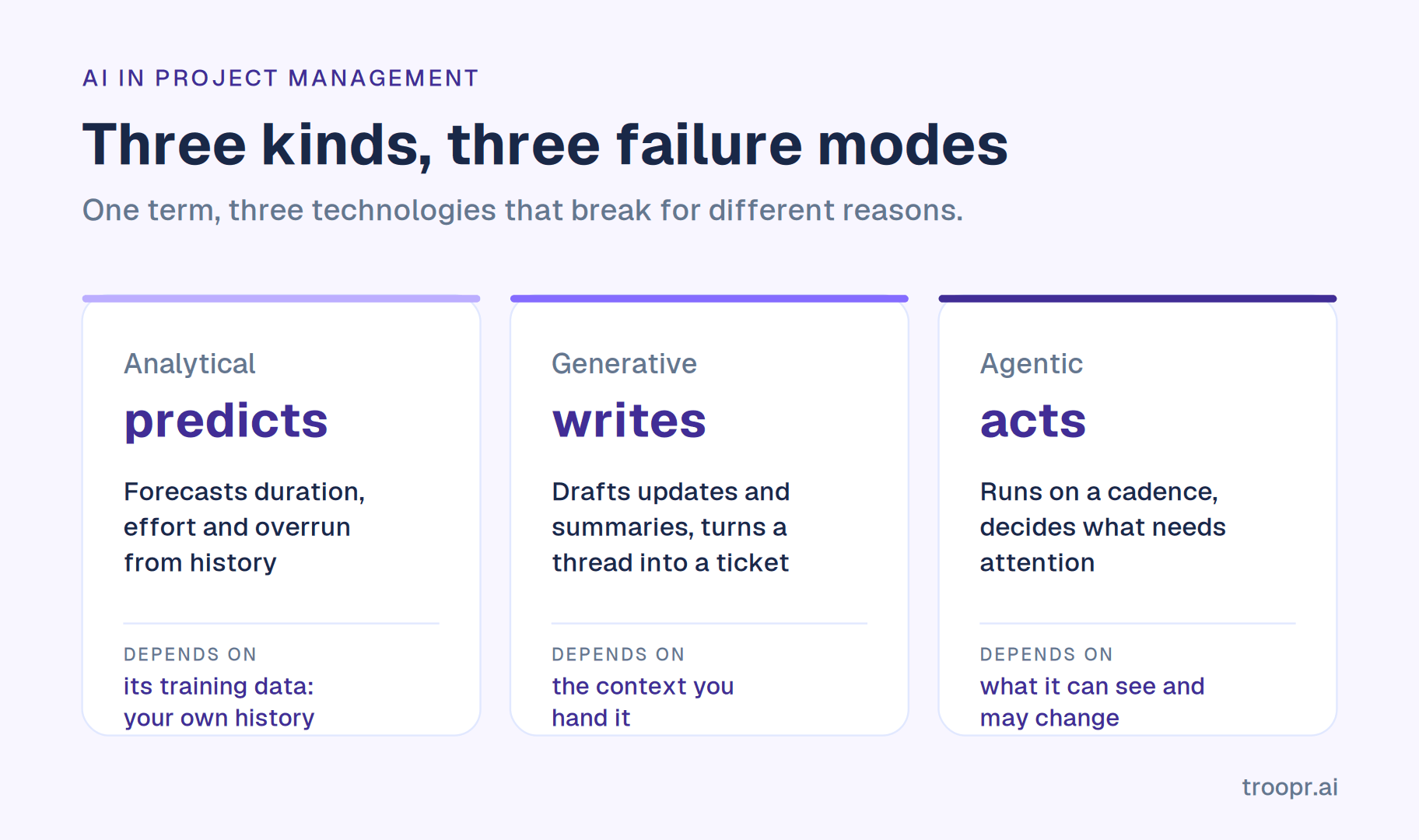
Analytical AI predicts. It learns from historical project data to forecast durations, flag likely overruns and estimate effort. Statistically straightforward and the oldest branch.
Generative AI writes. It drafts status updates, summarises threads, turns a conversation into a ticket, converts plain language into a query. This is where most of the visible value has landed in the last two years, because it works immediately and needs no training data from you.
Agentic AI acts. It runs on its own cadence, decides what needs attention, and performs or proposes multi-step work. The newest branch and the one with the most variance between what is claimed and what ships. We cover it in depth in our guide to AI agents for project management.
Why separate them: analytical AI depends entirely on the quality of your historical data, generative AI depends on the quality of the context you hand it, and agentic AI depends on what it can see and what it is allowed to change. Three different failure modes, three different questions to ask a vendor.
What AI in project management is not
It is not automation. A rule that posts to a channel when an issue closes has no model of whether that action still makes sense. Automation is cheap and predictable and keeps doing the wrong thing confidently when conditions change.
It is not the same as managing AI projects. A genuine source of confusion in search results. Running a project that builds an AI product is a different subject entirely.
It is not a replacement for a tracker. AI sits on top of a system of record. If you are being sold a migration, check whether the pitch is actually about the AI.
Why AI is important for project management
The honest case is narrower than the marketing and more durable.
Coordination cost grew faster than teams did. Work is now discussed in chat, tracked in Jira and shipped in GitHub, and keeping those three telling the same story is manual, constant and usually falls on one person. That reconciliation work did not exist at this scale fifteen years ago.
Self-reported status stopped scaling. What people report is what they remember to say. One team, fine. Three teams, and the picture is reconstructed from fragments every morning.
Distributed teams removed the free alignment. Co-located teams got a lot of coordination from overheard conversations. Distributed teams get none of it, and most did not replace it with anything deliberate.
AI contributors are adding coordination load. Coding agents raise output per engineer, and every additional contributor adds coordination cost. More work shipping through the same team means more to reconcile, not less. This is the counterintuitive one and it is already visible.
Put together: the administrative half of project management grew, and AI is the first thing that credibly removes some of it rather than moving it to a new interface.

Advantages of AI in project management
Status becomes a read rather than a report. The largest single benefit. When the update is produced from real activity, nobody spends their morning collecting it. Snowflake's engineering teams eliminated roughly 86% of their weekly status-meeting time after moving to automated check-ins.
The record stays closer to reality. AI that proposes corrections when work visibly happened keeps the tracker usable without a human doing data entry, which is what makes every downstream number trustworthy.
Less context switching. Every trip from chat to the tracker to answer a question costs more than the minute it takes. Roku reported roughly a 45% reduction in context switching between Slack and Jira, about 1.8 focused hours back per engineer per day.
Risk surfaces earlier. A person scans for problems when they have time. Software scans on a cadence, which is why things appear days earlier rather than at the review.
Coordination scales past one team. The constraint on a coordination role is how many teams one person can hold in their head. This is where the economics land for a director.
Institutional memory survives. A searchable record of what was decided and what changed is how a new joiner learns why the team works the way it does.
Fewer tools. A standup bot, a retro tool, a report scheduler and a tracker integration is four bills and four partial pictures of one team.
Ways to use AI in project management
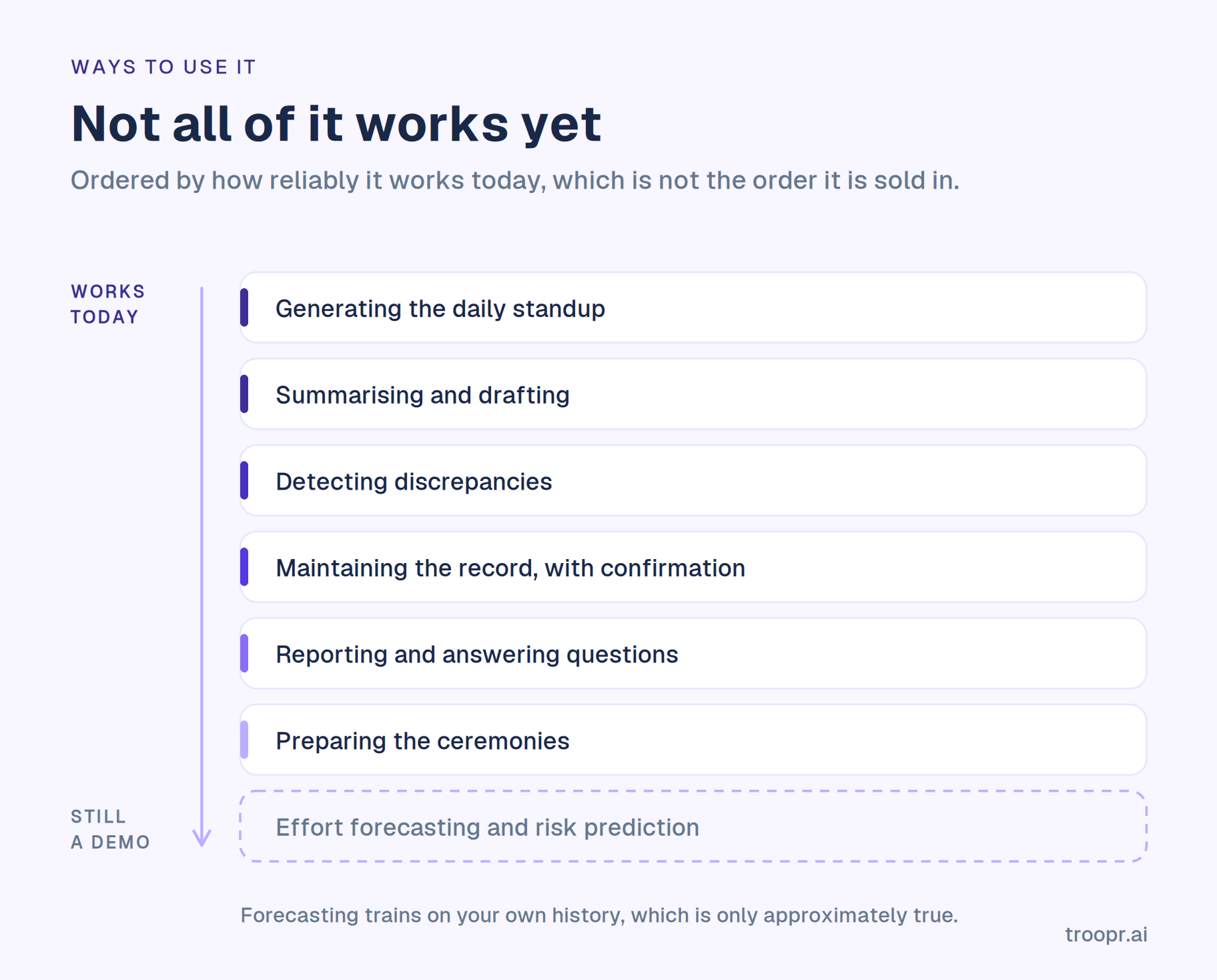
Ordered roughly by how reliably they work today, which is not the order vendors present them in.
Generating the daily standup. The most reliable use. Drafting each person's update from their tracker and code activity, asking only where the activity is ambiguous. Works because the inputs are factual and verifiable. This is what makes an async standup hold rather than fade after a month.
Summarising and drafting. Turning a thread into a ticket, a sprint into a summary, a meeting into action items. Reliable, immediately useful, and the lowest-risk place to start.
Detecting discrepancies. Flagging where the record and reality disagree: shipped work still open, a blocker with no owner, a ticket untouched for three weeks still in the sprint. Reliable when the tool can see both the tracker and the code host.
Maintaining the record. Proposing the correction and routing it to whoever owns the work. Reliable with a confirmation step, risky without one.
Reporting. Burndown, velocity, what shipped, what is at risk, delivered on a schedule as a Jira report in Slack rather than assembled by hand.
Answering questions about project state. Plain-language questions answered from real activity, which removes the manager as the only route to the information. Reliable when grounded in your data, unreliable when the model is answering from general knowledge.
Preparing ceremonies. Pulling the facts a retrospective or backlog refinement session needs before it starts, which is where a large share of those meetings currently goes.
Risk prediction and effort forecasting. The most heavily marketed and the least reliable, for a reason worth understanding. These models learn from your historical project data. If your tracker has been approximately true for two years, the model learns an approximate pattern and returns confident numbers built on it. Treat forecasting output as a prompt for a conversation rather than an answer.
The prerequisite nobody mentions: your data
This is the single most useful thing in this guide, and it explains why the same tool transforms one team and does nothing for another.
Every AI capability above runs on your project data. If tickets sit in the wrong status, work ships without the board moving, and decisions live in threads that never reach the issue, then AI does not fix that. It inherits it, and presents the result more confidently and more fluently than a human would have.
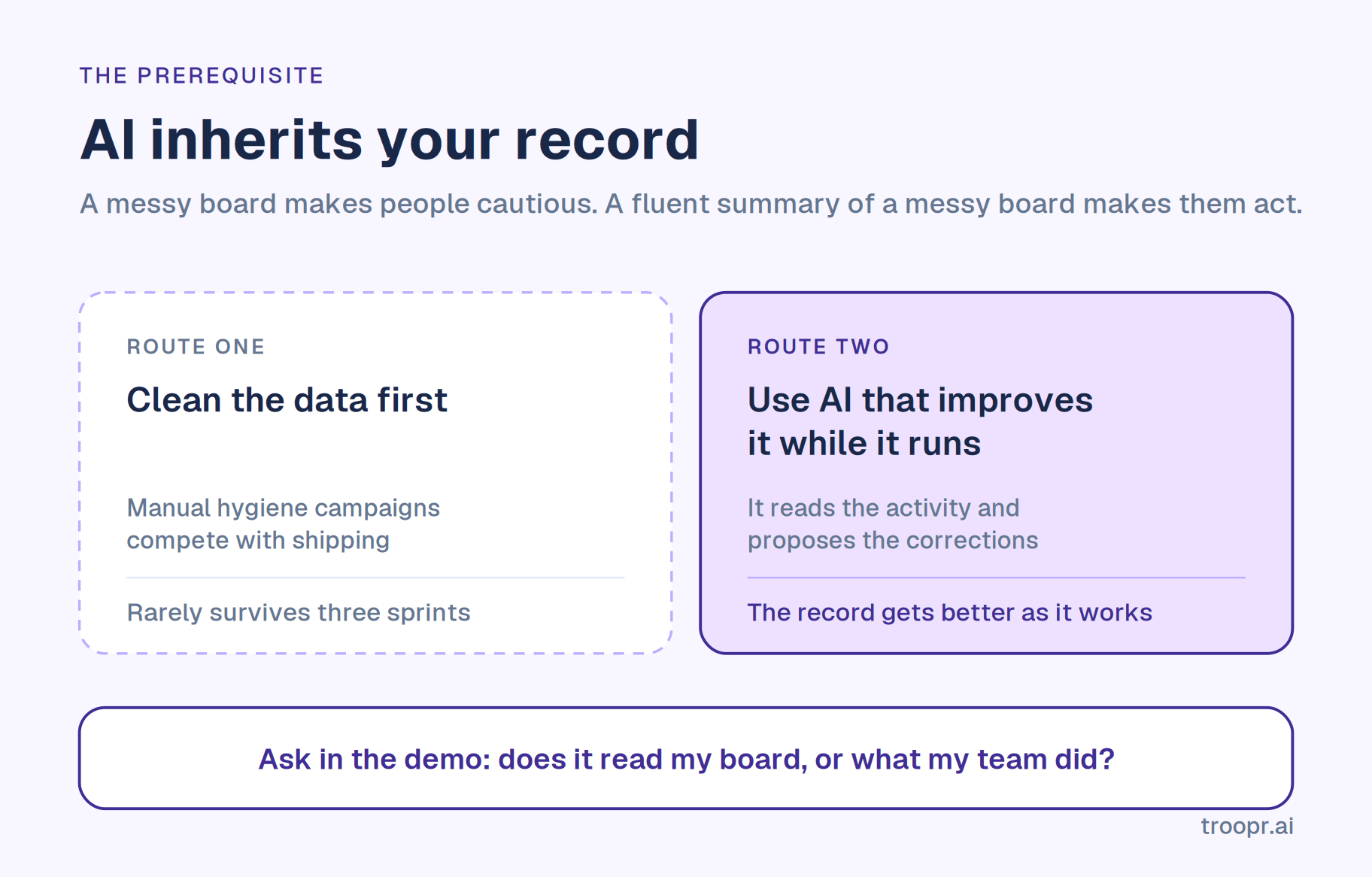
That is worse than no AI at all. A messy board makes people cautious. A beautifully formatted summary of a messy board makes people act.
So there are two routes in, and picking the wrong one is the most common way these projects fail.
Route one: clean the data first, then add AI. The conventional advice. It works and it rarely happens, because manual hygiene campaigns compete with shipping and lose by the third sprint.
Route two: use AI that improves the data as a side effect. Tools that read activity directly and propose corrections make the record better while they run. The tracker gets more accurate because the tool is working, not before it starts.
Route two is more realistic for most teams, and it is the right question to ask in a demo: does this read my board, or does it read what my team actually did? A tool that only reads the board can never be more accurate than the board. A tool that reads the code host and chat can tell you the board is wrong.
What AI in project management still gets wrong
It cannot set priority. Priority is a judgement about value and risk that depends on context the organisation holds. A tool that ranks your backlog is applying somebody's weighting and it is not yours.
Forecasts inherit your history. Covered above and worth repeating, because effort estimation is the capability most likely to be demoed and least likely to survive contact with your data.
It is confidently wrong about what it cannot see. A tool with partial visibility does not hedge. It produces a complete-sounding picture of a fraction of the work.
It misses human signal. Hesitation in an update, two people who have quietly stopped collaborating, an engineer whose updates have gone flat. None of this is in the data.
It degrades silently. A renamed status, a new repo nobody connected, a restructure. Output keeps arriving and keeps looking plausible.
It cannot be accountable. Accountability means someone can be asked to answer for an outcome. That is a social fact, not a capability gap.
Two statistics to be careful with
You will meet both of these while researching this topic and neither should inform a decision.
The first says 80% of project management work will be handled by AI by 2030. It traces to a single analyst press release from several years ago and is reproduced far more often than it is examined.
The second reports that 70% of project professionals already use AI with a further 29% planning to adopt. Those two figures sum to 99%, which should prompt a look at the sampling before anyone quotes it in a business case.
The useful number is the one you generate yourself: how many hours a week does your team currently spend reconstructing what happened.
How to integrate AI into project management
A sequence that works, in roughly ninety days.
Step 1. Pick one recurring task you personally dislike. Not a strategy. Assembling the standup, chasing ticket updates, building the weekly report. Tools deployed against a specific irritation get adopted; tools deployed as a platform initiative get piloted and forgotten.
Step 2. Connect every system the work touches before judging the output. The tracker, the code host, the chat channels. Evaluating on a partial connection tells you only that partial data produces partial answers, and teams routinely reject good tools for this reason.
Step 3. Run it read-only for one sprint. Let it report without changing anything. You are checking one thing: when it says something is wrong, is it right? Keep a count. Skipping this is the most common cause of quiet abandonment.
Step 4. Decide the confirmation boundary before you turn on writes. Who approves changes, whose credentials execute them, and whether a proposal is re-checked against live state at the moment of confirmation. A missed update costs one stale ticket; a wrong update costs trust in the whole board.
Step 5. Teach it your conventions. What done means in your real status names, who owns which area, which channels carry signal. Every tool worth running improves with this and most teams never do it, then conclude the product is generic.
Step 6. Expand by workflow, not by team. Add the retro, then reporting, then refinement, on the team already running it. Rolling a half-configured tool across six teams at once produces six sets of mediocre output and a reputation that takes a year to shake.
Step 7. Review what it missed. After a quarter, list the problems that bit you anyway. That tells you what to connect next and is the only honest measure of whether this is working.
On the team. Frame it as removing the administrative half rather than as efficiency. People hear efficiency as headcount. The accurate version is that the hours go back into work only a person can do, and that framing survives contact with reality because it is true. If someone asks the obvious question, our answer on whether AI will replace scrum masters covers it honestly.
How Troopr helps
Troopr is the AI project management agent for engineering teams, built for route two above: it improves the record while it runs rather than requiring you to clean it first. Its scrum-facing surface is the AI scrum master.
It reads each person's Jira activity, their pull requests and commits including the code diffs behind them, and the team's Slack channels, then forms its own view of what the team is doing. That covers all three systems engineering work spans, which is what lets it tell you the board is wrong rather than repeating what the board says. On top sits a per-team memory: who owns what, what done means in your real Jira status names, your cadence, where work repeatedly stalls.
Status is produced, not collected. Each person's update is drafted from their own real activity and posted to the channel, with Troopr asking directly only when it genuinely cannot tell. It still works on a day nobody meets.
Discrepancies come with their evidence. The ticket marked done that is still in review, the blocker with no owner, the pull request nobody mentioned. Every insight links back to its source, so anyone can check it rather than taking it on trust.
Corrections are proposed, never imposed. Each proposal is typed from a closed vocabulary, routed to the person who owns the work, re-validated against live Jira state at the moment of confirmation, and written under that person's own Jira login. Nothing reaches your board without a human agreeing to it, which is the confirmation boundary from step four, answered.
Standing instructions in plain English. Routines are written as sentences rather than built in a query editor. A report reads Jira and changes nothing; a proposal offers a change nobody writes until a person confirms. Any of them can stay silent until its condition is true, so hearing nothing means nothing is wrong.
The ceremonies run in chat. Retrospectives, planning poker and team mood run as check-in types, async at each person's local time, with retro action items becoming linked Jira issues. Scheduled estimation rounds work the same way.
Anyone can ask. Ask Troopr answers plain-language questions about team state in the web app, by Slack DM, or with a slash command in any channel, grounded in your real activity rather than general model knowledge.
Pricing is flat. Free forever for 10 seats with every feature and no credit card. Standard is $6 per seat per month billed annually, $8 monthly. Only people who take action count as seats, and nothing the AI produces is metered, which matters because most of this category now bills AI usage in credits on top of the seat price. We compare those models in the best AI project management tools and against Atlassian specifically in Troopr compared with Rovo.
Slack and Microsoft Teams, with two-way Jira sync across Cloud, Server and Data Center, and GitHub read-only by design. SOC 2 Type II, ISO 27001 and GDPR, OAuth that inherits Jira permissions, no training on customer data. At scale the enterprise procurement package covers the rest. Netflix's engineering team cited the internal security clearance as a deciding factor and reported roughly 67% less time finding and updating Jira issues. Standups, retrospectives, estimation and reporting all run in one app in Slack, on every plan including Free.
Conclusion
AI in project management is not one thing. It is prediction, generation and action, and they work to different degrees for different reasons.
What they share is a dependency. All three run on your project data, and on most teams that data is a rough approximation maintained by whoever has time. Pointing AI at an unreliable record produces unreliable output delivered with more confidence, which is the opposite of what you wanted.
So the first question is not which AI to buy. It is whether the tool you are evaluating reads your board or reads what your team actually did. Only the second kind can tell you the board is wrong, and on most teams that is where the value is.

Frequently asked questions
What is AI in project management?
AI in project management is the use of machine learning, language models and automation to do work a project manager would otherwise do by hand: producing status, forecasting outcomes, detecting risk, keeping records current and answering questions about project state. It covers three distinct technologies, analytical AI that predicts, generative AI that writes, and agentic AI that acts, and they succeed and fail for different reasons.
How is AI used in project management?
Most reliably for generating status updates from real activity, summarising and drafting, detecting discrepancies between the record and reality, maintaining the tracker, scheduled reporting, and answering plain-language questions about project state. Least reliably for effort forecasting and risk prediction, because those models learn from your historical project data and most teams' historical data is only approximately true.
What is the difference between AI and automation in project management?
Automation executes a predefined rule on a trigger and keeps executing it even when conditions change, because it has no model of whether the action still makes sense. AI evaluates the situation first, which is why it can handle the case nobody wrote a rule for. Automation is cheaper and more predictable; AI handles what you did not anticipate.
What are the benefits of AI in project management?
Status produced rather than collected, a record that stays closer to reality, less context switching for engineers, risk surfacing earlier than a human scan would catch it, coordination that scales past one team, and fewer separate tools to reconcile. The largest single benefit on most teams is removing the daily reconstruction work from whoever currently owns it.
Does AI in project management actually work?
It depends almost entirely on your data. Every AI capability runs on your project record, so a tool pointed at a tracker nobody maintains inherits the mess and presents it more confidently, which is worse than no AI. The tools that work on messy data are the ones that read activity directly, from the code host and chat as well as the tracker, because only those can tell you the record is wrong.
Will AI replace project managers?
No, though it does replace a version of the job defined by collecting and relaying information. Priority judgement, coaching, facilitation and accountability are not automatable. We cover the career question in detail in our comparison of AI tools for scrum masters and the role question separately.
How do I start using AI in project management?
Pick one recurring task you dislike rather than launching an initiative. Connect every system the work touches before judging output. Run it read-only for a sprint and count how often it is right when it says something is wrong. Decide your confirmation boundary before enabling any writes. Then teach it your conventions and expand one workflow at a time on the same team.
What is the best AI for project management?
For engineering teams on Jira and Slack, the useful filter is whether a tool reads the tracker, the code host and chat together, since anything reading one of the three describes a fraction of the work confidently. Also check the confirmation model, which Jira variants are supported and on which plan, and whether AI usage is metered. We compare the field in our roundup of the category and the Slack-specific options in best scrum tools for Slack.
Is AI project management the same as managing AI projects?
No, and the two get confused in search results constantly. AI in project management means using AI to run projects of any kind. Managing AI projects means running a project that builds or deploys an AI system, which brings its own concerns around data, evaluation and model risk. This guide is about the first.
Does the official Jira Slack app count as AI project management?
Partly. It relays Jira into Slack with notifications, previews and issue creation, and its natural-language work item creation requires Rovo on a paid Atlassian plan. It responds to requests rather than forming its own view of the work, which puts it at the assistant level rather than the agent level. Troopr compared with Jira Cloud for Slack covers where it stops.


The AI project manager for engineering teams. Forms its own view of the work and does the coordination, right where your team already works.
101 Arctic Circle, Round Rock, Texas 78664, United States.