

AI Agents for Project Management: Benefits, Trends and Real Examples
Every project management vendor now sells AI agents. Almost all of the writing about them is the same four paragraphs: agents are self-directed, they free you for strategic work.
The useful questions are narrower. What separates an agent from the automation you already have. What it can actually see, which sets a hard ceiling on how good it can be. How much it should be allowed to change without asking. What it costs once it runs every day.
This guide answers those for engineering teams specifically, the ones whose work is discussed in chat, tracked in Jira and shipped in GitHub, because that spread is what makes the problem hard and what most general advice skips.
What are AI agents for project management?
An AI agent for project management is software that reads live project data, decides what needs attention, and takes or proposes multi-step action on it, rather than waiting for a person to ask a question or configure a rule.
The word gets stretched to cover almost anything with a model behind it, so the distinction worth holding is initiative. A tool that answers when asked is an assistant. A tool that notices on its own is an agent.
Automation, assistant, agent: three levels that get conflated
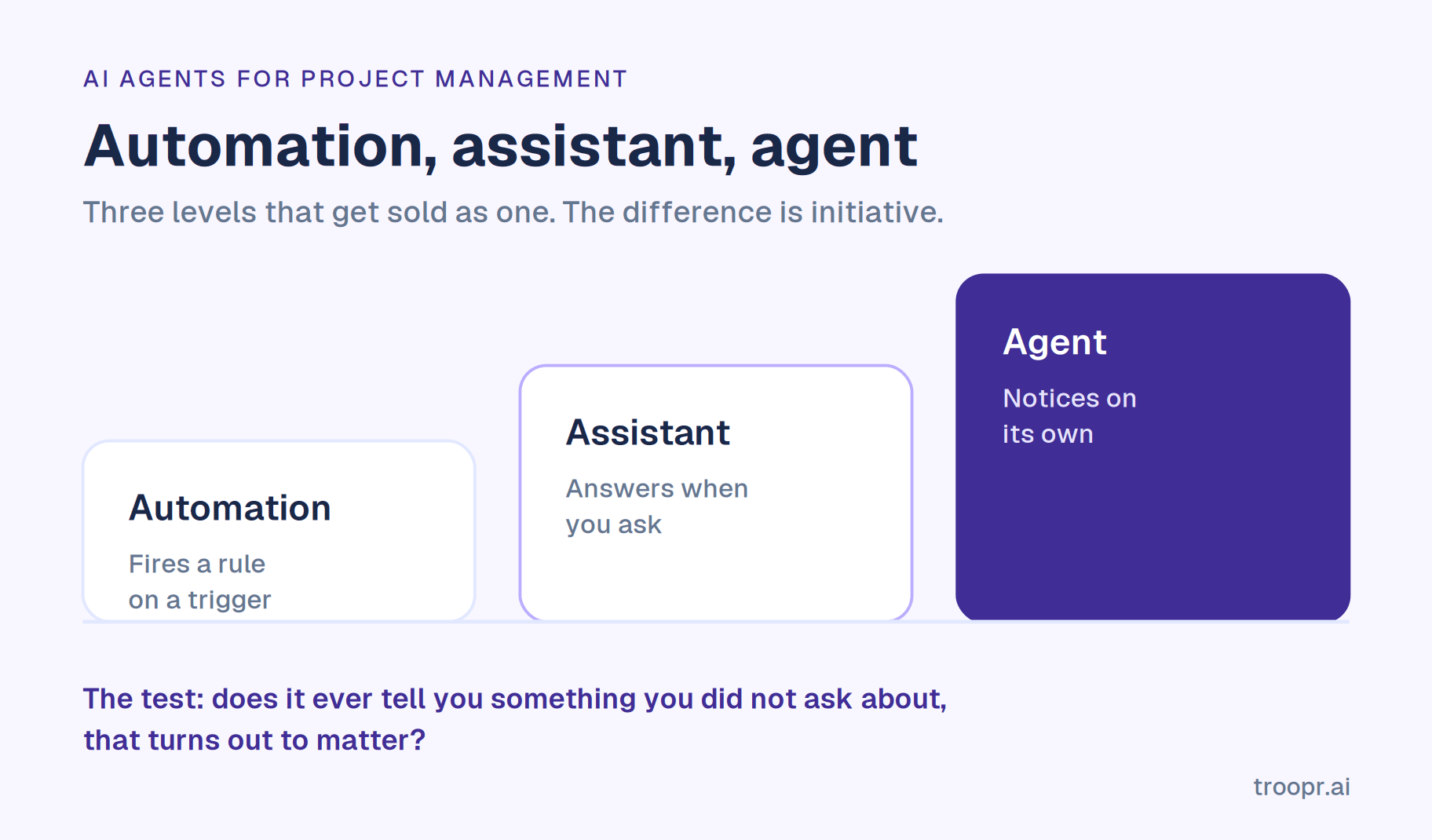
Automation fires a predefined rule on a trigger. When an issue moves to Done, post to a channel. If you already run Jira and Slack automation, this is what you have. Deterministic, cheap, brittle. It does exactly what you specified and nothing adjacent, and when reality changes it keeps firing anyway.
An assistant responds to a request. Summarise this thread, draft this ticket, what happened in the sprint. Genuinely useful, and it only runs when a human initiates and only sees what the question points at. Most AI in project tools today is this.
An agent runs on its own cadence, forms a view of current state, decides what matters, and performs or proposes a sequence of steps. The difference you feel is that nobody had to think of the question. It noticed that a pull request merged while the ticket still said in progress, worked out who owns it, and did something about it.
Most products marketed as agents sit at level two with a scheduler attached. A fair test: does it ever tell you something you did not ask about, that turns out to matter? If not, it is an assistant on a timer.
How do AI agents work in project management?
Perceive. Read current state from connected systems: the tracker, the code host, chat, sometimes the meeting itself. This step decides everything downstream.
Build context. Hold a model of how this specific team works: who owns what, what done means in your real status names, your cadence, where work habitually stalls. Without this an agent stays generic and you do the translation every time.
Reason. Compare current state against expected state and identify what is off. Not "list overdue tickets", which is a query, but "this looks finished and is not marked finished, and the person who would normally close it is on leave."
Act or propose. Draft the update, post the report, or put a specific change in front of the person who owns the work.
Learn. Use what people accept, edit and dismiss as signal. An agent corrected the same way twenty times that keeps making the same suggestion is a scheduled script, not an agent.
The ceiling is what it can see
This is the most useful thing to understand before evaluating anything in this category, and it is what vendor content skips.
An agent inside a work-management platform can reason only over what that platform holds. If your team's decisions happen in chat and the work ships in GitHub, the platform sees the consequences only after a human has entered them. The agent is then reasoning about a record it cannot verify, and a confident summary of a stale board is worse than no summary, because people act on it.
Engineering work is the hard case precisely because it spans three systems that nothing automatically reconciles. Any agent reading one of the three describes a third of the picture with full confidence.
Benefits of AI agents in project management
Hours back, concentrated in one role. The reconstruction work, chasing status, reconciling the board, writing the update, falls mostly on one person per team. Snowflake's engineering teams eliminated roughly 86% of their weekly status-meeting time after moving to automated check-ins.
A record people trust again. The compounding benefit. When the board is reliable, planning stops starting with archaeology and forecasts stop being built on a fictional starting position.
Less context switching. Every trip from chat to the tracker to answer a question costs more than the minute it takes. Roku reported roughly a 45% reduction in context switching between Slack and Jira, about 1.8 focused hours back per engineer per day.
Earlier risk detection. A human scans for problems when they have time. An agent scans on a cadence, so things surface days earlier rather than at the review.
Coordination that scales past one team. The real constraint on a coordination role is how many teams one person can hold in their head. Agents raise that number, which is where the economics land for a director.
Fewer tools. A standup bot, a retro tool, a report scheduler and a tracker integration is four bills and four partial pictures of one team.

Key capabilities of AI agents in project management
Status generation. Producing the update from activity rather than collecting it from people. The highest-value capability and the clearest line between an agent and a bot.
Discrepancy detection. Flagging where the record and reality disagree: shipped work still open, a blocker with no owner, a ticket nobody has touched in three weeks that is still in the sprint.
Record maintenance. Drafting the correction and routing it to the owner, so the tracker stays usable without a person doing data entry.
Risk surfacing. Watching for patterns that precede a slip: work piling up in review, an estimate that no longer looks plausible, a dependency that moved.
Reporting. Burndown, velocity, what shipped, what is at risk, delivered on a schedule to the people who need it instead of assembled by hand.
Question answering. Plain-language questions about team state, answered from real activity. Underrated, because it removes the manager as the only route to the information.
Ceremony support. Assembling the facts a retrospective or refinement session needs before it starts, which is where a large share of those meetings currently goes.
Conditional watching. Standing checks that stay silent unless something is true. The capability that scales, because anything posting daily regardless gets muted within a month.
Traditional project management tools vs AI agents
These are not competing categories. An agent needs a system of record to act on, so the comparison is about what each layer does.
What the tool does. Holds the record, enforces workflow, provides the board, reports what it has been told. It is accurate about what people entered and silent about what they did not.
What the agent does. Observes what actually happened across systems, compares it against the record, and closes the gap. Its value comes from the difference between the two, which is exactly what a tool cannot provide about itself.
Where automation sits. Between them. Rules are fast and predictable and will keep doing the wrong thing confidently when conditions change, because a rule has no model of whether its action still makes sense.
The practical implication. Replacing your tracker is almost never the answer. Jira is not failing because it lacks AI; it is failing because nobody updates it. That is an input problem, and an agent is an input-layer fix. If you are being sold a migration, check whether the pitch is actually about the agent.
How AI agents enhance project management workflows
The daily standup. From a round of verbal updates to a report produced from each person's real activity, posted before anyone logs on. This is what makes an async standup hold rather than fade after a month.
Sprint planning. From twenty minutes working out what the board shows, to arriving with the picture assembled and spending the time on sequencing and risk.
Backlog refinement. From a manual scan for items missing estimates or owners, to that sweep running before the session. More in our guide to backlog grooming.
Retrospectives. From memory, which over-weights the last three days, to the actual sprint data alongside people's reflections, with actions becoming tracked work instead of notes.
Status reporting upward. From a manager assembling a weekly summary, to a Jira report in Slack on a schedule, which also removes the manager as a bottleneck for anyone who wants to know something.
Ticket hygiene. From a periodic cleanup nobody enjoys, to continuous correction proposed as work happens. This keeps Jira best practices alive after setup rather than decaying the week everyone gets busy.
Real-world use cases: AI agents for project management
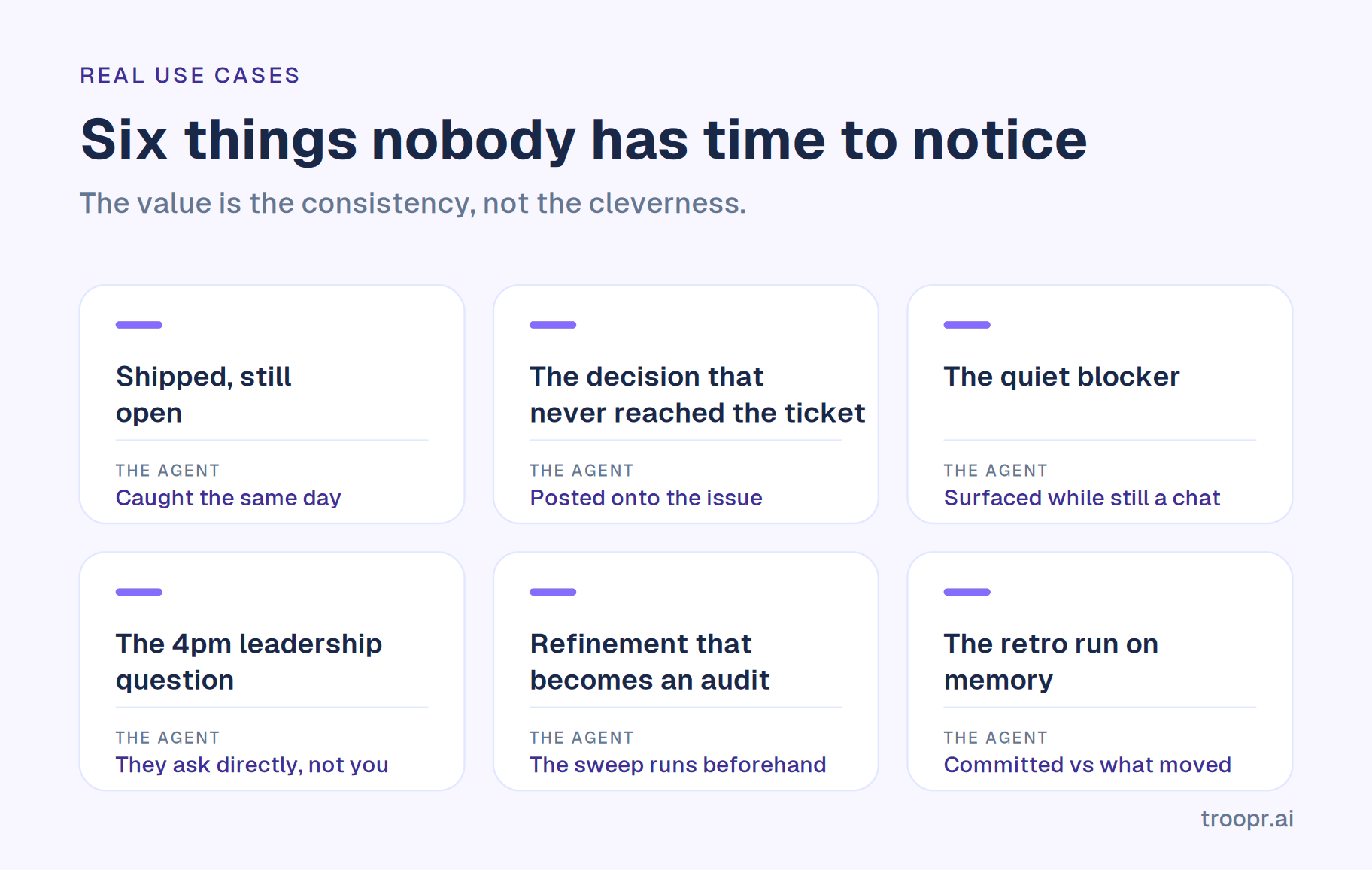
Six scenarios that come up repeatedly on engineering teams, with what the agent actually does in each.
The shipped-but-open ticket. A pull request merges on Thursday. The ticket stays in progress because the engineer moved to the next thing. At the sprint review the board shows four items incomplete that are actually done, and the velocity number is wrong. An agent reading the code host alongside the tracker catches this the same day and puts the transition in front of the person who owns it.
The decision that never reached the ticket. A scope question gets settled in a Slack thread. Six weeks later nobody remembers, and the team relitigates it. An agent watching the team's channels can turn that exchange into a comment on the issue, so the reasoning lives with the work.
The quiet blocker. Someone mentions on Monday that they are waiting on another team. It does not become a Jira blocker because raising it felt like escalation. By Friday it has cost three days. An agent that reads chat as a signal source surfaces it while it is still a conversation.
The leadership question at 4pm. A director asks what is at risk this sprint. Historically that is twenty minutes of a manager assembling an answer. With an agent holding the team's state, the director asks directly and the manager never enters the loop. This is the use case that scales a coordination role past one team. It is also what makes status meeting alternatives work rather than just moving the meeting.
The refinement session that becomes an audit. Half the backlog items have no estimate, no owner or no acceptance criteria, and the session is spent finding out which. An agent runs that sweep beforehand so the hour goes on the items that need discussion.
The retrospective run on memory. People recall the last three days and the one thing that went badly. An agent brings what was committed against what actually moved, which changes the conversation from impressions to evidence.
The pattern across all six: the agent is not doing clever work. It is doing the noticing that nobody has time to do consistently, and the value is in the consistency rather than the intelligence.
The autonomy question: how much should an agent change on its own?
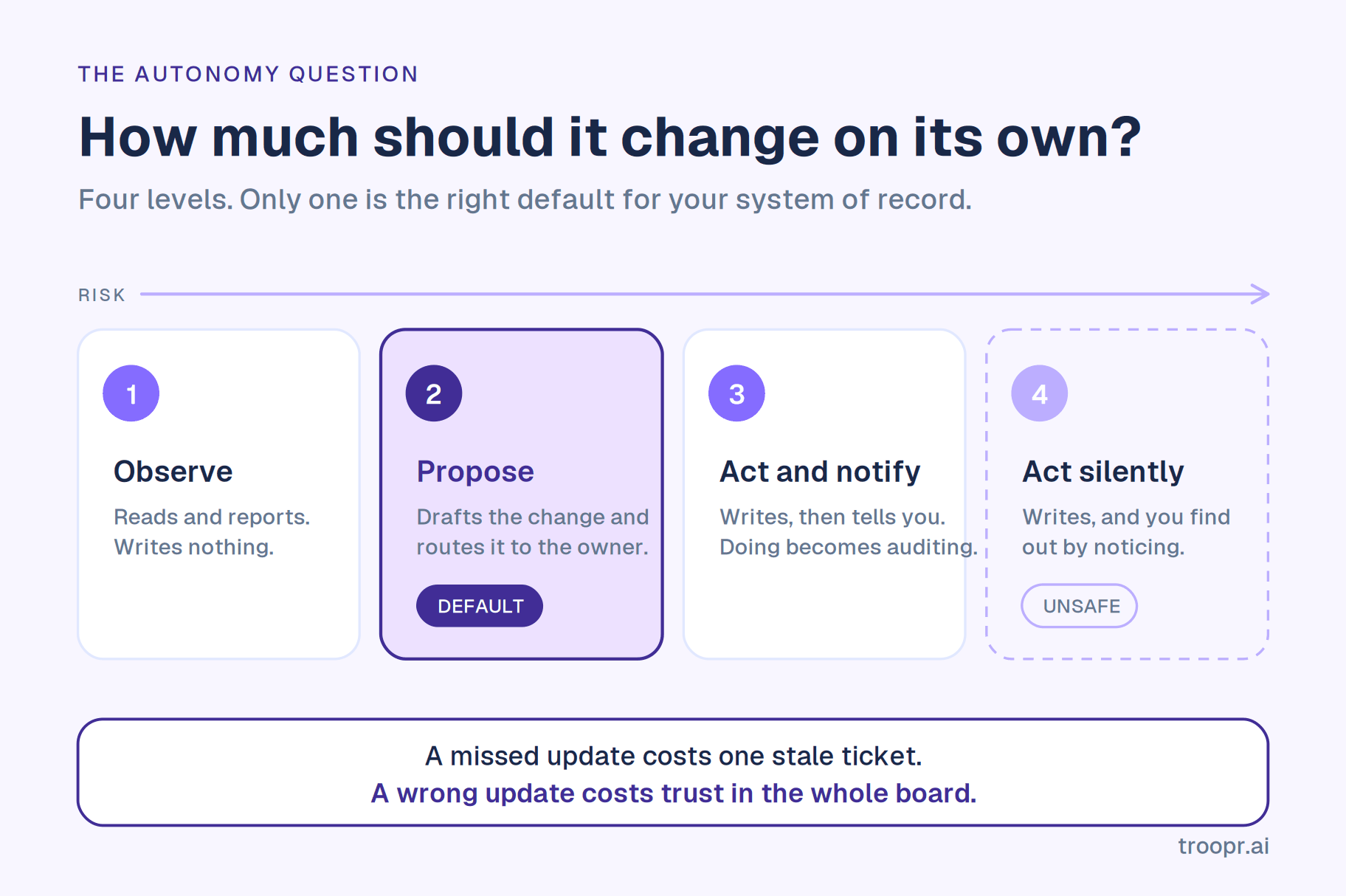
This gets almost no attention in vendor content and it determines whether the deployment survives. Think of it as a ladder.
Level 1, observe. The agent reads and reports. No writes. Zero risk, limited value, because somebody still has to act.
Level 2, propose. It drafts a specific change and routes it to whoever owns the work. Nothing is written until that person confirms. Most of the value, almost none of the risk.
Level 3, act with notification. It writes and tells you afterwards. Fast, and it quietly shifts work from doing to auditing, because now someone has to check what it did.
Level 4, act silently. It writes and you find out by noticing. Unsafe for a system of record, for a reason that has nothing to do with model quality.
The reason is asymmetry. A missed update costs you one stale ticket. A wrong update costs you trust in the whole board, and trust is slow to rebuild and hard to notice losing. Once people suspect the tracker contains changes nobody made deliberately, they stop treating it as authoritative, which is the exact problem you bought the agent to fix.
Level 2 is the right default for anything touching the record. Reserve higher autonomy for actions that are cheap to undo and easy to see.
Three questions to ask any vendor. Does a human approve before anything is written. Does the write execute under that person's own credentials and permissions, so it cannot do what they could not do by hand. Is the proposal re-checked against live state at the moment of confirmation, so a suggestion made yesterday does not get written today after someone already fixed it.
Challenges and what to watch out for
Two kinds of problem: what the technology cannot do, and what goes wrong in adoption. Both sink deployments, and the second is more common.
What the technology cannot do
They cannot set priority. Priority is a judgement about value and risk that depends on context the organisation holds. A tool that ranks your backlog is applying somebody's weighting and it is not yours.
They are confidently wrong about what they cannot see. The failure mode to watch. An agent with partial visibility does not hedge; it reports a complete-sounding picture of a fraction of the work.
They miss human signal. Hesitation in an update, two people who have quietly stopped collaborating, an engineer whose updates have gone flat. None of this is in the data.
They degrade quietly when inputs change. A renamed status, a new repo nobody connected, a team restructure. Output keeps arriving and keeps looking plausible.
They cannot be accountable. Accountability means someone can be asked to answer for an outcome. That is a social fact, not a capability gap.
What goes wrong in adoption
Garbage in. An agent reading a tracker nobody maintains inherits the mess and presents it more confidently. The first month usually surfaces how bad the data actually is, which feels like a tool problem and is not.
Permissions handled carelessly. If the agent acts through a shared service account, it can do things individual users cannot, and your audit trail says the bot did it. Insist that writes execute as the person confirming, through their own connection.
Automating too much at once. Six workflows switched on across four teams produces noise, and noise gets muted. Muted agents get cancelled at renewal.
Trust lost early. People extrapolate from the first few outputs. An agent that is wrong twice in week one is treated as unreliable for months, regardless of later accuracy. This is why an observation period before any writes matters more than it sounds.
The team reads it as a headcount signal. If the rollout is framed as efficiency, people hear redundancy and engagement drops. Frame it as removing the administrative half, which is both accurate and survivable.
Cost drifting with usage. Credit-metered pricing on a daily workflow means the bill scales with adoption, which is the opposite of what you want when it is working.
Silent decay. A renamed status or a new repo nobody connected degrades output without any error appearing. Build in a quarterly check of what the agent has not caught.
One caution on the research. You will see a widely repeated claim that 80% of project management work will be handled by AI by 2030. It traces to a single analyst press release from several years ago and is reproduced far more often than it is examined. It is not a basis for a headcount decision.
What AI agents actually cost
The pricing model changed in 2026 and the seat price is no longer the whole number.
Most AI project management agents now meter usage in credits on top of the subscription. That is reasonable, since inference costs the vendor per use, and awkward for buyers, because the workflows you want most are daily rather than occasional. A standup for a team of twelve is not an occasional query.
The clearest example is Atlassian. Rovo is included with paid Jira Cloud plans, metered in credits pooled per user per month, and from 3 December 2026 Atlassian begins charging for usage above the allowance, enabled by default. Grace periods on metered AI end. We work the numbers in Troopr compared with Rovo, and the credit models across the category in the best AI project management tools.
Four questions before you sign. What does a typical week of your intended workflow consume. Is the allowance per user or pooled across the account. What happens when it empties mid-month, does it stop or does it bill. And is the thing you are automating daily, because if so you are buying a variable cost for a fixed need.
How to implement AI agents for project management
A sequence that works, in roughly ninety days.
Step 1. Pick the single worst hour of your week. Not a strategy. One concrete recurring task: assembling the standup, chasing ticket updates, building the weekly report. Agents deployed against a specific irritation get adopted; agents deployed as a platform initiative get piloted and forgotten.
Step 2. Connect everything the work touches before judging the output. The tracker, the code host, the chat channels. Evaluating an agent on a partial connection tells you only that partial data produces partial answers, and teams routinely reject good tools for this reason.
Step 3. Run it in observe mode for one sprint. Let it report without writing anything. You are checking one thing: when it says something is wrong, is it right? Keep a count. This is the trust-building step and skipping it is the most common cause of quiet abandonment.
Step 4. Turn on proposals for one workflow. The narrowest useful one, usually status transitions for work that visibly shipped. Confirm each manually. Watch the acceptance rate; if people reject more than a third, the context is wrong, not the feature.
Step 5. Teach it your conventions. What done means in your real status names, who owns which area, which channels carry signal. Every agent worth running improves with this and most teams never do it, then conclude the product is generic.
Step 6. Expand by workflow, not by team. Add the retro, then reporting, then refinement, on the team already running it. Rolling a half-configured agent across six teams at once produces six sets of mediocre output and a reputation that takes a year to shake.
Step 7. Review what it did not catch. After a quarter, look for problems that bit you anyway. That list tells you what to connect next, and it is the only honest measure of whether the deployment is working.
On the team. Frame it as removing the administrative half rather than as efficiency. People hear efficiency as headcount. The accurate version is that the hours go back into work only a person can do, and that framing survives contact with reality because it is true.
Choosing the right AI agent for your team
A short evaluation framework. Run a candidate through these in order and most of the market eliminates itself in the first two.
1. Coverage. Which systems does it read, and does that set match where your work actually lives? For an engineering team that means the tracker, the code host and chat. Anything reading one of the three will describe a third of the picture confidently.
2. Initiative. Does it surface things nobody asked about? Ask for a demo on a day nobody updated anything. An assistant has nothing to say; an agent tells you what changed anyway.
3. Confirmation model. Who approves writes, whose credentials execute them, and is the proposal re-validated at the moment of confirmation. Covered in full above, and it is the question most buyers skip.
4. Memory. Does it hold a model of how your team works, and can you correct it? A tool that restarts from zero each morning stays generic forever and you supply the translation.
5. Surface. Does it live where the team already is, or is it another tab? Coordination tooling in a separate app is the most common reason these purchases quietly fail.
6. Economics. Metered or flat, and what does your intended daily workflow cost at full adoption rather than during the trial.
7. Trust evidence. SOC 2 Type II and ISO 27001 by name, whether customer data trains the model, and whether the agent can do anything in your tracker that the confirming person could not do by hand.
A note on the word framework. If a vendor conversation turns into a discussion of agent orchestration frameworks and which one they built on, that is an engineering concern and not a buying criterion. What matters is coverage, initiative, the confirmation model and the economics. The architecture underneath is theirs to worry about.
How managers can adapt to AI agents
The honest version, for the engineering manager, scrum master or TPM who now has an agent doing part of what they did.
Hand over the administration on purpose. The instinct to keep doing it manually, because it is visible and it feels like the job, is the one to resist. Status collection only has value while it is scarce.
Change what you are known for. If your visible output was keeping everyone informed, that output is now a subscription. Shift to things that are not: the team shipping more predictably, dependencies caught early, a difficult product relationship repaired.
Become the person who configures the coordination. Someone has to decide what the agent watches, what gets proposed, what stays silent. That is judgement work, it does not automate, and it is how one person covers three teams instead of one.
Keep the exceptions. Agents handle the routine and hand you the ambiguous cases. Your day shifts toward the hard ten percent, which is more demanding and considerably more interesting.
Audit on a cadence, not continuously. Set a monthly check of what the agent missed rather than reviewing every output. Reviewing everything recreates the work you just removed.
Tell your team what is changing and why. People notice when a bot starts posting their updates. Saying plainly that it removes the reporting burden and not the people is both true and the thing that prevents a bad first month.
We go deeper on the career question in our answer on whether AI will replace scrum masters.
Future trends in AI agents for project management
Status reporting stops being a human activity. The closest thing to settled. The verbal standup round is already going on distributed teams, and the argument for a person collecting what systems already know keeps weakening.
The confirmation boundary becomes something buyers compare on. As agents write more, buyers will start asking what executes under whose credentials and what gets re-validated, the way they learned to ask about SSO.
Coordination load rises before it falls. Coding agents raise output per engineer, and every additional contributor adds coordination cost. More shipping through the same team means more to reconcile. The counterintuitive one, and already visible.
Metering gets resolved by the market. Credit pricing for daily workflows creates buyer anxiety that vendors will eventually compete away, most likely by moving predictable workloads back into the seat price.
What will not change is the division of labour. Agents take the reconstruction work. People keep the judgement, the coaching and the accountability.
Meet Troopr: your AI project manager
Troopr is the AI project management agent for engineering teams, and it sits at level two of the autonomy ladder on purpose. Its scrum-facing surface is the AI scrum master.
It reads each person's Jira activity, their pull requests and commits including the code diffs behind them, and the team's Slack channels, then forms its own view of what the team is doing. That covers all three systems engineering work spans, which removes the visibility ceiling described earlier. On top sits a per-team memory: who owns what, what done means in your real Jira status names, your cadence, where work repeatedly stalls.
Status is produced, not collected. Each person's update is drafted from their own real activity and posted to the channel, with Troopr asking directly only when it genuinely cannot tell. It still works on a day nobody meets.
Discrepancies come with their evidence. The ticket marked done that is still in review, the blocker with no owner, the pull request nobody mentioned. Every insight links back to its source, so anyone can check it rather than taking it on trust.
Changes are proposed, never imposed. Each proposal is typed from a closed vocabulary, routed to the person who owns the work, re-validated against live Jira state at the moment of confirmation, and written under that person's own Jira login. A proposal that stops being true, including because someone already did it by hand, clears itself with a reason. That is the three-question test above, answered.
Standing instructions in plain English. Routines are written as sentences rather than built in a query editor. A report reads Jira and changes nothing; a proposal offers a change nobody writes until a person confirms. Any of them can stay silent until its condition is true, so hearing nothing means nothing is wrong.
The ceremonies run in chat. Retrospectives, planning poker and team mood run as check-in types, async at each person's local time, with retro action items becoming linked Jira issues. Scheduled estimation rounds work the same way.
Anyone can ask. Ask Troopr answers plain-language questions about team state in the web app, by Slack DM, or with a slash command in any channel, which takes the manager out of the middle.
Pricing is flat. Free forever for 10 seats with every feature and no credit card. Standard is $6 per seat per month billed annually, $8 monthly. Only people who take action count as seats, and nothing the AI produces is metered: a routine raising ten proposals in a week is one unit. No credits to budget for a workflow you run every morning.
Slack and Microsoft Teams, with two-way Jira sync across Cloud, Server and Data Center, and GitHub read-only by design. SOC 2 Type II, ISO 27001 and GDPR, OAuth that inherits Jira permissions, no training on customer data. At scale, the enterprise procurement package covers the rest. Netflix's engineering team cited the internal security clearance as a deciding factor and reported roughly 67% less time finding and updating Jira issues. Standups, retrospectives, estimation and reporting all run in one app in Slack, on every plan including Free.
Conclusion
The interesting question about AI agents in project management is not what they can do. It is what they can see, and how much you let them change.
An agent with full visibility and a confirmation step removes the reconstruction work that eats a coordination role. An agent with partial visibility and silent writes produces confident, well-formatted output that is wrong often enough to cost you the one thing you were building, which is a record people believe.
A fast way to tell them apart: stop updating the board for three days, then ask the agent what the team is doing.

Frequently asked questions
What are AI agents in project management?
AI agents for project management are software that reads live project data, decides what needs attention, and takes or proposes multi-step action on it without being asked each time. The distinction from an AI assistant is initiative: an assistant answers your questions, an agent notices things you did not think to ask about. The distinction from automation is judgement: a rule fires on a trigger regardless of whether the action still makes sense.
How do AI agents work in project management?
They run a loop: read current state from connected systems, hold context about how your team works, compare what is happening against what should be happening, then act or propose a change, and learn from what people accept or reject. The quality ceiling is set at the first step, because an agent can only reason about systems it can see.
What is the difference between AI agents and automation in project management?
Automation executes a predefined rule on a trigger and keeps executing it even when conditions change, because it has no model of whether the action still makes sense. An agent evaluates the situation first, which is why it can catch the case nobody wrote a rule for. Automation is cheaper and more predictable; agents handle what you did not anticipate.
Should AI agents update Jira automatically?
Generally no, not without confirmation. The asymmetry matters: a missed update costs one stale ticket, while a wrong update costs trust in the whole board, which is slow to rebuild. The safe default is that the agent proposes a specific change, routes it to the person who owns the work, and writes only after they confirm, under their own credentials, with the proposal re-validated against live state at that moment.
What can AI agents not do in project management?
Set priority, which depends on organisational context about value and risk. Read human signal such as hesitation or a team relationship going wrong. Be accountable, since accountability means someone can be asked to answer for an outcome. They also fail quietly: an agent with partial visibility reports a confident, complete-sounding picture of a fraction of the work.
How much do AI project management agents cost?
Entry pricing runs from roughly $6 to $19 per user per month, but most of the category now meters AI usage in credits on top of that, which matters because the workflows worth automating are daily. Atlassian begins charging for Rovo credits above the allowance on 3 December 2026, enabled by default, which illustrates how fast the answer changes. Troopr is $6 per seat per month billed annually with nothing the AI produces metered.
Will AI agents replace project managers?
No, though they do replace a version of the job defined by collecting and relaying information. Coaching, facilitation, priority judgement and accountability are not automatable. We cover the career question properly in our full answer on the scrum master role.
How do I get started with AI agents for project management?
Pick one recurring task that genuinely annoys you rather than launching a platform initiative. Connect every system the work touches before judging the output. Run it in observe mode for a sprint and count how often it is right when it says something is wrong. Then enable proposals for a single workflow, teach it your conventions, and expand one workflow at a time on the same team before rolling it wider.
Which AI agents work best for engineering teams?
The ones that read the tracker, the code host and chat together, because engineering work spans all three and anything reading one of them describes a third of the picture. Also check the confirmation model, which Jira variants are supported and on which plan, and whether the AI is metered. We compare the field in AI tools for scrum masters and the broader category in best scrum tools for Slack.
Is the official Jira Slack app an AI agent?
Not in the sense used here. It relays Jira into Slack with notifications, previews and issue creation, and its natural-language creation requires Rovo on a paid Atlassian plan. It responds rather than initiates, which puts it at the assistant level. Troopr compared with Jira Cloud for Slack covers where it stops.


The AI project manager for engineering teams. Forms its own view of the work and does the coordination, right where your team already works.
101 Arctic Circle, Round Rock, Texas 78664, United States.